

Android 14 представляет множество замечательных функций и API для разработчиков. Следующая информация поможет вам узнать о возможностях для ваших приложений и начать работу с соответствующими API.
Подробный список добавленных, измененных и удаленных API см. в отчете об изменениях API . Подробную информацию о добавленных API см. в справочнике API Android — для Android 14 ищите API, добавленные в API уровня 34. Чтобы узнать о том, как изменения платформы могут повлиять на ваши приложения, обязательно ознакомьтесь с изменениями в поведении Android 14 для приложений, ориентированных на Android 14 , и для всех приложений .
Интернационализация
Языковые настройки для каждого приложения
Android 14 expands on the per-app language features that were introduced in Android 13 (API level 33) with these additional capabilities:
Automatically generate an app's
localeConfig: Starting with Android Studio Giraffe Canary 7 and AGP 8.1.0-alpha07, you can configure your app to support per-app language preferences automatically. Based on your project resources, the Android Gradle plugin generates theLocaleConfigfile and adds a reference to it in the final manifest file, so you no longer have to create or update the file manually. AGP uses the resources in theresfolders of your app modules and any library module dependencies to determine the locales to include in theLocaleConfigfile.Dynamic updates for an app's
localeConfig: Use thesetOverrideLocaleConfig()andgetOverrideLocaleConfig()methods inLocaleManagerto dynamically update your app's list of supported languages in the device's system settings. Use this flexibility to customize the list of supported languages per region, run A/B experiments, or provide an updated list of locales if your app utilizes server-side pushes for localization.App language visibility for input method editors (IMEs): IMEs can utilize the
getApplicationLocales()method to check the language of the current app and match the IME language to that language.
API грамматического склонения
3 миллиарда человек говорят на гендерных языках : языках, в которых грамматические категории, такие как существительные, глаголы, прилагательные и предлоги, изменяются в зависимости от пола людей и предметов, с которыми вы разговариваете или о которых вы говорите. Традиционно во многих гендерных языках мужской грамматический род используется в качестве родового или общего рода по умолчанию.
Обращение к пользователям неправильного грамматического рода, например обращение к женщинам мужского грамматического рода, может негативно повлиять на их работу и отношение. Напротив, пользовательский интерфейс с языком, который правильно отражает грамматический пол пользователя, может улучшить взаимодействие с пользователем и обеспечить более персонализированный и естественный пользовательский интерфейс.
To help you build a user-centric UI for gendered languages, Android 14 introduces the Grammatical Inflection API, which lets you add support for grammatical gender without refactoring your app.
Региональные предпочтения
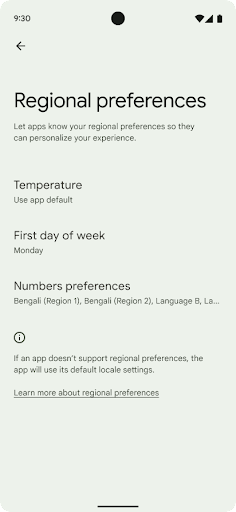
Regional preferences enable users to personalize temperature units, the first day of the week, and numbering systems. A European living in the United States might prefer temperature units to be in Celsius rather than Fahrenheit and for apps to treat Monday as the beginning of the week instead of the US default of Sunday.
New Android Settings menus for these preferences provide users with a
discoverable and centralized location to change app preferences. These
preferences also persist through backup and restore. Several APIs and
intents—such as
getTemperatureUnit
and
getFirstDayOfWeek—
grant your app read access to user preferences, so your app can adjust how it
displays information. You can also register a
BroadcastReceiver on
ACTION_LOCALE_CHANGED
to handle locale configuration changes when regional preferences change.
To find these settings, open the Settings app and navigate to System > Languages & input > Regional preferences.

Доступность
Нелинейное масштабирование шрифта до 200%.
Начиная с Android 14, система поддерживает масштабирование шрифтов до 200%, предоставляя пользователям дополнительные возможности доступа.
Чтобы предотвратить чрезмерное масштабирование крупных текстовых элементов на экране, система применяет нелинейную кривую масштабирования. Эта стратегия масштабирования означает, что крупный текст масштабируется не с той же скоростью, что и мелкий. Нелинейное масштабирование шрифтов помогает сохранить пропорциональную иерархию между элементами разных размеров, одновременно смягчая проблемы, возникающие при масштабировании линейного текста с высокой степенью масштабирования (например, обрезание текста или усложнение чтения текста из-за слишком большого размера экрана).
Протестируйте свое приложение с нелинейным масштабированием шрифтов

Если вы уже используете единицы измерения масштаба текста в пикселях (sp), то эти дополнительные параметры и улучшения масштабирования будут автоматически применены к тексту в вашем приложении. Однако вам всё равно следует провести тестирование пользовательского интерфейса с максимальным размером шрифта (200%), чтобы убедиться, что ваше приложение корректно применяет размеры шрифтов и может работать с более крупными шрифтами без ущерба для удобства использования.
Чтобы включить размер шрифта 200%, выполните следующие действия:
- Откройте приложение «Настройки» и перейдите в раздел «Специальные возможности» > «Размер дисплея и текст» .
- Для параметра «Размер шрифта» нажимайте значок плюс (+), пока не будет включена настройка максимального размера шрифта, как показано на изображении в этом разделе.
Используйте единицы измерения масштабированных пикселей (sp) для размеров текста
Не забывайте всегда указывать размеры текста в единицах измерения SP . Если ваше приложение использует единицы измерения SP, Android может применить выбранный пользователем размер текста и масштабировать его соответствующим образом.
Не используйте единицы sp для отступов и не определяйте высоту представления, предполагая неявный отступ: при нелинейном масштабировании шрифтов размеры sp могут быть не пропорциональны, поэтому 4sp + 20sp может не равняться 24sp.
Преобразовать масштабированные единицы пикселей (sp)
Используйте TypedValue.applyDimension() для преобразования единиц sp в пиксели, а метод TypedValue.deriveDimension() — для преобразования пикселей в sp. Эти методы автоматически применяют соответствующую кривую нелинейного масштабирования.
Избегайте жёсткого кодирования уравнений с помощью Configuration.fontScale или DisplayMetrics.scaledDensity . Поскольку масштабирование шрифтов нелинейно, поле scaledDensity больше не является точным. Поле fontScale следует использовать только в информационных целях, поскольку шрифты больше не масштабируются одним скалярным значением.
Используйте единицы sp для lineHeight
Всегда определяйте android:lineHeight в единицах sp, а не dp, чтобы высота строки масштабировалась вместе с текстом. В противном случае, если текст имеет значение sp, а lineHeight — в dp или px, он не масштабируется и выглядит сжатым. TextView автоматически корректирует lineHeight , сохраняя заданные пропорции, но только если textSize и lineHeight заданы в единицах sp.
Камера и медиа
Ультра HDR для изображений
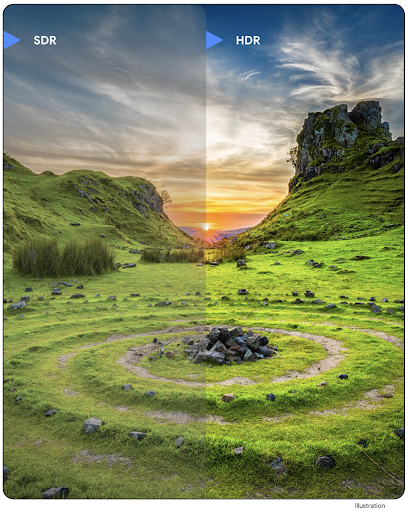
Android 14 adds support for High Dynamic Range (HDR) images that retain more of the information from the sensor when taking a photo, which enables vibrant colors and greater contrast. Android uses the Ultra HDR format, which is fully backward compatible with JPEG images, allowing apps to seamlessly interoperate with HDR images, displaying them in Standard Dynamic Range (SDR) as needed.
Rendering these images in the UI in HDR is done automatically by the framework
when your app opts in to using HDR UI for its Activity Window, either through a
manifest entry or at runtime by calling
Window.setColorMode(). You can also capture compressed Ultra
HDR still images on supported devices. With more colors recovered
from the sensor, editing in post can be more flexible. The
Gainmap associated with Ultra HDR images can be used to render
them using OpenGL or Vulkan.
Расширения для камеры: масштабирование, фокусировка, постпросмотр и многое другое.
Android 14 upgrades and improves camera extensions, allowing apps to handle longer processing times, which enables improved images using compute-intensive algorithms like low-light photography on supported devices. These features give users an even more robust experience when using camera extension capabilities. Examples of these improvements include:
- Dynamic still capture processing latency estimation provides much more
accurate still capture latency estimates based on the current scene and
environment conditions. Call
CameraExtensionSession.getRealtimeStillCaptureLatency()to get aStillCaptureLatencyobject that has two latency estimation methods. ThegetCaptureLatency()method returns the estimated latency betweenonCaptureStartedandonCaptureProcessStarted(), and thegetProcessingLatency()method returns the estimated latency betweenonCaptureProcessStarted()and the final processed frame being available. - Support for capture progress callbacks so that apps can display the current
progress of long-running, still-capture processing operations. You can check
if this feature is available with
CameraExtensionCharacteristics.isCaptureProcessProgressAvailable, and if it is, you implement theonCaptureProcessProgressed()callback, which has the progress (from 0 to 100) passed in as a parameter. Extension specific metadata, such as
CaptureRequest.EXTENSION_STRENGTHfor dialing in the amount of an extension effect, such as the amount of background blur withEXTENSION_BOKEH.Postview Feature for Still Capture in camera extensions, which provides a less-processed image more quickly than the final image. If an extension has increased processing latency, a postview image could be provided as a placeholder to improve UX and switched out later for the final image. You can check if this feature is available with
CameraExtensionCharacteristics.isPostviewAvailable. Then you can pass anOutputConfigurationtoExtensionSessionConfiguration.setPostviewOutputConfiguration.Support for
SurfaceViewallowing for a more optimized and power-efficient preview render path.Support for tap to focus and zoom during extension usage.
Встроенный в сенсор зум
When REQUEST_AVAILABLE_CAPABILITIES_STREAM_USE_CASE in
CameraCharacteristics contains
SCALER_AVAILABLE_STREAM_USE_CASES_CROPPED_RAW, your app
can use advanced sensor capabilities to give a cropped RAW stream the same
pixels as the full field of view by using a CaptureRequest
with a RAW target that has stream use case set to
CameraMetadata.SCALER_AVAILABLE_STREAM_USE_CASES_CROPPED_RAW.
By implementing the request override controls, the updated camera gives users
zoom control even before other camera controls are ready.
Аудио через USB без потерь
Android 14 gains support for lossless audio formats for audiophile-level
experiences over USB wired headsets. You can query a USB device for its
preferred mixer attributes, register a listener for changes in preferred mixer
attributes, and configure mixer attributes using the
AudioMixerAttributes class. This class represents the
format, such as channel mask, sample rate, and behavior of the audio mixer. The
class allows for audio to be sent directly, without mixing,
volume adjustment, or processing effects.
Инструменты и средства повышения производительности разработчиков
Менеджер учетных данных
Android 14 adds Credential Manager as a platform API, with additional support back to Android 4.4 (API level 19) devices through a Jetpack Library using Google Play services. Credential Manager aims to make sign-in easier for users with APIs that retrieve and store credentials with user-configured credential providers. Credential Manager supports multiple sign-in methods, including username and password, passkeys, and federated sign-in solutions (such as Sign-in with Google) in a single API.
Passkeys provide many advantages. For example, passkeys are built on industry standards, can work across different operating systems and browser ecosystems, and can be used with both websites and apps.
For more information, see the Credential Manager and passkeys documentation and the blogpost about Credential Manager and passkeys.
Health Connect
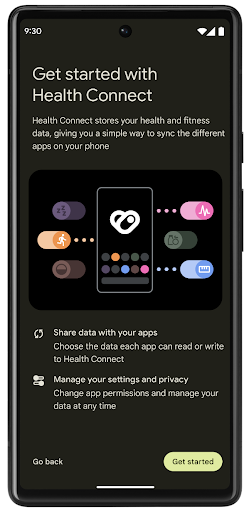
Health Connect is an on-device repository for user health and fitness data. It allows users to share data between their favorite apps, with a single place to control what data they want to share with these apps.
On devices running Android versions prior to Android 14, Health Connect is available to download as an app on the Google Play store. Starting with Android 14, Health Connect is part of the platform and receives updates through Google Play system updates without requiring a separate download. With this, Health Connect can be updated frequently, and your apps can rely on Health Connect being available on devices running Android 14 or higher. Users can access Health Connect from the Settings in their device, with privacy controls integrated into the system settings.
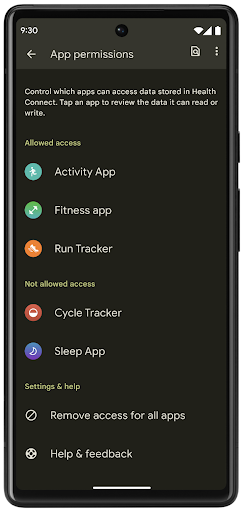
Health Connect includes several new features in Android 14, such as exercise routes, allowing users to share a route of their workout which can be visualized on a map. A route is defined as a list of locations saved within a window of time, and your app can insert routes into exercise sessions, tying them together. To ensure that users have complete control over this sensitive data, users must allow sharing individual routes with other apps.
For more information, see the Health Connection documentation and the blogpost on What's new in Android Health.
Обновления OpenJDK 17
Android 14 continues the work of refreshing Android's core libraries to align with the features in the latest OpenJDK LTS releases, including both library updates and Java 17 language support for app and platform developers.
The following features and improvements are included:
- Updated approximately 300
java.baseclasses to Java 17 support. - Text Blocks, which introduce multi-line string literals to the Java programming language.
- Pattern Matching for instanceof, which allows an object to
be treated as having a specific type in an
instanceofwithout any additional variables. - Sealed classes, which allow you restrict which classes and interfaces can extend or implement them.
Thanks to Google Play system updates (Project Mainline), over 600 million devices are enabled to receive the latest Android Runtime (ART) updates that include these changes. This is part of our commitment to give apps a more consistent, secure environment across devices, and to deliver new features and capabilities to users independent of platform releases.
Java and OpenJDK are trademarks or registered trademarks of Oracle and/or its affiliates.
Улучшения для магазинов приложений
Android 14 introduces several PackageInstaller APIs that
allow app stores to improve their user experience.
Request install approval before downloading
Installing or updating an app might require user approval.
For example, when an installer making use of the
REQUEST_INSTALL_PACKAGES permission attempts to install a
new app. In prior Android versions, app stores can only request user approval
after APKs are written to the install session and the
session is committed.
Starting with Android 14, the requestUserPreapproval()
method lets installers request user approval before committing the install
session. This improvement lets an app store defer downloading any APKs until
after the installation has been approved by the user. Furthermore, once a user
has approved installation, the app store can download and install the app in the
background without interrupting the user.
Claim responsibility for future updates
The setRequestUpdateOwnership() method allows an installer
to indicate to the system that it intends to be responsible for future updates
to an app it is installing. This capability enables update ownership
enforcement, meaning that only the update owner is permitted
to install automatic updates to the app. Update ownership enforcement helps to
ensure that users receive updates only from the expected app store.
Any other installer, including those making use of the
INSTALL_PACKAGES permission, must receive explicit user
approval in order to install an update. If a user decides to proceed with an
update from another source, update ownership is lost.
Update apps at less-disruptive times
App stores typically want to avoid updating an app that is actively in use because this leads to the app's running processes being killed, which potentially interrupts what the user was doing.
Starting with Android 14, the InstallConstraints API
gives installers a way to ensure that their app updates happen at an opportune
moment. For example, an app store can call the
commitSessionAfterInstallConstraintsAreMet() method to
make sure that an update is only committed when the user is no longer
interacting with the app in question.
Seamlessly install optional splits
With split APKs, features of an app can be delivered in separate APK files,
rather than as a monolithic APK. Split APKs allow app stores to optimize the
delivery of different app components. For example, app stores might optimize
based on the properties of the target device. The
PackageInstaller API has supported splits since its
introduction in API level 22.
In Android 14, the setDontKillApp() method allows an
installer to indicate that the app's running processes shouldn't be killed when
new splits are installed. App stores can use this feature to seamlessly install
new features of an app while the user is using the app.
Пакеты метаданных приложений
Starting in Android 14, the Android package installer lets you specify app metadata, such as data safety practices, to include on app store pages such as Google Play.
Определять, когда пользователи делают снимки экрана устройства.
To create a more standardized experience for detecting screenshots, Android 14 introduces a privacy-preserving screenshot detection API. This API lets apps register callbacks on a per-activity basis. These callbacks are invoked, and the user is notified, when the user takes a screenshot while that activity is visible.
пользовательский опыт
Настраиваемые действия в Sharesheet и улучшенное ранжирование
Android 14 updates the system sharesheet to support custom app actions and more informative preview results for users.
Add custom actions
With Android 14, your app can add custom actions to the system sharesheet it invokes.

Improve ranking of Direct Share targets
Android 14 uses more signals from apps to determine the ranking of the direct share targets to provide more helpful results for the user. To provide the most useful signal for ranking, follow the guidance for improving rankings of your Direct Share targets. Communication apps can also report shortcut usage for outgoing and incoming messages.

Поддержка встроенных и пользовательских анимаций для функции «Предиктивная реакция на нажатие кнопки «Назад»»
В Android 13 появилась предиктивная анимация возвращения домой, доступная для разработчиков. При использовании в поддерживаемом приложении с включенной опцией разработчика при смахивании назад отображается анимация, указывающая, что жест возврата позволяет выйти из приложения обратно на главный экран.
Android 14 включает в себя множество улучшений и новые рекомендации по функции Predictive Back:
- Вы можете установить
android:enableOnBackInvokedCallback=trueчтобы включить прогнозируемую обратную системную анимацию для каждого действия, а не для всего приложения. - Мы добавили новые системные анимации, сопровождающие анимацию возвращения домой из Android 13. Новые системные анимации связаны с перекрестными действиями и задачами, которые вы получаете автоматически после перехода на Predictive Back .
- Мы добавили новые анимации компонентов материала для нижних листов , боковых листов и поиска .
- Мы создали руководство по дизайну для создания пользовательских анимаций и переходов в приложениях.
- Мы добавили новые API для поддержки пользовательских анимаций перехода в приложении:
-
handleOnBackStarted,handleOnBackProgressed,handleOnBackCancelledinOnBackPressedCallback -
onBackStarted,onBackProgressed,onBackCancelledinOnBackAnimationCallback - Используйте
overrideActivityTransitionвместоoverridePendingTransitionдля переходов, которые реагируют, когда пользователь проводит пальцем назад.
-
В этой предварительной версии Android 14 все функции Predictive Back остаются за пределами возможностей разработчика. См. руководство для разработчиков, чтобы вернуть приложение на интеллектуальный режим , а также руководство для разработчиков по созданию пользовательских переходов внутри приложения .
Настройки для каждого приложения от производителя устройств с большим экраном
Per-app overrides enable device manufacturers to change the behavior of apps on large screen devices. For example, the FORCE_RESIZE_APP override instructs the system to resize the app to fit display dimensions (avoiding size compatibility mode) even if resizeableActivity="false" is set in the app manifest.
Overrides are intended to improve the user experience on large screens.
New manifest properties enable you to disable some device manufacturer overrides for your app.
Переопределение параметров для приложений при большом экране
Per-app overrides change the behavior of apps on large screen devices. For example, the OVERRIDE_MIN_ASPECT_RATIO_LARGE device manufacturer override sets the app aspect ratio to 16:9 regardless of the app's configuration.
Android 14 QPR1 enables users to apply per‑app overrides by means of a new settings menu on large screen devices.
Совместное использование экрана приложения
App screen sharing enables users to share an app window instead of the entire device screen during screen content recording.
With app screen sharing, the status bar, navigation bar, notifications, and other system UI elements are excluded from the shared display. Only the content of the selected app is shared.
App screen sharing improves productivity and privacy by enabling users to run multiple apps but limit content sharing to a single app.
Функция Smart Reply на основе LLM в Gboard на Pixel 8 Pro
На устройствах Pixel 8 Pro с декабрьским выпуском функций разработчики могут опробовать более качественные интеллектуальные ответы в Gboard на основе встроенных в устройство моделей больших языков (LLM), работающих на Google Tensor.
Эта функция доступна в виде ограниченной предварительной версии для американского английского языка в WhatsApp, Line и KakaoTalk. Для этого необходимо использовать устройство Pixel 8 Pro с Gboard в качестве клавиатуры.
Чтобы опробовать эту функцию, сначала включите эту функцию в «Настройки» > «Параметры разработчика» > «Настройки AiCore» > «Включить Aicore Persistent» .
Затем откройте беседу в поддерживаемом приложении, чтобы увидеть интеллектуальный ответ на базе LLM в полосе предложений Gboard в ответ на входящие сообщения.
Графика
Пути доступны для запросов и интерполяции.
Android's Path API is a powerful and flexible mechanism for
creating and rendering vector graphics, with the ability to stroke or fill a
path, construct a path from line segments or quadratic or cubic curves, perform
boolean operations to get even more complex shapes, or all of these
simultaneously. One limitation is the ability to find out what is actually in a
Path object; the internals of the object are opaque to callers after creation.
To create a Path, you call methods such as
moveTo(), lineTo(), and
cubicTo() to add path segments. But there has been no way to
ask that path what the segments are, so you must retain that information at
creation time.
Starting in Android 14, you can query paths to find out what's inside of them.
First, you need to get a PathIterator object using the
Path.getPathIterator API:
Kotlin
val path = Path().apply {
    moveTo(1.0f, 1.0f)
    lineTo(2.0f, 2.0f)
    close()
}
val pathIterator = path.pathIterator
Java
Path path = new Path();
path.moveTo(1.0F, 1.0F);
path.lineTo(2.0F, 2.0F);
path.close();
PathIterator pathIterator = path.getPathIterator();
Next, you can call PathIterator to iterate through the segments
one by one, retrieving all of the necessary data for each segment. This example
uses PathIterator.Segment objects, which packages up the data
for you:
Kotlin
for (segment in pathIterator) {
    println("segment: ${segment.verb}, ${segment.points}")
}
Java
while (pathIterator.hasNext()) {
    PathIterator.Segment segment = pathIterator.next();
    Log.i(LOG_TAG, "segment: " + segment.getVerb() + ", " + segment.getPoints());
}
PathIterator also has a non-allocating version of next() where you can pass
in a buffer to hold the point data.
One of the important use cases of querying Path data is interpolation. For
example, you might want to animate (or morph) between two different paths. To
further simplify that use case, Android 14 also includes the
interpolate() method on Path. Assuming the two paths have
the same internal structure, the interpolate() method creates a new Path
with that interpolated result. This example returns a path whose shape is
halfway (a linear interpolation of .5) between path and otherPath:
Kotlin
val interpolatedResult = Path()
if (path.isInterpolatable(otherPath)) {
    path.interpolate(otherPath, .5f, interpolatedResult)
}
Java
Path interpolatedResult = new Path();
if (path.isInterpolatable(otherPath)) {
    path.interpolate(otherPath, 0.5F, interpolatedResult);
}
The Jetpack graphics-path library enables similar APIs for earlier versions of Android as well.
Пользовательские сетки с вершинными и фрагментными шейдерами
Android has long supported drawing triangle meshes with custom shading, but the input mesh format has been limited to a few predefined attribute combinations. Android 14 adds support for custom meshes, which can be defined as triangles or triangle strips, and can, optionally, be indexed. These meshes are specified with custom attributes, vertex strides, varying, and vertex and fragment shaders written in AGSL.
The vertex shader defines the varyings, such as position and color, while the
fragment shader can optionally define the color for the pixel, typically by
using the varyings created by the vertex shader. If color is provided by the
fragment shader, it is then blended with the current Paint
color using the blend mode selected when
drawing the mesh. Uniforms can be passed
into the fragment and vertex shaders for additional flexibility.
Аппаратный буферный рендерер для Canvas
To assist in using Android's Canvas API to draw with
hardware acceleration into a HardwareBuffer, Android 14
introduces HardwareBufferRenderer. This API is
particularly useful when your use case involves communication with the system
compositor through SurfaceControl for low-latency
drawing.