
これまでのリリースと同様、Android 15 には、アプリに影響する可能性がある動作変更が含まれています。下記の動作変更は、Android 15 以上をターゲットとするアプリにのみ適用されます。アプリが Android 15 以上をターゲットとする場合は、必要に応じてアプリを変更し、下記の動作に適切に対応できるようにしてください。
アプリの targetSdkVersion に関係なく、Android 15 で実行されるすべてのアプリに影響する動作変更のリストも必ずご確認ください。
コア機能
Android 15 では、Android システムのさまざまなコア機能が変更または拡張されています。
フォアグラウンド サービスの変更
We are making the following changes to foreground services with Android 15.
- Data sync foreground service timeout behavior
- New media processing foreground service type
- Restrictions on
BOOT_COMPLETEDbroadcast receivers launching foreground services - Restrictions on starting foreground services while an app holds the
SYSTEM_ALERT_WINDOWpermission
Data sync foreground service timeout behavior
Android 15 では、Android 15(API レベル 35)以降をターゲットとするアプリに対して、dataSync に新しいタイムアウト動作が導入されます。この動作は、新しい mediaProcessing フォアグラウンド サービス タイプにも適用されます。
システムは、アプリの dataSync サービスを 24 時間以内に合計 6 時間実行することを許可します。その後、システムは実行中のサービスの Service.onTimeout(int, int) メソッド(Android 15 で導入)を呼び出します。この時点で、サービスは Service.stopSelf() を呼び出すために数秒間待機します。Service.onTimeout() が呼び出されると、サービスはフォアグラウンド サービスと見なされなくなります。サービスが Service.stopSelf() を呼び出さない場合、システムは内部例外をスローします。例外は Logcat に次のメッセージとともに記録されます。
Fatal Exception: android.app.RemoteServiceException: "A foreground service of
type dataSync did not stop within its timeout: [component name]"
この動作の変更による問題を回避するには、次のいずれかを行います。
- サービスに新しい
Service.onTimeout(int, int)メソッドを実装します。アプリがコールバックを受信したら、数秒以内にstopSelf()を呼び出します。(アプリをすぐに停止しないと、システムは障害を生成します)。 - アプリの
dataSyncサービスが、24 時間で合計 6 時間を超えて実行されていないことを確認します(ユーザーがアプリを操作してタイマーをリセットする場合を除きます)。 dataSyncフォアグラウンド サービスは、直接のユーザー操作の結果としてのみ起動します。サービスの開始時にアプリはフォアグラウンドにあるため、サービスはバックグラウンドに移行してから 6 時間すべてかかります。dataSyncフォアグラウンド サービスを使用する代わりに、代替の API を使用してください。
アプリの dataSync フォアグラウンド サービスが過去 24 時間以内に 6 時間実行されている場合、ユーザーがアプリをフォアグラウンドに表示した(これによりタイマーがリセットされる)場合を除き、別の dataSync フォアグラウンド サービスを開始することはできません。別の dataSync フォアグラウンド サービスを開始しようとすると、システムは ForegroundServiceStartNotAllowedException をスローし、「フォアグラウンド サービス タイプ dataSync の制限時間はすでに経過しています」などのエラー メッセージを出力します。
テスト
アプリの動作をテストするには、アプリが Android 15 をターゲットとしていない場合でも、データ同期のタイムアウトを有効にできます(アプリが Android 15 デバイスで実行されている場合)。タイムアウトを有効にするには、次の adb コマンドを実行します。
adb shell am compat enable FGS_INTRODUCE_TIME_LIMITS your-package-name
タイムアウト期間を調整して、上限に達したときアプリの動作を簡単にテストすることもできます。新しいタイムアウト期間を設定するには、次の adb コマンドを実行します。
adb shell device_config put activity_manager data_sync_fgs_timeout_duration duration-in-milliseconds
New media processing foreground service type
Android 15 introduces a new foreground service type, mediaProcessing. This
service type is appropriate for operations like transcoding media files. For
example, a media app might download an audio file and need to convert it to a
different format before playing it. You can use a mediaProcessing foreground
service to make sure the conversion continues even while the app is in the
background.
The system permits an app's mediaProcessing services to run for a total of 6
hours in a 24-hour period, after which the system calls the running service's
Service.onTimeout(int, int) method (introduced in Android
15). At this time, the service has a few seconds to call
Service.stopSelf(). If the service does not
call Service.stopSelf(), the system throws an internal exception. The
exception is logged in Logcat with the following message:
Fatal Exception: android.app.RemoteServiceException: "A foreground service of
type mediaProcessing did not stop within its timeout: [component name]"
To avoid having the exception, you can do one of the following:
- Have your service implement the new
Service.onTimeout(int, int)method. When your app receives the callback, make sure to callstopSelf()within a few seconds. (If you don't stop the app right away, the system generates a failure.) - Make sure your app's
mediaProcessingservices don't run for more than a total of 6 hours in any 24-hour period (unless the user interacts with the app, resetting the timer). - Only start
mediaProcessingforeground services as a result of direct user interaction; since your app is in the foreground when the service starts, your service has the full six hours after the app goes to the background. - Instead of using a
mediaProcessingforeground service, use an alternative API, like WorkManager.
If your app's mediaProcessing foreground services have run for 6 hours in the
last 24, you cannot start another mediaProcessing foreground service unless
the user has brought your app to the foreground (which resets the timer). If you
try to start another mediaProcessing foreground service, the system throws
ForegroundServiceStartNotAllowedException
with an error message like "Time limit already exhausted for foreground service
type mediaProcessing".
For more information about the mediaProcessing service type, see Changes to
foreground service types for Android 15: Media processing.
Testing
To test your app's behavior, you can enable media processing timeouts even if
your app is not targeting Android 15 (as long as the app is running on an
Android 15 device). To enable timeouts, run the following adb command:
adb shell am compat enable FGS_INTRODUCE_TIME_LIMITS your-package-name
You can also adjust the timeout period, to make it easier to test how your
app behaves when the limit is reached. To set a new timeout period, run the
following adb command:
adb shell device_config put activity_manager media_processing_fgs_timeout_duration duration-in-milliseconds
Restrictions on BOOT_COMPLETED broadcast receivers launching foreground services
There are new restrictions on BOOT_COMPLETED broadcast receivers launching
foreground services. BOOT_COMPLETED receivers are not allowed to launch the
following types of foreground services:
dataSynccameramediaPlaybackphoneCallmediaProjectionmicrophone(this restriction has been in place formicrophonesince Android 14)
If a BOOT_COMPLETED receiver tries to launch any of those types of foreground
services, the system throws ForegroundServiceStartNotAllowedException.
Testing
To test your app's behavior, you can enable these new restrictions even if your
app is not targeting Android 15 (as long as the app is running on an Android 15
device). Run the following adb command:
adb shell am compat enable FGS_BOOT_COMPLETED_RESTRICTIONS your-package-name
To send a BOOT_COMPLETED broadcast without restarting the device,
run the following adb command:
adb shell am broadcast -a android.intent.action.BOOT_COMPLETED your-package-name
Restrictions on starting foreground services while an app holds the SYSTEM_ALERT_WINDOW permission
以前は、アプリが SYSTEM_ALERT_WINDOW 権限を保持している場合、アプリが現在バックグラウンドで実行されている場合でも、フォアグラウンド サービスを起動できました(バックグラウンドでの起動制限の免除で説明しています)。
アプリが Android 15 をターゲットとしている場合、この免除はより限定的になりました。アプリには SYSTEM_ALERT_WINDOW 権限が必要になり、また、表示可能なオーバーレイ ウィンドウも必要になります。つまり、フォアグラウンド サービスを開始する前に、アプリがまず TYPE_APPLICATION_OVERLAY ウィンドウを起動し、そのウィンドウを表示する必要があります。
アプリがこれらの新しい要件を満たさずにバックグラウンドからフォアグラウンド サービスを起動しようとすると(他の例外がない限り)、システムは ForegroundServiceStartNotAllowedException をスローします。
アプリが SYSTEM_ALERT_WINDOW 権限を宣言し、バックグラウンドからフォアグラウンド サービスを起動する場合、この変更の影響を受ける可能性があります。アプリが ForegroundServiceStartNotAllowedException を取得した場合は、アプリの処理順序を確認し、バックグラウンドからフォアグラウンド サービスを開始する前に、アプリにアクティブなオーバーレイ ウィンドウがすでに存在することを確認します。オーバーレイ ウィンドウが現在表示されているかどうかを確認するには、View.getWindowVisibility() を呼び出します。また、View.onWindowVisibilityChanged() を上書きして、可視性が変更されるたびに通知を受け取ることもできます。
テスト
アプリの動作をテストするには、アプリが Android 15 をターゲットとしていない場合でも、これらの新しい制限を有効にできます(アプリが Android 15 デバイスで実行されている場合)。バックグラウンドからフォアグラウンド サービスを起動する際の新しい制限を有効にするには、次の adb コマンドを実行します。
adb shell am compat enable FGS_SAW_RESTRICTIONS your-package-name
アプリがサイレント モードのグローバル状態を変更できるタイミングの変更
Android 15(API レベル 35)以降をターゲットとするアプリは、デバイスのサイレント(DND)モードのグローバル状態やポリシーを変更できなくなりました(ユーザー設定の変更や DND モードのオフによる変更も含みます)。代わりに、アプリは AutomaticZenRule を提供する必要がある。システムは、既存の最も制限の厳しいポリシーが優先されるスキームで、これをグローバル ポリシーに統合します。以前はグローバル状態に影響していた既存の API(setInterruptionFilter、setNotificationPolicy)を呼び出すと、暗黙的な AutomaticZenRule が作成または更新されます。この AutomaticZenRule は、API 呼び出しの呼び出しサイクルに応じてオンまたはオフに切り替わります。
この変更は、アプリが setInterruptionFilter(INTERRUPTION_FILTER_ALL) を呼び出し、その呼び出しによって所有者によって以前に有効にされた AutomaticZenRule が無効になることを想定している場合にのみ、検出可能な動作に影響します。
OpenJDK API の変更
Android 15 continues the work of refreshing Android's core libraries to align with the features in the latest OpenJDK LTS releases.
Some of these changes can affect app compatibility for apps targeting Android 15 (API level 35):
Changes to string formatting APIs: Validation of argument index, flags, width, and precision are now more strict when using the following
String.format()andFormatter.format()APIs:String.format(String, Object[])String.format(Locale, String, Object[])Formatter.format(String, Object[])Formatter.format(Locale, String, Object[])
For example, the following exception is thrown when an argument index of 0 is used (
%0in the format string):IllegalFormatArgumentIndexException: Illegal format argument index = 0In this case, the issue can be fixed by using an argument index of 1 (
%1in the format string).Changes to component type of
Arrays.asList(...).toArray(): When usingArrays.asList(...).toArray(), the component type of the resulting array is now anObject—not the type of the underlying array's elements. So the following code throws aClassCastException:String[] elements = (String[]) Arrays.asList("one", "two").toArray();For this case, to preserve
Stringas the component type in the resulting array, you could useCollection.toArray(Object[])instead:String[] elements = Arrays.asList("two", "one").toArray(new String[0]);Changes to language code handling: When using the
LocaleAPI, language codes for Hebrew, Yiddish, and Indonesian are no longer converted to their obsolete forms (Hebrew:iw, Yiddish:ji, and Indonesian:in). When specifying the language code for one of these locales, use the codes from ISO 639-1 instead (Hebrew:he, Yiddish:yi, and Indonesian:id).Changes to random int sequences: Following the changes made in https://bugs.openjdk.org/browse/JDK-8301574, the following
Random.ints()methods now return a different sequence of numbers than theRandom.nextInt()methods do:Generally, this change shouldn't result in app-breaking behavior, but your code shouldn't expect the sequence generated from
Random.ints()methods to matchRandom.nextInt().
The new SequencedCollection API can affect your app's compatibility
after you update compileSdk in your app's build configuration to use
Android 15 (API level 35):
Collision with
MutableList.removeFirst()andMutableList.removeLast()extension functions inkotlin-stdlibThe
Listtype in Java is mapped to theMutableListtype in Kotlin. Because theList.removeFirst()andList.removeLast()APIs have been introduced in Android 15 (API level 35), the Kotlin compiler resolves function calls, for examplelist.removeFirst(), statically to the newListAPIs instead of to the extension functions inkotlin-stdlib.If an app is re-compiled with
compileSdkset to35andminSdkset to34or lower, and then the app is run on Android 14 and lower, a runtime error is thrown:java.lang.NoSuchMethodError: No virtual method removeFirst()Ljava/lang/Object; in class Ljava/util/ArrayList;The existing
NewApilint option in Android Gradle Plugin can catch these new API usages../gradlew lintMainActivity.kt:41: Error: Call requires API level 35 (current min is 34): java.util.List#removeFirst [NewApi] list.removeFirst()To fix the runtime exception and lint errors, the
removeFirst()andremoveLast()function calls can be replaced withremoveAt(0)andremoveAt(list.lastIndex)respectively in Kotlin. If you're using Android Studio Ladybug | 2024.1.3 or higher, it also provides a quick fix option for these errors.Consider removing
@SuppressLint("NewApi")andlintOptions { disable 'NewApi' }if the lint option has been disabled.Collision with other methods in Java
New methods have been added into the existing types, for example,
ListandDeque. These new methods might not be compatible with the methods with the same name and argument types in other interfaces and classes. In the case of a method signature collision with incompatibility, thejavaccompiler outputs a build-time error. For example:Example error 1:
javac MyList.javaMyList.java:135: error: removeLast() in MyList cannot implement removeLast() in List public void removeLast() { ^ return type void is not compatible with Object where E is a type-variable: E extends Object declared in interface ListExample error 2:
javac MyList.javaMyList.java:7: error: types Deque<Object> and List<Object> are incompatible; public class MyList implements List<Object>, Deque<Object> { both define reversed(), but with unrelated return types 1 errorExample error 3:
javac MyList.javaMyList.java:43: error: types List<E#1> and MyInterface<E#2> are incompatible; public static class MyList implements List<Object>, MyInterface<Object> { class MyList inherits unrelated defaults for getFirst() from types List and MyInterface where E#1,E#2 are type-variables: E#1 extends Object declared in interface List E#2 extends Object declared in interface MyInterface 1 errorTo fix these build errors, the class implementing these interfaces should override the method with a compatible return type. For example:
@Override
public Object getFirst() {
    return List.super.getFirst();
}
セキュリティ
Android 15 には、悪意のあるアプリからアプリとユーザーを保護するために、システムのセキュリティを強化する変更が含まれています。
制限付き TLS バージョン
Android 15 restricts the usage of TLS versions 1.0 and 1.1. These versions had previously been deprecated in Android, but are now disallowed for apps targeting Android 15.
バックグラウンド アクティビティの安全な起動
Android 15 では、悪意のあるバックグラウンド アプリが他のアプリをフォアグラウンドに移動させたり、権限を昇格させたり、ユーザー インタラクションを悪用したりすることを防ぐ変更が加えられ、悪意のあるアプリからユーザーを保護し、デバイスの制御性を高めています。Android 10(API レベル 29)以降、バックグラウンド アクティビティの起動が制限されています。
その他の変更点
PendingIntentクリエイターのデフォルトをバックグラウンド アクティビティの起動をブロックに変更。これにより、アプリが誤ってPendingIntentを作成し、悪意のある行為者によって不正使用されるのを防ぐことができます。PendingIntent送信者が許可しない限り、アプリをフォアグラウンドに移動しないでください。この変更は、悪意のあるアプリがバックグラウンドでアクティビティを開始する機能を悪用することを防ぐことを目的としています。デフォルトでは、作成者がバックグラウンド アクティビティの起動権限を許可するか、送信者がバックグラウンド アクティビティの起動権限を持っている場合を除き、アプリがタスクスタックをフォアグラウンドに移動することは許可されません。- タスクスタックの最上位のアクティビティがタスクを完了する方法を制御します。最上位のアクティビティがタスクを終了すると、Android は最後にアクティブだったタスクに戻ります。また、最上位でないアクティビティがタスクを終了した場合、Android はホーム画面に戻ります。この最上位でないアクティビティの終了はブロックされません。
- 他のアプリから任意の Activity が自分のタスクに起動されるのを防ぎます。この変更により、悪意のあるアプリが他のアプリからのものに見せかけたアクティビティを作成してユーザーをフィッシングするのを防ぐことができます。
- 非表示のウィンドウがバックグラウンド アクティビティの起動の対象にならないようにブロック。これにより、悪意のあるアプリがバックグラウンド アクティビティの起動を不正使用して、ユーザーに不要なコンテンツや悪意のあるコンテンツを表示するのを防ぐことができます。
より安全なインテント
Android 15 では、インテント用に StrictMode が導入されています。
Intent の使用違反に関する詳細なログを表示するには、次の方法を使用します。
Kotlin
fun onCreate() {
    StrictMode.setVmPolicy(VmPolicy.Builder()
        .detectUnsafeIntentLaunch()
        .build()
    )
}
Java
public void onCreate() {
    StrictMode.setVmPolicy(new VmPolicy.Builder()
            .detectUnsafeIntentLaunch()
            .build());
}
ユーザー エクスペリエンスとシステム UI
Android 15 には、より一貫性のある直感的なユーザー エクスペリエンスを実現するための変更が含まれています。
ウィンドウ インセットの変更
There are two changes related to window insets in Android 15: edge-to-edge is enforced by default, and there are also configuration changes, such as the default configuration of system bars.
エッジ ツー エッジの適用
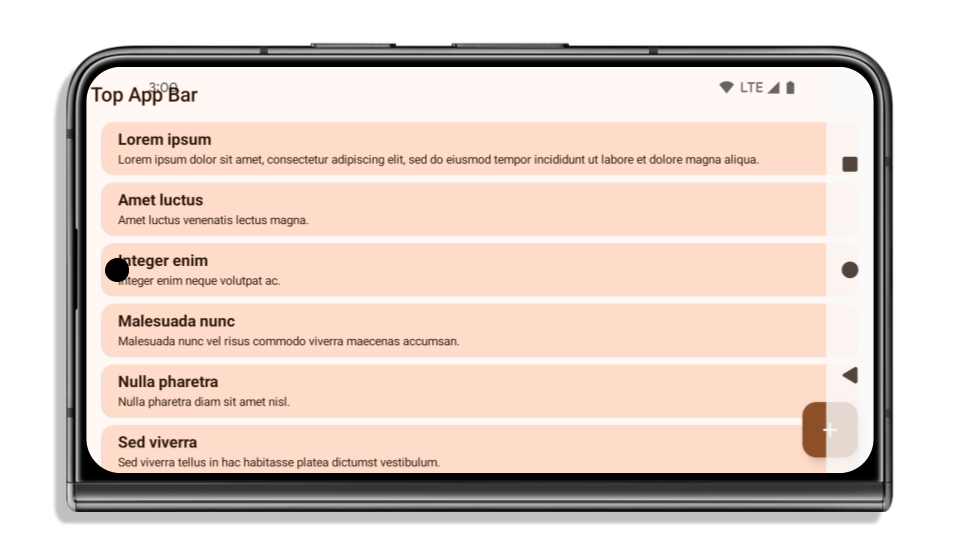
Apps are edge-to-edge by default on devices running Android 15 if the app is targeting Android 15 (API level 35).
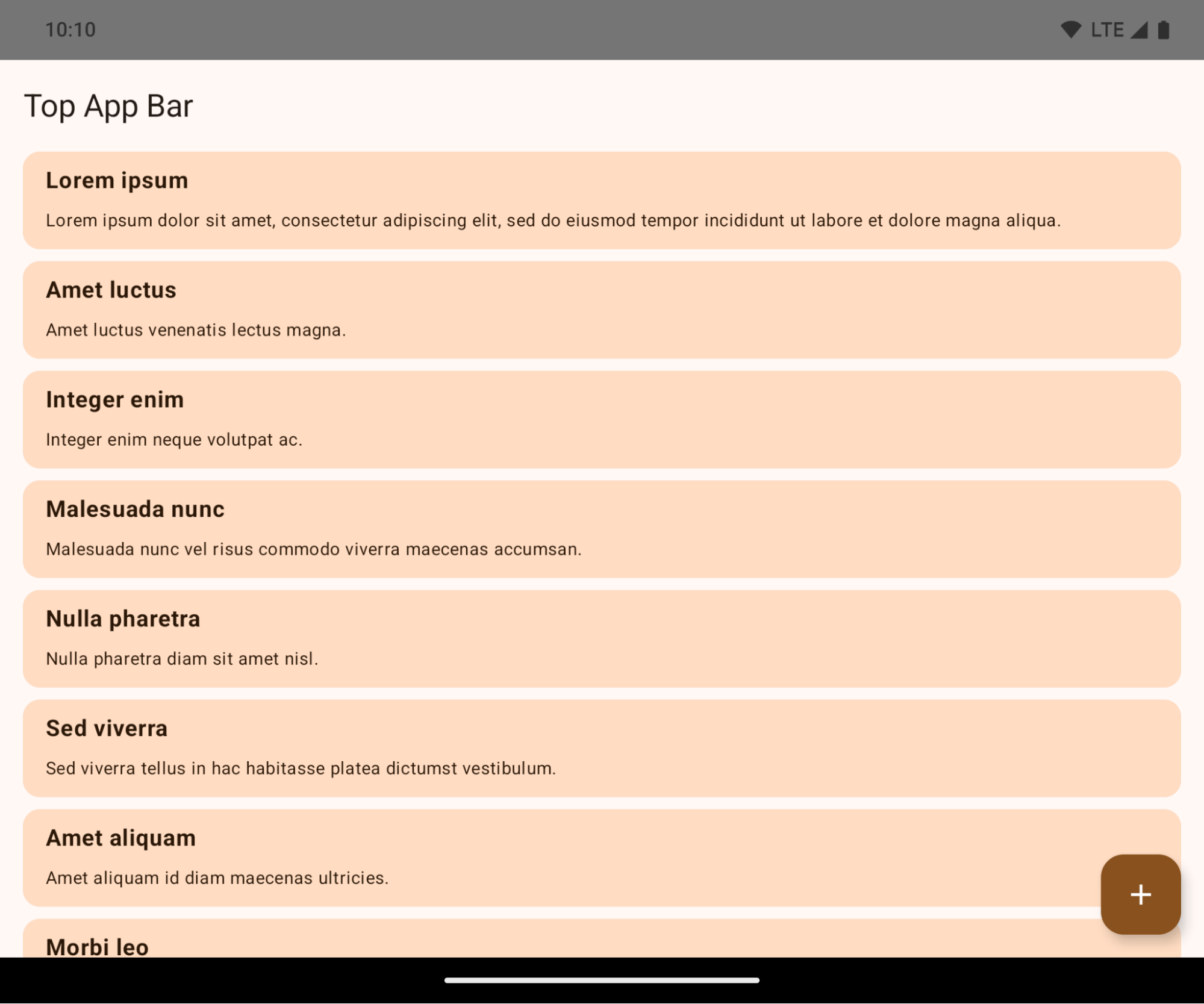
This is a breaking change that might negatively impact your app's UI. The changes affect the following UI areas:
- Gesture handle navigation bar
- Transparent by default.
- Bottom offset is disabled so content draws behind the system navigation bar unless insets are applied.
setNavigationBarColorandR.attr#navigationBarColorare deprecated and don't affect gesture navigation.setNavigationBarContrastEnforcedandR.attr#navigationBarContrastEnforcedcontinue to have no effect on gesture navigation.
- 3-button navigation
- Opacity set to 80% by default, with color possibly matching the window background.
- Bottom offset disabled so content draws behind the system navigation bar unless insets are applied.
setNavigationBarColorandR.attr#navigationBarColorare set to match the window background by default. The window background must be a color drawable for this default to apply. This API is deprecated but continues to affect 3-button navigation.setNavigationBarContrastEnforcedandR.attr#navigationBarContrastEnforcedis true by default, which adds an 80% opaque background across 3-button navigation.
- Status bar
- Transparent by default.
- The top offset is disabled so content draws behind the status bar unless insets are applied.
setStatusBarColorandR.attr#statusBarColorare deprecated and have no effect on Android 15.setStatusBarContrastEnforcedandR.attr#statusBarContrastEnforcedare deprecated but still have an effect on Android 15.
- Display cutout
layoutInDisplayCutoutModeof non-floating windows must beLAYOUT_IN_DISPLAY_CUTOUT_MODE_ALWAYS.SHORT_EDGES,NEVER, andDEFAULTare interpreted asALWAYSso that users don't see a black bar caused by the display cutout and appear edge-to-edge.
The following example shows an app before and after targeting Android 15 (API level 35), and before and after applying insets. This example is not comprehensive, this might appear differently on Android Auto.


What to check if your app is already edge-to-edge
If your app is already edge-to-edge and applies insets, you are mostly unimpacted, except in the following scenarios. However, even if you think you aren't impacted, we recommend you test your app.
- You have a non-floating window, such as an
Activitythat usesSHORT_EDGES,NEVERorDEFAULTinstead ofLAYOUT_IN_DISPLAY_CUTOUT_MODE_ALWAYS. If your app crashes on launch, this might be due to your splashscreen. You can either upgrade the core splashscreen dependency to 1.2.0-alpha01 or later or setwindow.attributes.layoutInDisplayCutoutMode = WindowManager.LayoutInDisplayCutoutMode.always. - There might be lower-traffic screens with occluded UI. Verify these
less-visited screens don't have occluded UI. Lower-traffic screens include:
- Onboarding or sign-in screens
- Settings pages
What to check if your app is not already edge-to-edge
If your app is not already edge-to-edge, you are most likely impacted. In addition to the scenarios for apps that are already edge-to-edge, you should consider the following:
- If your app uses Material 3 Components (
androidx.compose.material3) in compose, such asTopAppBar,BottomAppBar, andNavigationBar, these components are likely not impacted because they automatically handle insets. - If your app is using Material 2 Components (
androidx.compose.material) in Compose, these components don't automatically handle insets. However, you can get access to the insets and apply them manually. In androidx.compose.material 1.6.0 and later, use thewindowInsetsparameter to apply the insets manually forBottomAppBar,TopAppBar,BottomNavigation, andNavigationRail. Likewise, use thecontentWindowInsetsparameter forScaffold. - If your app uses views and Material Components
(
com.google.android.material), most views-based Material Components such asBottomNavigationView,BottomAppBar,NavigationRailView, orNavigationView, handle insets and require no additional work. However, you need to addandroid:fitsSystemWindows="true"if usingAppBarLayout. - For custom composables, apply the insets manually as padding. If your
content is within a
Scaffold, you can consume insets using theScaffoldpadding values. Otherwise, apply padding using one of theWindowInsets. - If your app is using views and
BottomSheet,SideSheetor custom containers, apply padding usingViewCompat.setOnApplyWindowInsetsListener. ForRecyclerView, apply padding using this listener and also addclipToPadding="false".
What to check if your app must offer custom background protection
If your app must offer custom background protection to 3-button navigation or
the status bar, your app should place a composable or view behind the system bar
using WindowInsets.Type#tappableElement() to get the 3-button
navigation bar height or WindowInsets.Type#statusBars.
Additional edge-to-edge resources
See the Edge to Edge Views and Edge to Edge Compose guides for additional considerations on applying insets.
Deprecated APIs
The following APIs are deprecated but not disabled:
R.attr#enforceStatusBarContrastR.attr#navigationBarColor(for 3 button navigation, with 80% alpha)Window#isStatusBarContrastEnforcedWindow#setNavigationBarColor(for 3 button navigation, with 80% alpha)Window#setStatusBarContrastEnforced
The following APIs are deprecated and disabled:
R.attr#navigationBarColor(for gesture navigation)R.attr#navigationBarDividerColorR.attr#statusBarColorWindow#setDecorFitsSystemWindowsWindow#getNavigationBarColorWindow#getNavigationBarDividerColorWindow#getStatusBarColorWindow#setNavigationBarColor(for gesture navigation)Window#setNavigationBarDividerColorWindow#setStatusBarColor
安定版の構成
アプリが Android 15(API レベル 35)以上をターゲットにしている場合、Configuration はシステムバーを除外しません。レイアウトの計算に Configuration クラスの画面サイズを使用している場合は、必要に応じて適切な ViewGroup、WindowInsets、WindowMetricsCalculator などのより良い代替手段に置き換える必要があります。
Configuration は API 1 以降で利用可能です。通常は Activity.onConfigurationChanged から取得します。ウィンドウの密度、向き、サイズなどの情報が提供されます。Configuration から返されるウィンドウ サイズの重要な特徴の 1 つは、以前はシステムバーが除外されていたことです。
構成サイズは通常、/res/layout-h500dp などのリソース選択に使用されますが、これは依然として有効なユースケースです。ただし、レイアウトの計算に使用することは常に推奨されていません。その場合は、今すぐ離れてください。ユースケースに応じて、Configuration の使用をより適切なものに置き換える必要があります。
レイアウトの計算に使用する場合は、CoordinatorLayout や ConstraintLayout などの適切な ViewGroup を使用します。システム ナビバーの高さを判断するために使用する場合は、WindowInsets を使用します。アプリ ウィンドウの現在のサイズを知りたい場合は、computeCurrentWindowMetrics を使用します。
この変更の影響を受けるフィールドは次のとおりです。
Configuration.screenWidthDpサイズとscreenHeightDpサイズでシステムバーが除外されなくなりました。Configuration.smallestScreenWidthDpは、screenWidthDpとscreenHeightDpの変更の影響を間接的に受けます。Configuration.orientationは、正方形に近いデバイスのscreenWidthDpとscreenHeightDpの変更によって間接的に影響を受けます。Display.getSize(Point)は、Configurationの変更の影響を間接的に受けます。これは API レベル 30 以降で非推奨になりました。Display.getMetrics()は、API レベル 33 以降、すでにこの動作をしています。
elegantTextHeight 属性のデフォルト値が true になりました
Android 15(API レベル 35)をターゲットとするアプリの場合、elegantTextHeight TextView 属性はデフォルトで true になります。これにより、デフォルトで使用されるコンパクトなフォントが、読みやすく大きな縦方向の測定値を持つスクリプトに置き換えられます。コンパクト フォントは、レイアウトの分割を防ぐために導入されました。Android 13(API レベル 33)では、fallbackLineSpacing 属性を使用してテキスト レイアウトの垂直方向の高さを伸ばすことで、このような分割の多くを防ぐことができます。
Android 15 では、コンパクト フォントは引き続きシステムに残るため、アプリで elegantTextHeight を false に設定して以前と同じ動作を実現できますが、今後のリリースでサポートされる可能性は低いです。そのため、アプリがアラビア語、ラオス語、ミャンマー語、タミル語、グジャラート語、カンナダ語、マラヤーラム語、オディア語、テルグ語、タイ語のスクリプトをサポートしている場合は、elegantTextHeight を true に設定してアプリをテストします。
 Android 14(API レベル 34)以前をターゲットとするアプリの
 elegantTextHeight の動作
elegantTextHeight の動作。複雑な文字の形状に合わせて TextView の幅が変更される
In previous versions of Android, some cursive fonts or languages that have
complex shaping might draw the letters in the previous or next character's area.
In some cases, such letters were clipped at the beginning or ending position.
Starting in Android 15, a TextView allocates width for drawing enough space
for such letters and allows apps to request extra paddings to the left to
prevent clipping.
Because this change affects how a TextView decides the width, TextView
allocates more width by default if the app targets Android 15 (API level 35) or
higher. You can enable or disable this behavior by calling the
setUseBoundsForWidth API on TextView.
Because adding left padding might cause a misalignment for existing layouts, the
padding is not added by default even for apps that target Android 15 or higher.
However, you can add extra padding to preventing clipping by calling
setShiftDrawingOffsetForStartOverhang.
The following examples show how these changes can improve text layout for some fonts and languages.

<TextView
    android:fontFamily="cursive"
    android:text="java" />

<TextView
    android:fontFamily="cursive"
    android:text="java"
    android:useBoundsForWidth="true"
    android:shiftDrawingOffsetForStartOverhang="true" />

<TextView
    android:text="คอมพิวเตอร์" />

<TextView
    android:text="คอมพิวเตอร์"
    android:useBoundsForWidth="true"
    android:shiftDrawingOffsetForStartOverhang="true" />
EditText のロケール対応のデフォルトの行の高さ
以前のバージョンの Android では、テキスト レイアウトは、現在の言語 / 地域に一致するフォントの行の高さに合うようにテキストの高さを伸ばしていました。たとえば、コンテンツが日本語の場合、日本語フォントの行間がラテン文字フォントよりも少し大きいため、テキストの高さが少し大きくなっていました。ただし、次の画像に示すように、このような行の高さの違いにもかかわらず、EditText 要素は、使用されている言語 / 地域に関係なく、均一にサイズ設定されていました。

EditText 要素を表す 3 つのボックス。これらの言語の行の高さは異なりますが、EditText の高さは同じです。Android 15(API レベル 35)をターゲットとするアプリの場合、指定されたロケールの参照フォントに合わせて、EditText の最小行の高さが予約されるようになりました。これは次の図に示すとおりです。

EditText 要素を表す 3 つのボックス。EditText の高さに、これらの言語のフォントのデフォルトの行の高さに対応するスペースが追加されました。必要に応じて、useLocalePreferredLineHeightForMinimum 属性を false に指定することで、以前の動作を復元できます。また、Kotlin と Java で setMinimumFontMetrics API を使用して、カスタムの最小垂直指標を設定することもできます。
カメラとメディア
Android 15 では、Android 15 以上をターゲットとするアプリのカメラとメディアの動作が次のように変更されています。
音声フォーカス リクエストの制限
Apps that target Android 15 (API level 35) must be the top app or running a
foreground service in order to request audio focus. If an app
attempts to request focus when it does not meet one of these requirements, the
call returns AUDIOFOCUS_REQUEST_FAILED.
You can learn more about audio focus at Manage audio focus.
非 SDK の制限の更新
Android 15 では、Android デベロッパーの協力と直近の内部テストに基づいて、制限を受ける非 SDK インターフェースのリストが更新されています。Google は、非 SDK インターフェースを制限する前に、可能な限り、その代わりとなる公開インターフェースを利用可能にしています。
Android 15 をターゲットとしないアプリでは、この変更の一部はすぐには影響しない可能性があります。ただし、アプリのターゲット API レベルに応じて、アプリが一部の非 SDK インターフェースにアクセスできる場合もありますが、非 SDK のメソッドまたはフィールドを使用すると、アプリが機能しなくなるリスクが高くなります。
アプリが非 SDK インターフェースを使用しているかどうか不明な場合は、アプリをテストして確認できます。アプリが非 SDK インターフェースに依存している場合は、SDK の代替インターフェースへの移行を計画してください。ただし Google も、一部のアプリには非 SDK インターフェースを使用する正当なユースケースがあると承知しています。アプリの機能に使用している非 SDK インターフェースの代わりが見つからない場合は、新しい公開 API をリクエストしてください。
Android の今回のリリースの変更について詳しくは、非 SDK インターフェースの制限に関する Android 15 での変更点をご覧ください。非 SDK インターフェース全般について詳しくは、非 SDK インターフェースの制限をご覧ください。