

Android 16 wprowadza nowe funkcje i interfejsy API dla programistów. W kolejnych sekcjach znajdziesz podsumowanie tych funkcji, które pomoże Ci zacząć korzystać z powiązanych interfejsów API.
Szczegółową listę nowych, zmodyfikowanych i usuniętych interfejsów API znajdziesz w raporcie o różnicach w interfejsach API. Więcej informacji o nowych interfejsach API znajdziesz w dokumentacji interfejsów API Androida. Nowe interfejsy API są wyróżnione w celu zwiększenia widoczności.Warto też sprawdzić obszary, w których zmiany na platformie mogą wpłynąć na Twoje aplikacje. Więcej informacji znajdziesz na tych stronach:
- Zmiany w działaniu, które wpływają na aplikacje, gdy są kierowane na Androida 16
- Zmiany w działaniu, które wpływają na wszystkie aplikacje niezależnie od
targetSdkVersion
Główna funkcjonalność
Android zawiera nowe interfejsy API, które rozszerzają podstawowe możliwości systemu Android.
2 wersje interfejsu API Androida w 2025 r.
- Ta wersja testowa dotyczy następnej głównej wersji Androida, która zostanie wprowadzona w II kwartale 2025 r. Ta wersja jest podobna do wszystkich naszych poprzednich wersji interfejsu API, w których planowane zmiany zachowania często były powiązane z parametrem targetSdkVersion.
- Planujemy wprowadzić główną wersję o kwartał wcześniej (w II kwartale, a nie w III kwartale, jak w poprzednich latach), aby lepiej dopasować harmonogram wprowadzania urządzeń w naszym ekosystemie. Dzięki temu więcej urządzeń będzie mogło szybciej otrzymać główną wersję Androida. Główna aktualizacja zostanie wydana w II kwartale, więc aby mieć pewność, że Twoje aplikacje będą gotowe, musisz przeprowadzić coroczne testy zgodności kilka miesięcy wcześniej niż w poprzednich latach.
- W IV kwartale 2025 r. planujemy kolejną aktualizację, która będzie zawierać nowe interfejsy API dla programistów. Wersja główna z II kwartału będzie jedyną wersją w 2025 r., która będzie zawierać planowane zmiany zachowania, które mogą mieć wpływ na aplikacje.
Oprócz nowych interfejsów API dla deweloperów w wersji z IV kwartału uwzględniono również uaktualnienia funkcji, optymalizacje i poprawki błędów. Nie zawiera ona żadnych zmian zachowania, które mogłyby wpłynąć na działanie aplikacji.
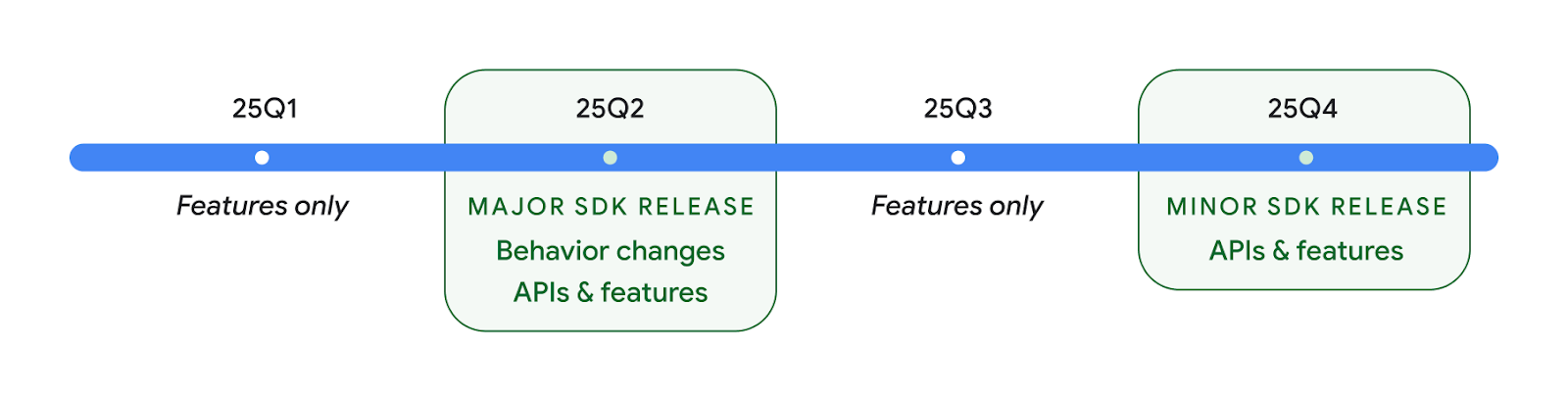
Będziemy nadal co kwartał wydawać nowe wersje Androida. Aktualizacje w I i III kwartale między wydaniami interfejsu API będą zawierać ulepszenia, które pomogą zapewnić ciągłą jakość. Współpracujemy z partnerami ds. urządzeń, aby udostępnić aktualizację Q2 jak największej liczbie urządzeń.
Korzystanie z nowych interfejsów API w przypadku wersji głównych i podstawowych
Zabezpieczenie bloku kodu za pomocą kontroli poziomu interfejsu API jest obecnie realizowane za pomocą stałej SDK_INT z VERSION_CODES. Będzie ona nadal obsługiwana w przypadku głównych wersji Androida.
if (SDK_INT >= VERSION_CODES.BAKLAVA) {
  // Use APIs introduced in Android 16
}
Nowa stała SDK_INT_FULL może być używana do sprawdzania interfejsu API w odniesieniu do wersji głównych i podrzędnych za pomocą nowego zbioru VERSION_CODES_FULL.
if (SDK_INT_FULL >= VERSION_CODES_FULL.[MAJOR or MINOR RELEASE]) {
  // Use APIs introduced in a major or minor release
}
Możesz też użyć metody Build.getMinorSdkVersion(), aby pobrać tylko mniejszą wersję pakietu SDK.
val minorSdkVersion = Build.getMinorSdkVersion(VERSION_CODES_FULL.BAKLAVA)
Te interfejsy API nie zostały jeszcze sfinalizowane i mogą ulec zmianie, dlatego jeśli masz jakiekolwiek wątpliwości, prześlij nam opinię.
Wygoda użytkowania i interfejs systemu
Android 16 daje programistom i użytkownikom większą kontrolę i elastyczność w konfigurowaniu urządzenia pod kątem swoich potrzeb.
Powiadomienia dotyczące postępu
Android 16 wprowadza powiadomienia dotyczące postępów, które pomagają użytkownikom płynnie śledzić rozpoczęte przez nich od początku do końca ścieżki.
Notification.ProgressStyle to nowy styl powiadomień, który umożliwia tworzenie powiadomień skupionych na postępach. Najważniejsze zastosowania to: przejazdy współdzielone, dostawy i nawigacja. W klasie Notification.ProgressStylemożesz oznaczać stany i milestones w ścieżce użytkownika za pomocą punktów i segmentów.
Więcej informacji znajdziesz na stronie dokumentacji poświęconej powiadomieniom o postępach.


Aktualizacje przewidywanego przejścia wstecz
Android 16 zawiera nowe interfejsy API, które ułatwiają włączanie przewidujących animacji przejścia wstecz w przypadku nawigacji za pomocą gestów, np. animacji powrotu do ekranu głównego. Zarejestrowanie funkcji
onBackInvokedCallback z nową
PRIORITY_SYSTEM_NAVIGATION_OBSERVER pozwala aplikacji na
odbieranie zwykłego wywołania onBackInvoked, gdy system obsługuje cofanie bez wpływu na normalny przepływ procesu cofania.
Android 16 zawiera dodatkowo finishAndRemoveTaskCallback() i moveTaskToBackCallback. Dzięki zarejestrowaniu tych funkcji z OnBackInvokedDispatcher system może wywoływać określone zachowania i odtwarzać odpowiednie animacje z wyprzedzeniem, gdy zostanie użyty gest wstecz.
Bogatsze reakcje haptyczne
Od samego początku Android umożliwia kontrolę nad siłownikami haptycznymi.
Android 11 obsługuje bardziej złożone efekty haptyczne, które mogą być obsługiwane przez bardziej zaawansowane siłowniki za pomocą VibrationEffect.Compositions zdefiniowanych przez urządzenie prymitywów semantycznych.
Android 16 zawiera interfejsy API haptyczne, które umożliwiają aplikacjom definiowanie krzywych amplitudy i częstotliwości efektu haptycznego, abstrahując od różnic między możliwościami urządzeń.
Wydajność programistów i narzędzia
Chociaż większość naszych działań mających na celu zwiększenie Twojej produktywności koncentruje się na narzędziach takich jak Android Studio, Jetpack Compose i biblioteki Android Jetpack, zawsze szukamy sposobów, aby pomóc Ci zrealizować Twoją wizję na platformie.
Obsługa treści w przypadku animowanych tapet
W Androidzie 16 framework animowanych tapet zyskuje nowy interfejs API treści, który rozwiązuje problemy związane z dynamicznymi tapetami tworzonymi przez użytkowników. Obecnie tapety na żywo zawierające treści przesłane przez użytkowników wymagają złożonych implementacji dostosowanych do poszczególnych usług. Android 16 wprowadza WallpaperDescription i WallpaperInstance. Atrybut WallpaperDescription umożliwia identyfikowanie różnych wystąpień animowanej tapety z tego samego serwisu. Na przykład tapeta, która występuje zarówno na ekranie głównym, jak i na ekranie blokady, może mieć unikalne treści na obu tych ekranach. Wybór tapety i WallpaperManager korzystają z tych metadanych, aby lepiej prezentować tapety użytkownikom i ułatwić tworzenie różnorodnych, spersonalizowanych tapet na żywo.
Wydajność i bateria
Android 16 wprowadza interfejsy API, które pomagają zbierać informacje o Twoich aplikacjach.
Profilowanie wywoływane przez system
ProfilingManager zostało
dodane w Androidzie 15, dzięki czemu aplikacje mogą żądać gromadzenia danych do profilowania za pomocą Perfetta na publicznych urządzeniach.
Jednak ponieważ profilowanie musi być uruchamiane z aplikacji, aplikacje nie będą mogły rejestrować ważnych procesów, takich jak uruchamianie aplikacji czy komunikaty ANR.
Aby ułatwić to zadanie, Android 16 wprowadza profilowanie wywoływane przez system w ProfilingManager. Aplikacje mogą zgłaszać zainteresowanie otrzymywaniem śladów w przypadku określonych czynników takich jak uruchamianie „na zimno” reportFullyDrawn lub powiadomienia o problemach. System rozpoczyna i zatrzymuje śledzenie w imieniu aplikacji. Po zakończeniu śledzenia wyniki są dostarczane do katalogu danych aplikacji.
Uruchamianie komponentu w ApplicationStartInfo
ApplicationStartInfo została dodana w Androidzie 15, aby umożliwić aplikacji wyświetlanie powodów uruchamiania procesu, typu uruchamiania, czasu uruchamiania, ograniczania przepustowości i innych przydatnych danych diagnostycznych. Android 16 dodaje getStartComponent(), aby odróżnić, który typ komponentu wywołał uruchomienie, co może być przydatne do optymalizacji procesu uruchamiania aplikacji.
Lepsze sprawdzanie zadań
Interfejs API JobScheduler#getPendingJobReason() zwraca powód, dla którego zadanie może być oczekujące. Zadania mogą być oczekujące z różnych powodów.
W Androidzie 16 wprowadzamy nowe API JobScheduler#getPendingJobReasons(int jobId), które zwraca wiele przyczyn, dla których zadanie jest oczekujące, zarówno ze względu na ograniczenia jawne ustawione przez dewelopera, jak i na ograniczenia domyślne ustawione przez system.
Wprowadzamy też funkcję JobScheduler#getPendingJobReasonsHistory(int jobId), która zwraca listę najnowszych zmian w ograniczeniach.
Zalecamy korzystanie z interfejsu API, aby dowiedzieć się, dlaczego zadania się nie wykonują, zwłaszcza jeśli zauważysz spadek skuteczności niektórych zadań lub błędy związane z czasem oczekiwania na wykonanie zadania. Na przykład nie udało się zaktualizować widżetów w tle lub nie udało się wywołać zadania wstępnego pobierania przed uruchomieniem aplikacji.
Dzięki temu łatwiej będzie Ci też ustalić, czy określone zadania nie są wykonywane z powodu ograniczeń określonych przez system, a nie ustawionych przez Ciebie.
Adaptacyjna częstotliwość odświeżania
Zastosowanie adaptacyjnej częstotliwości odświeżania (ARR) wprowadzonej w Androidzie 15 umożliwia wyświetlaczowi dostosowanie częstotliwości odświeżania na obsługiwanym sprzęcie do liczby klatek treści za pomocą oddzielnych kroków synchronizacji pionowej. Pozwala to zmniejszyć zużycie energii, eliminując jednocześnie potrzebę przełączania trybów, które może powodować zakłócenia.
Android 16 wprowadza hasArrSupport() i getSuggestedFrameRate(int) przy przywracaniu getSupportedRefreshRates(), aby ułatwić aplikacjom korzystanie z ARR. RecyclerView
1.4 obsługuje ARR wewnętrznie, gdy przechodzi z przesunięcia lub płynnego przewijania. Nadal pracujemy nad dodaniem obsługi ARR do kolejnych bibliotek Jetpacka. Z tego artykułu dowiesz się, których interfejsów API możesz używać do ustawiania liczby klatek na sekundę, aby aplikacja mogła bezpośrednio korzystać z ARR.
Interfejsy API rezerwy w ADPF
W SystemHealthManager wprowadzamy interfejsy API getCpuHeadroom i getGpuHeadroom, które dostarczają szacowanych wartości dostępnych zasobów procesora i procesora graficznego dla gier i aplikacji wymagających dużej ilości zasobów. Te metody pozwalają ocenić, jak aplikacja lub gra może poprawić stan systemu, zwłaszcza w połączeniu z innymi interfejsami API Android Dynamic Performance Framework (ADPF), które wykrywanie ograniczania wydajności z powodu przegrzania.
Za pomocą CpuHeadroomParams i GpuHeadroomParams na obsługiwanych urządzeniach możesz dostosować okno czasowe używane do obliczania zapasu i wybrać średnią lub minimalną dostępność zasobów. Może to pomóc w zmniejszeniu wykorzystania procesora lub karty graficznej, co przekłada się na lepsze wrażenia użytkowników i dłuższy czas pracy na baterii.
Ułatwienia dostępu
Android 16 dodaje nowe interfejsy API i funkcje ułatwień dostępu, które mogą pomóc Ci udostępnić aplikację wszystkim użytkownikom.
Ulepszone interfejsy API ułatwień dostępu
Android 16 zawiera dodatkowe interfejsy API, które zwiększają spójność semantyki interfejsu użytkownika, co ułatwia korzystanie z usług ułatwień dostępu, takich jak TalkBack.
Kontur tekstu dla maksymalnego kontrastu
Użytkownicy ze słabszym wzrokiem często mają zmniejszoną wrażliwość na kontrast, przez co trudno im odróżnić obiekty od tła. Aby ułatwić korzystanie z Androida 16, zastąpiliśmy tekst o wysokim kontraście tekstem z konturem, który rysuje większy obszar o wysokim kontraście wokół tekstu, aby znacznie ułatwić jego czytelność.
Android 16 zawiera nowe interfejsy API AccessibilityManager, które umożliwiają aplikacjom sprawdzanie lub rejestrowanie listenera, aby sprawdzić, czy ten tryb jest włączony. Jest to przede wszystkim narzędzie dla pakietów narzędzi interfejsu użytkownika, takich jak Compose, które zapewniają podobne wrażenia wizualne. Jeśli masz bibliotekę UI Toolkit lub Twoja aplikacja wykonuje niestandardowe renderowanie tekstu, które omija klasę android.text.Layout, możesz użyć tej metody, aby dowiedzieć się, kiedy tekst obrysu jest włączony.

Czas trwania dodany do elementu TtsSpan
Android 16 rozszerza TtsSpan o TYPE_DURATION, który składa się z ARG_HOURS, ARG_MINUTES i ARG_SECONDS. Umożliwia to bezpośrednie dodawanie adnotacji do czasu trwania, co zapewnia dokładne i spójne generowanie tekstu na mowę w usługach takich jak TalkBack.
Obsługa elementów z wieloma etykietami
Android umożliwia obecnie pobieranie etykiety ułatwień dostępu przez elementy interfejsu z innej etykiety. Obecnie można też powiązać wiele etykiet, co jest częstym scenariuszem w przypadku treści internetowych. Dzięki wprowadzeniu interfejsu API opartego na listach w AccessibilityNodeInfo Android może bezpośrednio obsługiwać te relacje między wieloma etykietami. W ramach tej zmiany wycofujemy parametry AccessibilityNodeInfo#setLabeledBy i #getLabeledBy na rzecz parametrów #addLabeledBy, #removeLabeledBy i #getLabeledByList.
Ulepszona obsługa elementów rozwijanych
Android 16 zawiera interfejsy API ułatwień dostępu, które umożliwiają wyświetlanie elementów interaktywnych, takich jak menu czy rozwijane listy, w rozwiniętym lub zwężonym stanie. Ustawienie stanu rozwiniętego za pomocą setExpandedState i wysłanie zdarzenia TYPE_WINDOW_CONTENT_CHANGED AccessibilityEvents z typem zmiany zawartości CONTENT_CHANGE_TYPE_EXPANDED pozwala zapewnić, aby czytniki ekranu, takie jak TalkBack, ogłaszały zmiany stanu, co daje bardziej intuicyjne i włączające wrażenia użytkownika.
Paski postępu nieokreślonego
Android 16 dodaje RANGE_TYPE_INDETERMINATE, dzięki czemu możesz udostępniać RangeInfo zarówno w przypadku widżetów deterministycznych, jak i niedeterministycznych ProgressBar, co pozwala usługom takim jak TalkBack zapewniać bardziej spójną informację zwrotną dla wskaźników postępu.
Pole wyboru z 3 stanami
Nowe metody AccessibilityNodeInfo
getChecked i setChecked(int)
w Androidzie 16 obsługują teraz stan „częściowo zaznaczone” oprócz stanów „zaznaczone” i „niezaznaczone”. Zastępuje wycofane typy danych logicznych isChecked i setChecked(boolean).
Dodatkowe teksty reklamy
Gdy usługa ułatwień dostępu opisuje element ViewGroup, łączy etykiety treści jego podrzędnych elementów. Jeśli podasz wartość contentDescription dla atrybutu ViewGroup, usługi ułatwień dostępu założą, że zastępujesz też opis podrzędnych widoków bez możliwości wyboru. Może to być problematyczne, jeśli chcesz oznaczyć coś jak menu (np. „Rodzina czcionek”), zachowując jednocześnie bieżący wybór w ramach ułatwień dostępu (np. „Roboto”). Android 16 zawiera element setSupplementalDescription, dzięki któremu możesz podać tekst zawierający informacje o elementach potomnych elementu ViewGroup bez zastępowania informacji z tych elementów.
Pola wymagane
Android 16 dodaje setFieldRequired do AccessibilityNodeInfo, aby aplikacje mogły poinformować usługę ułatwień dostępu, że dane w polu formularza są wymagane. Jest to ważny scenariusz dla użytkowników wypełniających różne rodzaje formularzy, nawet te proste, takie jak wymagane pole wyboru w warunkach korzystania z usługi. Pomaga on użytkownikom konsekwentnie identyfikować wymagane pola i szybko się między nimi przemieszczać.
Telefon jako źródło dźwięku podczas połączeń głosowych z użyciem aparatów słuchowych LEA
Android 16 umożliwia użytkownikom aparatów słuchowych LE Audio przełączanie się między wbudowanymi mikrofonami aparatów słuchowych a mikrofonem w telefonie podczas połączeń głosowych. Może to być przydatne w głośnym otoczeniu lub w innych sytuacjach, w których mikrofony aparatu słuchowego mogą nie działać prawidłowo.
Sterowanie głośnością dźwięków otoczenia w przypadku aparatów słuchowych LEA
Android 16 umożliwia użytkownikom aparatów słuchowych LE Audio dostosowywanie głośności dźwięku otoczenia, który jest odbierany przez mikrofony aparatu. Może to być przydatne w sytuacjach, gdy szum w tle jest zbyt głośny lub zbyt cichy.
Aparat
Android 16 rozszerza obsługę profesjonalnych użytkowników aparatu, umożliwiając hybrydowe automatyczne ustawianie ekspozycji oraz precyzyjne dostosowywanie temperatury kolorów i odcieni. Nowy wskaźnik trybu nocnego pomaga aplikacji określić, kiedy przełączyć się na sesję aparatu w trybie nocnym i z powrotem. Nowe działania Intent ułatwiają robienie zdjęć ruchomych, a my nadal ulepszamy obrazy UltraHDR, dodając obsługę kodowania HEIC i nowych parametrów z projektu standardu ISO 21496-1.
Hybrydowe automatyczne ustawianie ekspozycji
Android 16 dodaje do aplikacji Camera2 nowe hybrydowe tryby automatycznej ekspozycji, które umożliwiają ręczne kontrolowanie określonych aspektów ekspozycji, a resztą zajmuje się algorytm automatycznej ekspozycji (AE). Możesz kontrolować ISO + AE oraz czas naświetlania + AE, co zapewnia większą elastyczność w porównaniu z obecnym podejściem, w którym masz albo pełną kontrolę ręczną, albo polegasz całkowicie na automatycznym naświetlaniu.
fun setISOPriority() {
    // ... (Your existing code before the snippet) ...

    val availablePriorityModes = mStaticInfo.characteristics.get(
        CameraCharacteristics.CONTROL_AE_AVAILABLE_PRIORITY_MODES
    )

    // ... (Your existing code between the snippets) ...

    // Turn on AE mode to set priority mode
    reqBuilder.set(
        CaptureRequest.CONTROL_AE_MODE,
        CameraMetadata.CONTROL_AE_MODE_ON
    )
    reqBuilder.set(
        CaptureRequest.CONTROL_AE_PRIORITY_MODE,
        CameraMetadata.CONTROL_AE_PRIORITY_MODE_SENSOR_SENSITIVITY_PRIORITY
    )
    reqBuilder.set(
        CaptureRequest.SENSOR_SENSITIVITY,
        TEST_SENSITIVITY_VALUE
    )
    val request: CaptureRequest = reqBuilder.build()

    // ... (Your existing code after the snippet) ...
}
Precyzyjne dostosowywanie temperatury kolorów i odcieni
Android 16 obsługuje kamery, które umożliwiają dokładne dostosowanie temperatury barw i odcieku, aby lepiej obsługiwać profesjonalne aplikacje do nagrywania filmów. W poprzednich wersjach Androida można było kontrolować ustawienia balansu bieli za pomocą CONTROL_AWB_MODE, które zawiera opcje ograniczone do listy wstępnie ustawionych wartości, takich jak żarówka, chmury i zmierzch. Opcja COLOR_CORRECTION_MODE_CCT umożliwia użycie COLOR_CORRECTION_COLOR_TEMPERATURE i COLOR_CORRECTION_COLOR_TINT do precyzyjnego dostosowania balansu bieli na podstawie skorelowanej temperatury barwowej.
fun setCCT() {
    // ... (Your existing code before this point) ...

    val colorTemperatureRange: Range<Int> =
        mStaticInfo.characteristics[CameraCharacteristics.COLOR_CORRECTION_COLOR_TEMPERATURE_RANGE]

    // Set to manual mode to enable CCT mode
    reqBuilder[CaptureRequest.CONTROL_AWB_MODE] = CameraMetadata.CONTROL_AWB_MODE_OFF
    reqBuilder[CaptureRequest.COLOR_CORRECTION_MODE] = CameraMetadata.COLOR_CORRECTION_MODE_CCT
    reqBuilder[CaptureRequest.COLOR_CORRECTION_COLOR_TEMPERATURE] = 5000
    reqBuilder[CaptureRequest.COLOR_CORRECTION_COLOR_TINT] = 30

    val request: CaptureRequest = reqBuilder.build()

    // ... (Your existing code after this point) ...
}
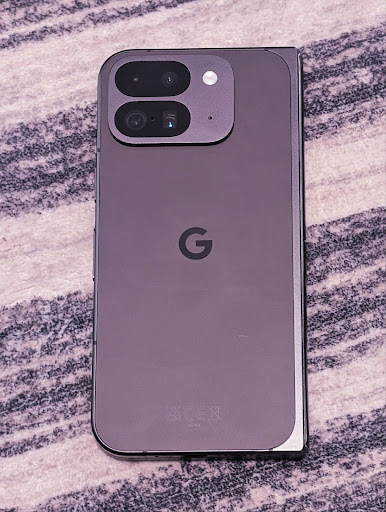
Poniższe przykłady pokazują, jak zdjęcie będzie wyglądać po zastosowaniu różnych ustawień temperatury barw i odcienia:


Wykrywanie sceny w trybie nocnym aparatu
Aby pomóc aplikacji określić, kiedy rozpocząć i zakończyć sesję w trybie nocnym, Android 16 dodaje EXTENSION_NIGHT_MODE_INDICATOR. Jeśli jest obsługiwana, jest dostępna w sekcji CaptureResult w aplikacji Camera2.
W poście na blogu Jak Instagram umożliwia użytkownikom robienie niesamowitych zdjęć w słabo oświetlonych miejscach wspomnieliśmy o tym, że interfejs API będzie dostępny w krótce. Ten post to praktyczny przewodnik po wdrażaniu trybu nocnego wraz ze szczegółowym przykładem, który łączy wyższej jakości zdjęcia w trybie nocnym w aplikacji z większą liczbą zdjęć udostępnianych z aplikacji za pomocą aparatu.
Działania intencji przechwytywania zdjęć ruchomych
Android 16 dodaje standardowe działania intencji ACTION_MOTION_PHOTO_CAPTURE i ACTION_MOTION_PHOTO_CAPTURE_SECURE, które proszą aplikację aparatu o zrobienie filmu poklatkowego i zwrócenie go.
Musisz przekazać dodatkowy parametr EXTRA_OUTPUT, aby kontrolować, gdzie zostanie zapisane zdjęcie, lub parametr Uri przez Intent.setClipData(ClipData). Jeśli nie ustawisz parametru
ClipData, zostanie on skopiowany do tego pola podczas połączenia
Context.startActivity(Intent).
Ulepszenia obrazu UltraHDR
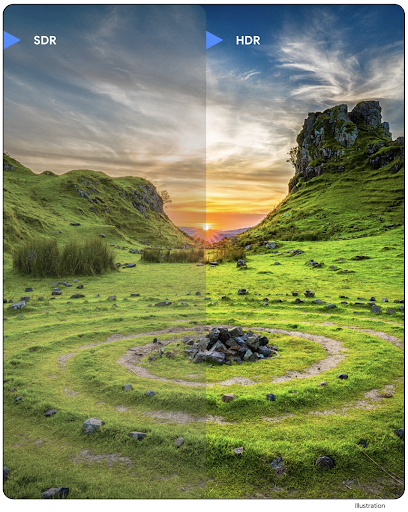
Android 16 to kontynuacja naszych działań na rzecz zapewnienia oszałamiającej jakości zdjęć za pomocą obrazów UltraHDR. Dodano obsługę obrazów UltraHDR w formacie pliku HEIC. Te obrazy będą miały typ ImageFormatHEIC_ULTRAHDR i będą zawierać wbudowaną mapę wzmocnienia podobną do istniejącego formatu JPEG UltraHDR. Pracujemy też nad obsługą formatu AVIF w przypadku UltraHDR.
Dodatkowo Android 16 implementuje w UltraHDR dodatkowe parametry ze standardu ISO 21496-1 w wersji roboczej, w tym możliwość pobierania i ustawiania przestrzeni kolorów, w której ma być stosowana matematyka mapy wzmocnienia, oraz obsługę obrazów bazowych zakodowanych w HDR z mapami wzmocnienia SDR.
Grafika
Android 16 zawiera najnowsze ulepszenia grafiki, takie jak niestandardowe efekty graficzne z AGSL.
Niestandardowe efekty graficzne z AGSL
Android 16 zawiera metody RuntimeColorFilter i RuntimeXfermode, które umożliwiają tworzenie złożonych efektów, takich jak próg, sepia czy nasycenie barw, i ich stosowanie do wywołań rysowania. Od Androida 13 możesz używać AGSL do tworzenia niestandardowych shaderów środowiska wykonawczego, które rozszerzają Shader. Nowe API odzwierciedla to, dodając RuntimeColorFilter oparty na AGSL, który rozszerza ColorFilter oraz efekt Xfermode, który umożliwia implementowanie niestandardowego składania i mieszania pikseli źródłowych i docelowych na podstawie AGSL.
private val thresholdEffectString = """
    uniform half threshold;

    half4 main(half4 c) {
        half luminosity = dot(c.rgb, half3(0.2126, 0.7152, 0.0722));
        half bw = step(threshold, luminosity);
        return bw.xxx1 * c.a;
    }"""

fun setCustomColorFilter(paint: Paint) {
   val filter = RuntimeColorFilter(thresholdEffectString)
   filter.setFloatUniform(0.5);
   paint.colorFilter = filter
}
Łączność
Android 16 aktualizuje platformę, aby zapewnić Twojej aplikacji dostęp do najnowszych osiągnięć w dziedzinie komunikacji i technologii bezprzewodowych.
Określanie odległości z większym bezpieczeństwem
Android 16 dodaje obsługę solidnych funkcji zabezpieczeń w lokalizacji Wi-Fi na obsługiwanych urządzeniach z użyciem standardu 802.11az Wi-Fi 6, co pozwala aplikacjom łączyć większą dokładność, większą skalowalność i dynamiczne harmonogramowanie protokołu z ulepszeniami zabezpieczeń, w tym szyfrowaniem AES-256 i ochroną przed atakami MITM. Umożliwia to bezpieczniejsze korzystanie z urządzenia w przypadku zastosowań związanych z użyciem w pobliżu, takich jak odblokowywanie laptopa czy drzwi samochodu. 802.11az jest zintegrowany ze standardem Wi-Fi 6, wykorzystując jego infrastrukturę i możliwości do szerszego wdrażania oraz łatwiejszego stosowania.
Ogólne interfejsy API określania odległości
Android 16 zawiera nową usługę RangingManager, która umożliwia określanie odległości i kąta na obsługiwanym sprzęcie między urządzeniem lokalnym a urządzeniem zdalnym. RangingManager obsługuje różne technologie pomiaru odległości, takie jak pomiar odległości na kanale BLE, pomiar odległości na podstawie wartości RSSI BLE, łącze ultraszerokopasmowe i czas przesyłania pakietów Wi-Fi.
Obecność urządzenia w Menedżerze urządzeń towarzyszących
W Androidzie 16 wprowadzamy nowe interfejsy API do wiązania aplikacji towarzyszącej. Usługa będzie związana, gdy BLE jest w zasięgu, a Bluetooth jest połączony, oraz będzie odłączona, gdy BLE jest poza zasięgiem lub Bluetooth jest rozłączony. Aplikacja otrzyma nową funkcję wywołania onDevicePresenceEvent() na podstawie różnych DevicePresenceEvent.
Więcej informacji znajdziesz w metodzie startObservingDevicePresence(ObservingDevicePresenceRequest).
Multimedia
Android 16 zawiera wiele funkcji, które poprawiają jakość multimediów.
Ulepszenia selektora zdjęć
Selektor zdjęć to bezpieczny, wbudowany sposób, dzięki któremu użytkownicy mogą przyznawać Twojej aplikacji dostęp do wybranych obrazów i filmów z magazynu lokalnego i chmury zamiast do całej biblioteki multimediów. Dzięki połączeniu modułów systemowych w ramach aktualizacji systemu od Google oraz Usług Google Play jest ona obsługiwana na urządzeniach z Androidem 4.4 (poziom interfejsu API 19) i starszych. Integracja wymaga tylko kilku linii kodu z powiązaną biblioteką Jetpacka na Androida.
Android 16 zawiera te ulepszenia selektora zdjęć:
- Umieszczony selektor zdjęć: nowe interfejsy API, które umożliwiają aplikacjom umieszczanie selektora zdjęć w hierarchii widoku. Dzięki temu użytkownik może mieć wrażenie, że jest to bardziej zintegrowana część aplikacji, a jednocześnie nadal korzystać z izolacji procesów, która pozwala użytkownikom wybierać media bez konieczności przyznawania aplikacji zbyt szerokich uprawnień. Aby zmaksymalizować zgodność z różnymi wersjami platform i uprościć integrację, jeśli chcesz zintegrować wbudowany selektor zdjęć, użyj nadchodzącej biblioteki Jetpacka na Androida.
- Wyszukiwanie w chmurze w selektorze zdjęć: nowe interfejsy API, które umożliwiają wyszukiwanie w chmurze u dostawcy multimediów w przypadku selektora zdjęć na Androida. Funkcja wyszukiwania w selektorze zdjęć będzie dostępna wkrótce.
Zaawansowane profesjonalne opcje wideo
Android 16 wprowadza obsługę kodeka Advanced Professional Video (APV), który został zaprojektowany do profesjonalnego nagrywania i postprodukcji wysokiej jakości filmów.
Standard kodeka APV ma te funkcje:
- Niezauważalna utrata jakości (zbliżona do jakości surowego filmu)
- kodowanie tylko wewnątrz ramki o niskiej złożoności i dużej przepustowości (bez przewidywania domeny pikseli) w celu lepszego obsługiwania przepływów pracy związanych z edycją;
- Obsługa wysokiej szybkości transmisji bitów do kilku Gb/s w przypadku treści o rozdzielczości 2K, 4K i 8K, dzięki prostemu schematowi kodowania entropii
- Układanie ramek w przypadku treści wciągających i umożliwiające równoległe kodowanie i dekodowanie
- obsługa różnych formatów próbkowania chroma i głębi bitowej;
- Obsługa wielokrotnego dekodowania i ponownego kodowania bez znacznego pogorszenia jakości obrazu
- Obsługa filmów z wieloma widokami i filmów pomocniczych, takich jak głębia, alfa i podgląd
- Obsługa HDR10/10+ i metadanych zdefiniowanych przez użytkownika
Referencyjna implementacja APV jest dostępna w projekcie OpenAPV. Android 16 wprowadzi obsługę profilu APV 422-10, który zapewnia próbkowanie kolorów YUV 422 z kodowaniem 10-bitowym i docelowymi szybkościami transmisji danych do 2 Gbps.
Prywatność
Android 16 zawiera wiele funkcji, które pomagają programistom chronić prywatność użytkowników.
Aktualizacje Health Connect
Health Connect dodaje ACTIVITY_INTENSITY, typ danych zdefiniowany zgodnie z wytycznymi Światowej Organizacji Zdrowia dotyczącymi umiarkowanej i intensywnej aktywności. Każdy rekord wymaga podania godziny rozpoczęcia i zakończenia oraz określenia, czy intensywność aktywności była umiarkowana czy wysoka.
Health Connect zawiera też zaktualizowane interfejsy API obsługujące dokumenty medyczne. Pozwala to aplikacjom na odczytywanie i zapisywanie dokumentacji medycznej w formacie FHIR za wyraźną zgodą użytkownika.
Piaskownica prywatności na Androida
Android 16 zawiera najnowszą wersję Piaskownicy prywatności na Androida, która jest częścią naszych nieustannych prac nad tworzeniem technologii, w których użytkownicy mają pewność, że ich prywatność jest chroniona. Więcej informacji o programie beta Piaskownicy prywatności na Androida znajdziesz na naszej stronie. Zapoznaj się ze środowiskiem wykonawczym SDK, które umożliwia uruchamianie pakietów SDK w dedykowanym środowisku wykonawczym oddzielonym od aplikacji, w której są one używane. Zapewnia to większą ochronę danych użytkowników podczas ich gromadzenia i udostępniania.
Bezpieczeństwo
Android 16 zawiera funkcje, które pomagają zwiększyć bezpieczeństwo aplikacji i chronić jej dane.
Interfejs API udostępniania kluczy
Android 16 zawiera interfejsy API, które umożliwiają udostępnianie dostępu do kluczy Android Keystore innym aplikacjom. Nowa klasa KeyStoreManager umożliwia przyznawanie i odbieranie dostępu do kluczy na podstawie identyfikatora aplikacji oraz zawiera interfejs API, który umożliwia aplikacjom dostęp do udostępnionych kluczy.
Formaty urządzeń
Android 16 zapewnia aplikacjom obsługę, która pozwala w pełni wykorzystać formaty Androida.
Ustandaryzowany system jakości obrazu i dźwięku w telewizorach
Nowy pakiet MediaQualityw Androidzie 16 udostępnia zestaw standardowych interfejsów API umożliwiających dostęp do profili dźwięku i obrazu oraz ustawień związanych ze sprzętem. Umożliwia to aplikacjom do strumieniowego przesyłania danych wysyłanie zapytań do profili i dynamiczne stosowanie ich do multimediów:
- Filmy z szerszym zakresem dynamicznym wymagają większej dokładności kolorów, aby można było dostrzec subtelne szczegóły w cieniu i dostosować je do światła otoczenia. Dlatego odpowiedni może być profil, który preferuje dokładność kolorów nad jasnością.
- Transmisje na żywo wydarzeń sportowych są często masterowane z wąskim zakresem dynamicznym, ale często oglądane są w świetle dziennym, więc profil, który preferuje jasność nad dokładnością kolorów, może przynieść lepsze rezultaty.
- Pełnowartościowe treści interaktywne wymagają minimalnego przetwarzania w celu zmniejszenia opóźnienia oraz wyższej częstotliwości klatek, dlatego wiele telewizorów jest dostarczanych z profilem gry.
Interfejs API umożliwia aplikacjom przełączanie się między profilami, a użytkownikom dostosowanie obsługiwanych telewizorów do ich treści.
Internacjonalizacja
Android 16 dodaje funkcje i możliwości, które uzupełniają wygodę użytkowania, gdy urządzenie jest używane w różnych językach.
Tekst w pionie
Android 16 dodaje obsługę niskiego poziomu renderowania i pomiaru tekstu w pionie, aby zapewnić deweloperom bibliotek podstawową obsługę pisania w pionie. Jest to szczególnie przydatne w przypadku języków takich jak japoński, w których powszechnie stosuje się systemy pisma wertykalnego. Do klasy Paint dodano nową flagę VERTICAL_TEXT_FLAG. Gdy ten parametr jest ustawiony za pomocą parametru Paint.setFlags, interfejsy API do pomiaru tekstu w Paint będą raportować postępy w kierunku pionowym, a nie poziomym, a interfejs Canvas będzie rysować tekst w kierunku pionowym.
val text = "「春は、曙。」"
Box(
    Modifier.padding(innerPadding).background(Color.White).fillMaxSize().drawWithContent {
        drawIntoCanvas { canvas ->
            val paint = Paint().apply { textSize = 64.sp.toPx() }
            // Draw text vertically
            paint.flags = paint.flags or VERTICAL_TEXT_FLAG
            val height = paint.measureText(text)
            canvas.nativeCanvas.drawText(
                text,
                0,
                text.length,
                size.width / 2,
                (size.height - height) / 2,
                paint
            )
        }
    }
) {}
Dostosowywanie systemu miar
Użytkownicy mogą teraz dostosować system miar w ustawieniach regionalnych w sekcji Ustawienia. Preferencja użytkownika jest uwzględniana w ramach kodu języka, więc możesz zarejestrować BroadcastReceiver w ACTION_LOCALE_CHANGED, aby obsługiwać zmiany konfiguracji języka, gdy zmieniają się preferencje regionalne.
Aby dostosować formatowanie do lokalnych preferencji, możesz użyć formaterów. Na przykład „0,5 cala” w języku angielskim (Stany Zjednoczone) to „12,7 mm” dla użytkownika,który ustawił telefon na język angielski (Dania) lub używa telefonu w języku angielskim (Stany Zjednoczone) z systemem metrycznym jako preferowanym systemem pomiarowym.
Aby znaleźć te ustawienia, otwórz aplikację Ustawienia i kliknij System > Języki i region.