

สำหรับแอปพลิเคชันที่ต้องใช้การรองรับเสียงแบบเรียลไทม์และมีความหน่วงต่ำ เช่น แชทบ็อตหรือการโต้ตอบแบบ Agentic Gemini Live API มีวิธีที่เหมาะที่สุดในการสตรีมทั้งอินพุตและเอาต์พุตสำหรับโมเดล Gemini การใช้ Firebase AI Logic ช่วยให้คุณเรียกใช้ Gemini Live API ได้โดยตรงจากแอป Android โดยไม่จำเป็นต้องผสานรวมแบ็กเอนด์ คู่มือนี้จะแสดงวิธีใช้ Gemini Live API ในแอป Android ด้วย Firebase AI Logic
เริ่มต้นใช้งาน
ก่อนเริ่มต้น ให้ตรวจสอบว่าแอปกำหนดเป้าหมายเป็น API ระดับ 23 ขึ้นไป
หากยังไม่ได้ดำเนินการ ให้ตั้งค่าโปรเจ็กต์ Firebase และเชื่อมต่อแอปกับ Firebase ดูรายละเอียดได้ที่เอกสารประกอบ Firebase AI Logic
ตั้งค่าโปรเจ็กต์ Android
เพิ่มทรัพยากร Dependency ของไลบรารี Firebase AI Logic ลงในไฟล์ระดับแอป
build.gradle.kts หรือ build.gradle ใช้ Firebase Android
BoM เพื่อจัดการเวอร์ชันของไลบรารี
dependencies {
  // Import the Firebase BoM
  implementation(platform("com.google.firebase:firebase-bom:34.13.0"))
  // Add the dependency for the Firebase AI Logic library
  // When using the BoM, you don't specify versions in Firebase library dependencies
  implementation("com.google.firebase:firebase-ai")
}
หลังจากเพิ่มทรัพยากร Dependency แล้ว ให้ซิงค์โปรเจ็กต์ Android กับ Gradle
ผสานรวม Firebase AI Logic และเริ่มต้นโมเดล Generative
เพิ่มสิทธิ์ RECORD_AUDIO ลงในไฟล์ AndroidManifest.xml ของแอปพลิเคชัน
<uses-permission android:name="android.permission.RECORD_AUDIO" />
เริ่มต้นบริการแบ็กเอนด์ Gemini Developer API และเข้าถึง LiveModel
ใช้โมเดลที่รองรับ Live API เช่น gemini-2.5-flash-native-audio-preview-12-2025
ดูโมเดลที่พร้อมใช้งานได้ในเอกสารประกอบ Firebase
หากต้องการระบุเสียง ให้ตั้งค่า ชื่อเสียง ภายใน
speechConfig ออบเจ็กต์ ซึ่งเป็นส่วนหนึ่งของ การกำหนดค่าโมเดล หากไม่ได้ระบุเสียง ระบบจะใช้เสียงเริ่มต้นเป็น Puck
Kotlin
// Initialize the `LiveModel` val model = Firebase.ai(backend = GenerativeBackend.googleAI()).liveModel( modelName = "gemini-2.5-flash-native-audio-preview-12-2025", generationConfig = liveGenerationConfig { responseModality = ResponseModality.AUDIO speechConfig = SpeechConfig(voice = Voice("FENRIR")) } )
Java
// Initialize the `LiveModel`
LiveGenerativeModel model = FirebaseAI
       .getInstance(GenerativeBackend.googleAI())
       .liveModel(
              "gemini-2.5-flash-native-audio-preview-12-2025",
              new LiveGenerationConfig.Builder()
                     .setResponseModality(ResponseModality.AUDIO)
                     .setSpeechConfig(new SpeechConfig(new Voice("FENRIR"))
              ).build(),
        null,
        null
);
คุณสามารถกำหนดบุคลิกหรือบทบาทที่โมเดลจะแสดงได้โดยการตั้งค่าคำแนะนำของระบบ (ไม่บังคับ)
Kotlin
val systemInstruction = content { text("You are a helpful assistant, you main role is [...]") } val model = Firebase.ai(backend = GenerativeBackend.googleAI()).liveModel( modelName = "gemini-2.5-flash-native-audio-preview-12-2025", generationConfig = liveGenerationConfig { responseModality = ResponseModality.AUDIO speechConfig = SpeechConfig(voice = Voice("FENRIR")) }, systemInstruction = systemInstruction, )
Java
Content systemInstruction = new Content.Builder()
       .addText("You are a helpful assistant, you main role is [...]")
       .build();

LiveGenerativeModel model = FirebaseAI
       .getInstance(GenerativeBackend.googleAI())
       .liveModel(
              "gemini-2.5-flash-native-audio-preview-12-2025",
              new LiveGenerationConfig.Builder()
                     .setResponseModality(ResponseModality.AUDIO)
                     .setSpeechConfig(new SpeechConfig(new Voice("FENRIR"))
              ).build(),
        tools, // null if you don't want to use function calling
        systemInstruction
);
คุณสามารถปรับแต่งการสนทนากับโมเดลให้เฉพาะเจาะจงมากขึ้นได้โดยใช้คำแนะนำของระบบเพื่อระบุบริบทที่เกี่ยวข้องกับแอป (เช่น ประวัติกิจกรรมในแอปของผู้ใช้)
เริ่มต้นเซสชัน Live API
เมื่อสร้างอินสแตนซ์ LiveModel แล้ว ให้เรียกใช้ model.connect() เพื่อสร้างออบเจ็กต์ LiveSession และสร้างการเชื่อมต่อแบบถาวรกับโมเดลด้วยการสตรีมที่มีความหน่วงต่ำ LiveSession ช่วยให้คุณโต้ตอบกับโมเดลได้โดยการเริ่มและหยุดเซสชันเสียง รวมถึงส่งและรับข้อความ
จากนั้นคุณสามารถเรียกใช้ startAudioConversation() เพื่อเริ่มการสนทนากับโมเดลได้ดังนี้
Kotlin
val session = model.connect() session.startAudioConversation()
Java
LiveModelFutures model = LiveModelFutures.from(liveModel);
ListenableFuture<LiveSession> sessionFuture = model.connect();

Futures.addCallback(sessionFuture, new FutureCallback<LiveSession>() {
    @Override
    public void onSuccess(LiveSession ses) {
        LiveSessionFutures session = LiveSessionFutures.from(ses);
        session.startAudioConversation();
    }
    @Override
    public void onFailure(Throwable t) {
        // Handle exceptions
    }
}, executor);
โปรดทราบว่าโมเดลไม่รองรับการขัดจังหวะในการสนทนา นอกจากนี้ Live API ยังเป็น แบบสองทิศทาง คุณจึงใช้การเชื่อมต่อเดียวกันเพื่อส่งและรับเนื้อหาได้
นอกจากนี้ คุณยังใช้ Gemini Live API เพื่อสร้างเสียงจากอินพุตหลายรูปแบบได้ด้วย
- ส่งอินพุตข้อความ
- ส่งอินพุตวิดีโอ (ดูแอปเริ่มต้นใช้งานฉบับย่อของ Firebase)
การเรียกใช้ฟังก์ชัน: เชื่อมต่อ Gemini Live API กับแอป
คุณยังสามารถเปิดใช้โมเดลให้โต้ตอบกับตรรกะของแอปได้โดยตรงโดยใช้การเรียกใช้ฟังก์ชัน
การเรียกใช้ฟังก์ชัน (หรือการเรียกใช้เครื่องมือ) เป็นฟีเจอร์ของการใช้งาน Generative AI ที่ช่วยให้โมเดลเรียกใช้ฟังก์ชันได้ด้วยตนเองเพื่อดำเนินการ หากฟังก์ชันมีเอาต์พุต โมเดลจะเพิ่มเอาต์พุตนั้นลงในบริบทและใช้สำหรับการสร้างครั้งต่อๆ ไป
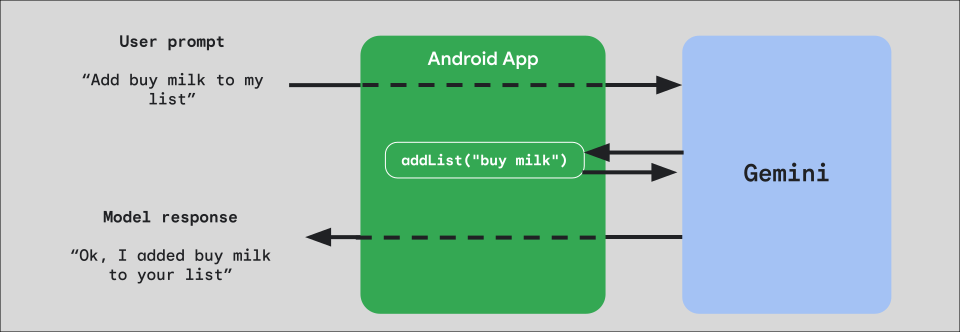
หากต้องการใช้การเรียกใช้ฟังก์ชันในแอป ให้เริ่มด้วยการสร้างออบเจ็กต์ FunctionDeclaration สำหรับแต่ละฟังก์ชันที่ต้องการเปิดเผยต่อโมเดล
ตัวอย่างเช่น หากต้องการเปิดเผยฟังก์ชัน addList ที่เพิ่มสตริงลงในรายการสตริงไปยัง Gemini ให้เริ่มด้วยการสร้างตัวแปร FunctionDeclaration ที่มีชื่อและคำอธิบายสั้นๆ เป็นภาษาอังกฤษธรรมดาของฟังก์ชันและพารามิเตอร์
Kotlin
val itemList = mutableListOf<String>() fun addList(item: String) { itemList.add(item) } val addListFunctionDeclaration = FunctionDeclaration( name = "addList", description = "Function adding an item the list", parameters = mapOf( "item" to Schema.string("A short string describing the item to add to the list") ) )
Java
HashMap<String, Schema> addListParams = new HashMap<String, Schema>(1);

addListParams.put("item", Schema.str("A short string describing the item to add to the list"));

FunctionDeclaration addListFunctionDeclaration = new FunctionDeclaration(
    "addList",
    "Function adding an item the list",
    addListParams,
    Collections.emptyList()
);
จากนั้นส่ง FunctionDeclaration นี้เป็น Tool ไปยังโมเดลเมื่อสร้างอินสแตนซ์
Kotlin
val addListTool = Tool.functionDeclarations(listOf(addListFunctionDeclaration)) val model = Firebase.ai(backend = GenerativeBackend.googleAI()).liveModel( modelName = "gemini-2.5-flash-native-audio-preview-12-2025", generationConfig = liveGenerationConfig { responseModality = ResponseModality.AUDIO speechConfig = SpeechConfig(voice = Voice("FENRIR")) }, systemInstruction = systemInstruction, tools = listOf(addListTool) )
Java
LiveGenerativeModel model = FirebaseAI.getInstance(
    GenerativeBackend.googleAI()).liveModel(
        "gemini-2.5-flash-native-audio-preview-12-2025",
  new LiveGenerationConfig.Builder()
        .setResponseModalities(ResponseModality.AUDIO)
        .setSpeechConfig(new SpeechConfig(new Voice("FENRIR")))
        .build(),
  List.of(Tool.functionDeclarations(List.of(addListFunctionDeclaration))),
               null,
               systemInstruction
        );
สุดท้าย ให้ใช้ฟังก์ชันตัวแฮนเดิลเพื่อจัดการการเรียกใช้เครื่องมือที่โมเดลสร้างขึ้นและส่งการตอบกลับกลับไป ฟังก์ชันแฮนเดิลนี้ที่ส่งไปยัง LiveSession เมื่อคุณเรียกใช้ startAudioConversation จะใช้พารามิเตอร์ FunctionCallPart และแสดงผล FunctionResponsePart
Kotlin
session.startAudioConversation(::functionCallHandler) // ... fun functionCallHandler(functionCall: FunctionCallPart): FunctionResponsePart { return when (functionCall.name) { "addList" -> { // Extract function parameter from functionCallPart val itemName = functionCall.args["item"]!!.jsonPrimitive.content // Call function with parameter addList(itemName) // Confirm the function call to the model val response = JsonObject( mapOf( "success" to JsonPrimitive(true), "message" to JsonPrimitive("Item $itemName added to the todo list") ) ) FunctionResponsePart(functionCall.name, response) } else -> { val response = JsonObject( mapOf( "error" to JsonPrimitive("Unknown function: ${functionCall.name}") ) ) FunctionResponsePart(functionCall.name, response) } } }
Java
Futures.addCallback(sessionFuture, new FutureCallback<LiveSessionFutures>() {

    @RequiresPermission(Manifest.permission.RECORD_AUDIO)
    @Override
    @OptIn(markerClass = PublicPreviewAPI.class)
    public void onSuccess(LiveSessionFutures ses) {
        ses.startAudioConversation(::handleFunctionCallFuture);
    }

    @Override
    public void onFailure(Throwable t) {
        // Handle exceptions
    }
}, executor);

// ...

ListenableFuture<JsonObject> handleFunctionCallFuture = Futures.transform(response, result -> {
    for (FunctionCallPart functionCall : result.getFunctionCalls()) {
        if (functionCall.getName().equals("addList")) {
            Map<String, JsonElement> args = functionCall.getArgs();
            String item =
                    JsonElementKt.getContentOrNull(
                            JsonElementKt.getJsonPrimitive(
                                    locationJsonObject.get("item")));
            return addList(item);
        }
    }
    return null;
}, Executors.newSingleThreadExecutor());
ขั้นตอนถัดไป
- ลองใช้ Gemini Live API ในแอปตัวอย่างแคตตาล็อก AI ของ Android
- อ่านข้อมูลเพิ่มเติมเกี่ยวกับ Gemini Live API ในเอกสารประกอบ Firebase AI Logic
- ดูข้อมูลเพิ่มเติมเกี่ยวกับโมเดิล Gemini ที่พร้อมใช้งาน
- ดูข้อมูลเพิ่มเติมเกี่ยวกับการเรียกใช้ฟังก์ชัน
- สำรวจกลยุทธ์การออกแบบพรอมต์