
在 Android 12.0(API 级别 31)及更高版本中,系统提供了
CallStyle 通知模板,用于区分通话通知与
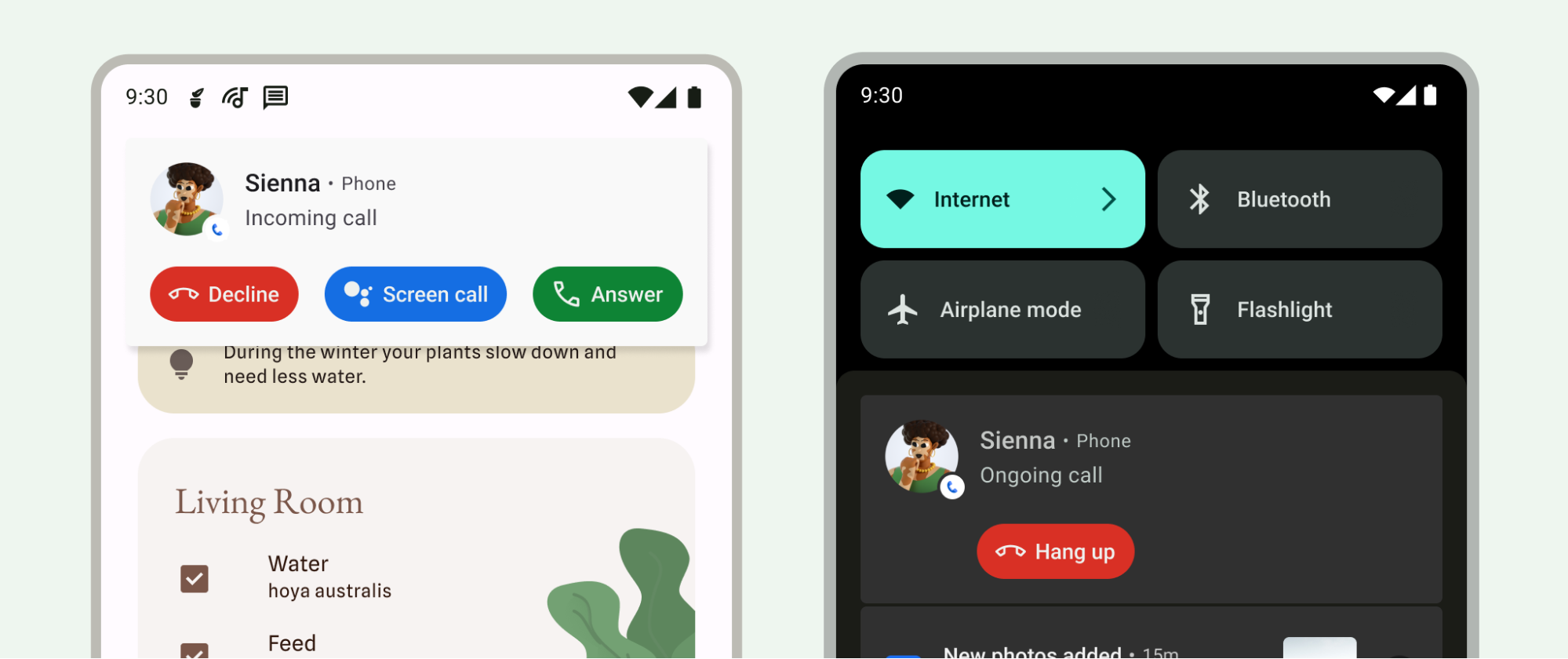
其他类型的通知。使用此模板可创建来电或正在通话通知。该模板支持大型通知,其中包含来电者信息和必要的操作,例如接听或拒接来电。
由于来电和正在通话是高优先级事件,因此这些通知在通知栏中排名最高。这种排名还让系统能够将这些优先处理的通话转接到其他设备。
CallStyle 通知模板包含以下必要操作:
- 针对来电的接听 或拒接 。
- 针对正在通话的挂断 。
- 针对来电过滤的接听 或挂断 。
此样式的操作以按钮形式显示,系统会自动添加相应的图标和文本。不支持手动为按钮添加标签。 如需详细了解通知设计原则,请参阅 通知。
必要操作以 intent 形式传递,例如以下部分中的 hangupIntent 和 answerIntent。这些都是对系统维护的令牌的引用。令牌是一种轻量级对象,可以在不同的应用和进程之间传递。系统负责管理令牌的生命周期,并确保即使创建该令牌的应用不再运行,PendingIntent 仍可用。当您向另一个应用提供 PendingIntent 时,即表示您授予该应用执行指定操作(例如拒接或接听)的权限。即使创建 intent 的应用未运行,也会授予此权限。如需了解详情,请参阅
PendingIntent的参考文档。
从 Android 14(API 级别 34)开始,您可以将通话通知配置为不可关闭。为此,请使用 CallStyle 通知,并通过
Notification.FLAG_ONGOING_EVENT 使用
Notification.Builder#setOngoing(true)。
以下示例展示了如何将各种方法与 CallStyle 通知搭配使用。
  // Create a new call, setting the user as the caller.
  val incomingCaller = Person.Builder()
      .setName("Jane Doe")
      .setImportant(true)
      .build()
来电
使用 forIncomingCall() 方法为来电创建通话样式通知。
  // Create a call style notification for an incoming call.
  val builder = Notification.Builder(context, CHANNEL_ID)
      .setContentIntent(contentIntent)
      .setSmallIcon(smallIcon)
      .setStyle(
           Notification.CallStyle.forIncomingCall(caller, declineIntent, answerIntent))
      .addPerson(incomingCaller)
正在通话
使用 forOngoingCall() 方法为正在通话创建通话样式通知。
  // Create a call style notification for an ongoing call.
  val builder = Notification.Builder(context, CHANNEL_ID)
      .setContentIntent(contentIntent)
      .setSmallIcon(smallIcon)
      .setStyle(
           Notification.CallStyle.forOngoingCall(caller, hangupIntent))
      .addPerson(second_caller)
过滤通话
使用 forScreeningCall() 方法为过滤通话创建通话样式通知。
  // Create a call style notification for screening a call.
  val builder = Notification.Builder(context, CHANNEL_ID)
      .setContentIntent(contentIntent)
      .setSmallIcon(smallIcon)
      .setStyle(
           Notification.CallStyle.forScreeningCall(caller, hangupIntent, answerIntent))
      .addPerson(second_caller)
提供对更多 Android 版本的兼容性
将 API 版本 30 或更低版本中的 CallStyle 通知与前台服务相关联,以便为它们分配在 API 级别 31 或更高版本中获得的较高排名。此外,API 版本 30
或更低版本中的 CallStyle 通知可以通过使用 setColorized() 方法将通知标记为
彩色,从而获得类似的排名。
将 Telecom API 与 CallStyle 通知搭配使用。如需了解详情,请参阅
Telecom 框架概览。