Questo documento descrive come utilizzare gli obiettivi dei servizi per i giochi di Google Play nei giochi C++. Questo
documento presuppone che tu abbia configurato il progetto come descritto in Configurazione
di Google Play Games Services. Puoi trovare l'API Achievements in
PgsAchievementsClient.
Prima di iniziare
Se non l'hai ancora fatto, potrebbe esserti utile rivedere i concetti di gioco degli obiettivi.
Prima di iniziare a scrivere codice utilizzando l'API Achievements:
Segui le istruzioni per installare e configurare l'app in modo che utilizzi Play Games Services nella guida Configura Play Games Services.
Definisci gli obiettivi che vuoi che il tuo gioco sblocchi o mostri seguendo le istruzioni della guida di Google Play Console.
Acquisisci familiarità con i consigli descritti nella lista di controllo della qualità.
Ottenere un client di obiettivi
Per iniziare a utilizzare l'API Achievements, il tuo gioco deve prima ottenere un oggetto
PgsAchievementsClient. Puoi ottenerlo chiamando il metodo
PgsAchievementsClient_create
e passando l'attività.
Sbloccare obiettivi
Per sbloccare un obiettivo, chiama il metodo
PgsAchievementsClient_unlock
e passa l'PgsAchievementsClient e l'ID obiettivo.
Il seguente snippet di codice mostra come la tua app può sbloccare gli obiettivi:
// Example Usage
void TriggerUnlock(PgsGamesClient* gamesClient) {
    // You must obtain the achievements client from the main games client
    PgsAchievementsClient* achievementsClient = PgsGamesClient_getAchievementsClient(gamesClient);

    // Replace with your actual Achievement ID from the Play Console
    const char* MY_ACHIEVEMENT_ID = "CgkI...sQw";

    UnlockAchievement(achievementsClient, MY_ACHIEVEMENT_ID);
}
Se l'obiettivo è di tipo incrementale (ovvero sono necessari diversi passaggi
per sbloccarlo), chiama PgsAchievementsClient_increment.
Il seguente snippet di codice mostra come la tua app può incrementare l'obiettivo del giocatore:
void IncrementMyAchievement(PgsAchievementsClient* client,
     const char* achievementId, uint32_t steps) {
    if (client == nullptr) {
        return;
    }

    // Call the API
    // Parameters typically include:
    // 1. Client handle
    // 2. Achievement ID (string)
    // 3. Number of steps to increment by (For example, 1)
    // 4. Callback function
    // 5. User context (passed to callback)
    PgsAchievementsClient_increment(
        client,
        achievementId,
        steps,
        OnIncrementCallback,
        (void*)achievementId // Pass ID as context so the callback knows which one finished
    );
}

//  Example Usage in Game Loop
void OnEnemyDefeated(PgsGamesClient* gamesClient) {
    // Get the achievements client handle
    PgsAchievementsClient* achievementsClient = PgsGamesClient_getAchievementsClient(gamesClient);

    // ID from Google Play Console
    const char* ACH_ENEMY_KILLER = "CgkI...xyz";

    // Increment by 1 step
    IncrementMyAchievement(achievementsClient, ACH_ENEMY_KILLER, 1);
}
Non devi scrivere codice aggiuntivo per sbloccare l'obiettivo. Google Play Games Services sblocca automaticamente l'obiettivo una volta raggiunto il numero di passaggi richiesto.
Una buona pratica è definire gli ID obiettivo nel file strings.xml, in modo che
il gioco possa fare riferimento agli obiettivi in base all'ID risorsa. Quando effettui chiamate per
aggiornare e caricare gli obiettivi, assicurati di seguire anche queste
best practice per evitare di superare la quota dell'API.
Visualizzare gli obiettivi
Per mostrare gli obiettivi di un giocatore, chiama
PgsAchievementsClient_showAchievementsUI.
Il seguente snippet di codice mostra come la tua app può visualizzare l'interfaccia utente predefinita per gli obiettivi.
void OnShowAchievementsUICallback(void* context, PgsError error) {
    if (error == PgsError_Success) {
        // The UI was displayed and closed successfully by the user.
        // You might resume your game loop here if it was paused.
    } else {
        // Handle error (For example,, user not signed in, UI failed to load).
    }
}

// Function to trigger the Achievements UI
void ShowMyAchievements(PgsAchievementsClient* achievementsClient) {
    if (achievementsClient == nullptr) {
        // Log error: Client not initialized
        return;
    }

    // Call the API
    // Note: The specific arguments often include the client, a callback, and user_data.
    // Some versions might require the Android Activity or a Request Code as well.
    PgsAchievementsClient_showAchievementsUI(
        achievementsClient,
        OnShowAchievementsUICallback, // Callback function
        nullptr                       // Optional user data (context) passed to callback
    );
}
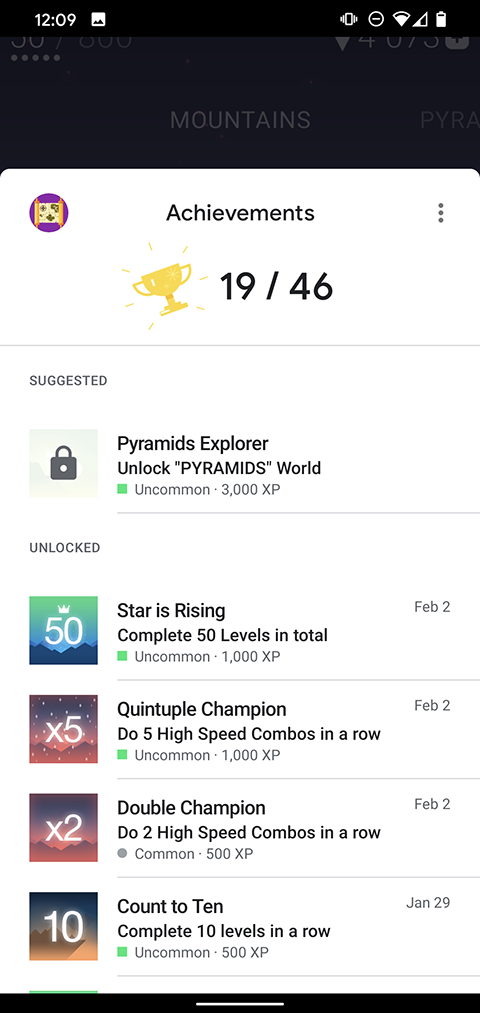
La seguente immagine mostra un esempio della UI predefinita degli obiettivi: