
R8 Configuration Analyzer is a tool designed to help you maximize R8's performance benefits by providing detailed insights into your app's configuration quality. It lets you track and improve R8 optimization by monitoring key metrics—specifically shrinking, optimization, and obfuscation scores—which indicate the percentage of your codebase available for optimization. By identifying broad or unnecessary keep rules, including those introduced by third-party libraries, the analyzer helps you refine your configuration to ensure R8 can effectively optimize as many of your classes, fields, and methods as possible.
Generate the report
From AGP 9.3.0-alpha05 and later, the report is automatically generated in
build/outputs/mapping/release/configanalyzer.html when running an R8 build. To
disable the automatic generation of the outputs, set the following Gradle
property:
android.experimental.r8.enableR8ConfigurationAnalyzer=false
For AGP 9.2 and earlier, set the
com.android.tools.r8.dumpkeepradiushtmltodirectory system property when
running a Gradle task with a build enabled with R8.
./gradlew assembleRelease \
    -Dcom.android.tools.r8.dumpkeepradiushtmltodirectory=<output_directory>
For example, use the following command to generate the HTML report in the
/tmp/r8analysis directory:
// To create the /tmp/r8analysis folder.
mkdir -p /tmp/r8analysis

// To generate the report in the /tmp/r8analysis folder.
./gradlew assembleRelease \
    -Dcom.android.tools.r8.dumpkeepradiushtmltodirectory=/tmp/r8analysis
Understand the report
R8 Configuration Analyzer provides insights into your app's R8 configuration and the impact of each keep rule on your app. This helps you attain the maximum optimization from R8, improving your app performance. Use the following scores to understand how much of your codebase is available for optimization by R8.

Shrinking score
When R8 shrinks your app, it reduces the overall size of your app by identifying and eliminating code and resources that are unused, ensuring your final build is as lean as possible. The shrinking score tracks the percentage of classes, fields, and methods that are subject to shrinking. For example, a shrinking score of 66% means that R8 can perform shrinking in 66% of your codebase.
Optimization score
R8 performs optimizations such as method inlining and class merging which results in startup and memory improvements for your app. The optimization score tracks the percentage of classes, fields, and methods that are subject to R8 optimizations. For example, if the optimization score is 66%, it means that R8 can only perform optimization in 66% of your codebase.
Obfuscation score
By obfuscating classes, fields and methods into shorter names R8 reduces the app's metadata footprint to save memory. The obfuscation score measures the percentage of code available for obfuscation within your codebase.
Refine keep rules
In order to improve the scores and to unlock better R8 optimization, you should refine your keep rules so that they doesn't unnecessarily prevent R8 from optimizing your app. You should only keep classes, methods or fields that are accessed using reflection.
To achieve this, use the Keep Rule Analysis.

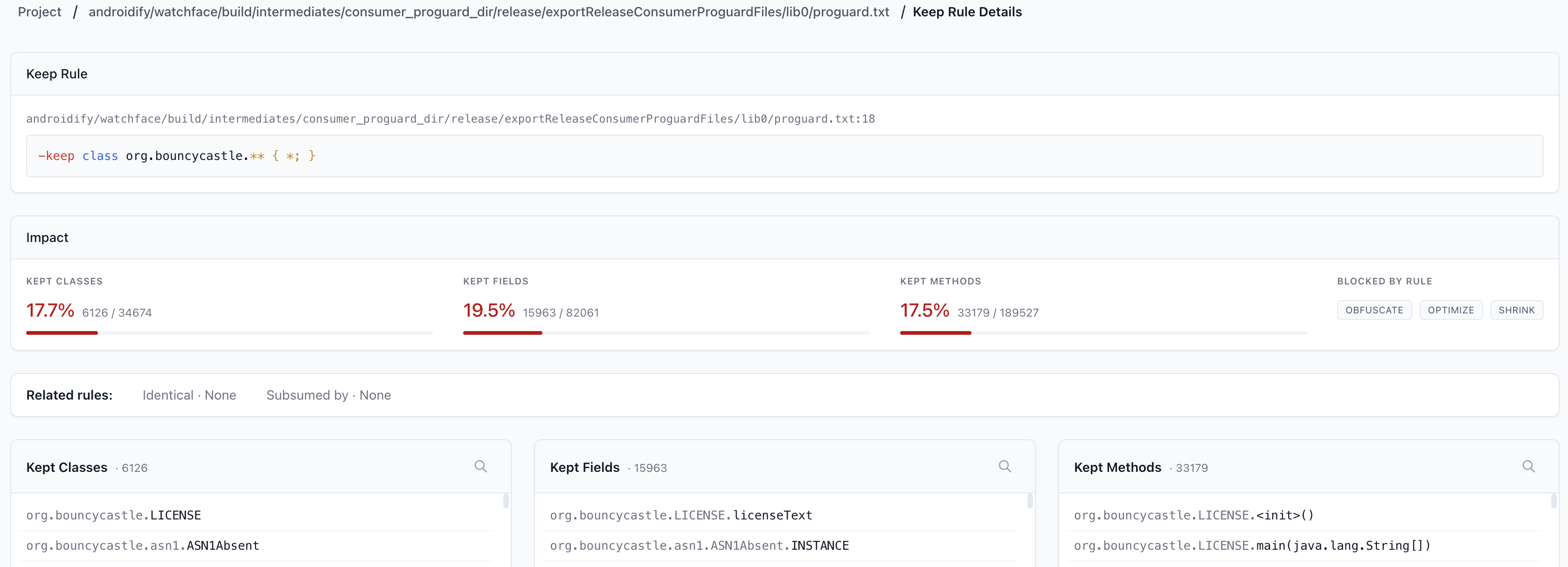
To see the detailed analysis of a rule, click it to open the details screen.
How to refine keep rules
To refine your keep rules and unlock the full potential of R8 optimizations for your app, do the following:
- For each keep rule, see the percentage of classes, fields, and methods that cannot be optimized by R8 in Configuration Analyzer. Use this to identify the keep rules preventing optimization in a large number of classes, fields, or methods. The optimization properties prevented by each keep rule is also listed.
- If you see a keep rule that is preventing optimization of a large number of classes, you should make sure to check which classes, fields and methods are prevented from optimization by the keep rule to see if this rule is keeping items that are not invoked dynamically using reflection.
- Reduce the optimization blocked by keep rules by targeting only necessary classes, fields, or methods by choosing the right keep option and following the best practices.
- Investigate and run tests that cover the affected classes, fields and methods of the keep rule and refine the keep rules.
Inspect optimization of libraries
When you integrate third-party libraries, they often include their own consumer keep rules to work with R8. Because the library author cannot predict your specific implementation, they sometimes write conservative, wide-reaching rules that prevent optimization in more classes, fields, and methods than necessary. This may prevent R8 from optimizing parts of your app that have nothing to do with the library's actual runtime execution. You can use R8 Configuration Analyzer to identify libraries introducing rules that negatively impact the optimization of your app.
Use the configuration analyzer to inspect the combined effect of all merged consumer keep rules. By analyzing the impact of each keep rule coming from a third-party library, you can identify and trace the specific third-party libraries that prevent a high amount of optimization in your app.
How to optimize libraries
- If a library includes an overly broad rule, we recommend contacting the maintainer of the library with the data from your report to demonstrate how their current rules impact your app's optimization scores. If it's an external library, look for existing bugs in the library before filing issues.
- If necessary, you can test potential improvements by filtering out rules from a specific library. You can import the library's rules into your project, exclude the broad ones, and re-run the configuration analyzer to measure the potential gains in size and performance.
Subsumed rules
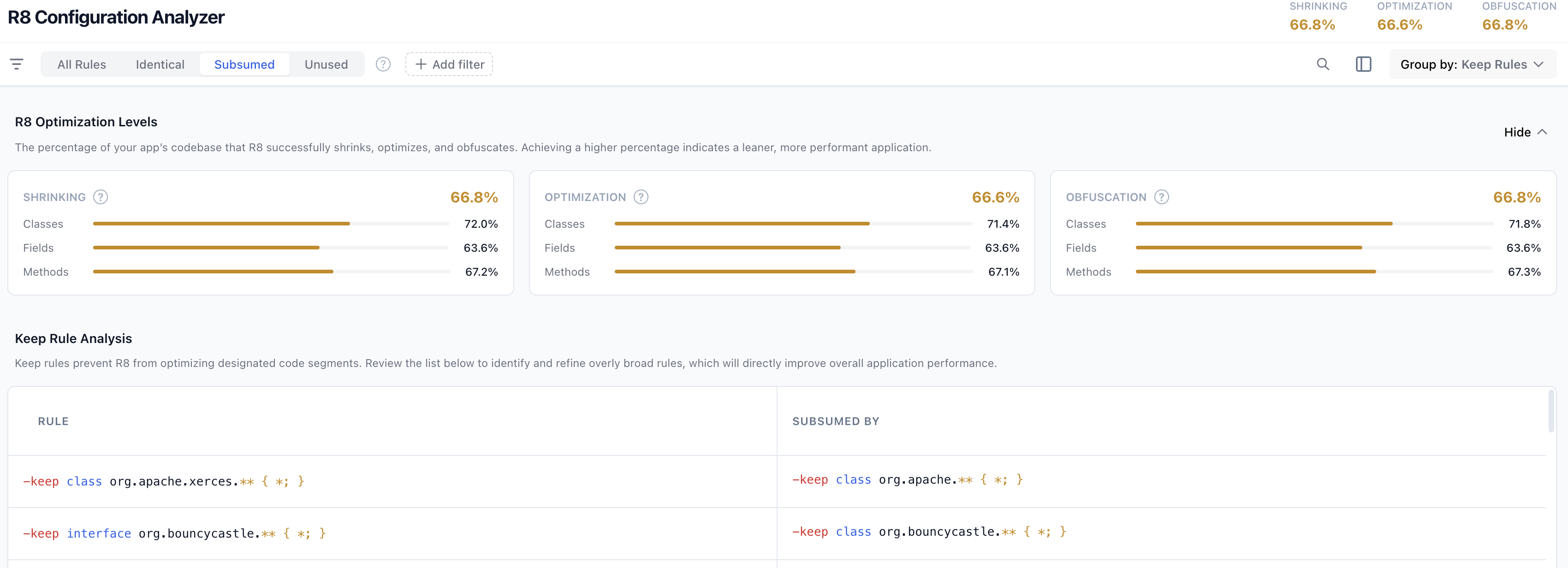
There might be cases where multiple keep rules are overlapping and one of the rules might be preventing more optimization than necessary. If there are two keep rules in your codebase.
# Prevents optimization in the entire package
# Remove this to improve optimization
-keep class com.example.package.** { *; }

# Prevents optimization to the class inside the package
-keep class com.example.package.Myclass
The first keep rule which prevents optimization in the entire package is subsuming the second keep rule which is targeting a class inside the package kept by the first keep rule. When keep rules overlap, one may block more optimizations than required. By refining these overlapping rules, you can maximize R8 optimization and eliminate technical debt. This process involves streamlining your configuration to ensure only essential code is kept while unlocking the full potential of R8's optimization capabilities.
Optimize subsumed rules
- Find the subsuming keep rules using R8 Configuration Analyzer.
- Identify the exact classes, fields, or methods in your codebase that actually rely on reflection, which needs to be kept using keep rules. Knowing this will help you refine the keep rules.
- Using the configuration analyzer, compare the impact of each rule that is
targeting the same classes, fields or methods. You could use optimization
percentage prevented by each keep rule to identify which is broader and
which is a narrow keep rule.
- If the narrow rule is written precisely—only keeping the exact members or classes that are reflectively accessed– then remove the broader keep rule. This safely unlocks R8 optimizations for the rest of your package.
- If the broad rule is targeting the right classes, keep the broad rule and delete the narrow rule. The narrow rule is just redundant clutter. Make sure to refine the broad rule to target only classes, fields or methods that you have identified.
Verify and test your changes: Re-run the configuration analyzer to ensure the conflict is fixed. Then, compile a release build and test your changes to ensure that the codebase works as expected.
Remove unnecessary rules
Using the configuration analyzer, you can systematically audit your codebase to identify and prune obsolete keep rules that clutter your configuration. R8 Configuration Analyzer specifically highlights two primary sources of unnecessary rules:
- Unused rules: Rules that match zero classes, methods, or fields in your current build. They often persist after code refactoring, dependency removal, or from copy-paste configurations that are no longer relevant, adding unnecessary configuration complexity.
- Identical rules: Identical keep rules means rules that target the same classes, fields, and methods or duplicate declarations of keep rule in same or across keep rule files.
Both types of rules add clutter to your configuration, making it harder to maintain and debug. By identifying these, you can clean up your configuration.