
Platform Android 16 menyertakan perubahan perilaku yang mungkin memengaruhi aplikasi Anda.
Perubahan perilaku berikut ini berlaku untuk semua aplikasi saat dijalankan di Android 16,
terlepas dari targetSdkVersion. Sebaiknya uji aplikasi Anda, lalu modifikasi sesuai kebutuhan untuk mendukung perubahan ini, jika memungkinkan.
Selain itu, pastikan Anda meninjau daftar perubahan perilaku yang hanya memengaruhi aplikasi yang menargetkan Android 16.
Fungsi inti
Android 16 (level API 36) mencakup perubahan berikut yang mengubah atau memperluas berbagai kemampuan inti sistem Android.
Pengoptimalan kuota JobScheduler
Mulai Android 16, kami menyesuaikan kuota runtime eksekusi tugas reguler dan dipercepat berdasarkan faktor-faktor berikut:
- Bucket siaga aplikasi tempat aplikasi berada: di Android 16, bucket siaga aktif akan mulai diterapkan dengan kuota runtime yang besar.
- Jika tugas mulai dieksekusi saat aplikasi berada dalam status teratas: di Android 16, Tugas yang dimulai saat aplikasi terlihat oleh pengguna dan berlanjut setelah aplikasi menjadi tidak terlihat, akan mematuhi kuota runtime tugas.
- Jika tugas sedang dieksekusi saat menjalankan Layanan Latar Depan: di Android 16, tugas yang dieksekusi secara bersamaan dengan layanan latar depan akan mematuhi kuota runtime tugas. Jika Anda memanfaatkan tugas untuk transfer data yang dimulai pengguna, sebaiknya gunakan tugas transfer data yang dimulai pengguna.
Perubahan ini memengaruhi tugas yang dijadwalkan menggunakan WorkManager, JobScheduler, dan
DownloadManager. Untuk men-debug alasan tugas dihentikan, sebaiknya catat alasan tugas Anda dihentikan dengan memanggil WorkInfo.getStopReason() (untuk tugas JobScheduler, panggil JobParameters.getStopReason()).
Untuk mengetahui informasi tentang pengaruh status aplikasi terhadap resource yang dapat digunakannya, lihat Batas resource pengelolaan daya. Untuk mengetahui informasi selengkapnya tentang praktik terbaik yang mengoptimalkan baterai, lihat panduan tentang mengoptimalkan penggunaan baterai untuk API penjadwalan tugas.
Sebaiknya manfaatkan juga API
JobScheduler#getPendingJobReasonsHistory baru yang diperkenalkan di
Android 16 untuk memahami alasan tugas belum dieksekusi.
Pengujian
Untuk menguji perilaku aplikasi, Anda dapat mengaktifkan penggantian pengoptimalan kuota tugas tertentu selama aplikasi berjalan di perangkat Android 16.
Untuk menonaktifkan penerapan "status teratas akan mematuhi kuota runtime tugas", jalankan perintah adb berikut:
adb shell am compat enable OVERRIDE_QUOTA_ENFORCEMENT_TO_TOP_STARTED_JOBS APP_PACKAGE_NAME
Untuk menonaktifkan penerapan "tugas yang dieksekusi secara bersamaan dengan
layanan latar depan akan mematuhi kuota runtime tugas", jalankan perintah
adb berikut:
adb shell am compat enable OVERRIDE_QUOTA_ENFORCEMENT_TO_FGS_JOBS APP_PACKAGE_NAME
Untuk menguji perilaku bucket standby aplikasi tertentu, Anda dapat menyetel bucket standby aplikasi
menggunakan perintah adb berikut:
adb shell am set-standby-bucket APP_PACKAGE_NAME active|working_set|frequent|rare|restricted
Untuk memahami bucket standby aplikasi tempat aplikasi Anda berada, Anda bisa mendapatkan bucket standby aplikasi menggunakan perintah adb berikut:
adb shell am get-standby-bucket APP_PACKAGE_NAME
Alasan penghentian tugas kosong yang ditinggalkan
An abandoned job occurs when the JobParameters object associated with the job
has been garbage collected, but JobService#jobFinished(JobParameters,
boolean) has not been called to signal job completion. This indicates that
the job may be running and being rescheduled without the app's awareness.
Apps that rely on JobScheduler, don't maintain a strong reference to the
JobParameters object, and timeout will now be granted the new job stop reason
STOP_REASON_TIMEOUT_ABANDONED, instead of STOP_REASON_TIMEOUT.
If there are frequent occurrences of the new abandoned stop reason, the system will take mitigation steps to reduce job frequency.
Apps should use the new stop reason to detect and reduce abandoned jobs.
If you're using WorkManager, AsyncTask, or DownloadManager, you aren't impacted because these APIs manage the job lifecycle on your app's behalf.
Menghentikan penggunaan JobInfo#setImportantWhileForeground sepenuhnya
The JobInfo.Builder#setImportantWhileForeground(boolean)
method indicates the importance of a job while the scheduling app is in the
foreground or when temporarily exempted from background restrictions.
This method has been deprecated since Android 12 (API level 31). Starting in Android 16, it no longer functions effectively and calling this method will be ignored.
This removal of functionality also applies to
JobInfo#isImportantWhileForeground(). Starting in Android
16, if the method is called, the method returns false.
Cakupan prioritas siaran berurutan tidak lagi global
Android apps are allowed to define priorities on broadcast receivers to control
the order in which the receivers receive and process the broadcast. For
manifest-declared receivers, apps can use the
android:priority attribute to define the priority and for
context-registered receivers, apps can use the
IntentFilter#setPriority() API to define the priority. When
a broadcast is sent, the system delivers it to receivers in order of their
priority, from highest to lowest.
In Android 16, broadcast delivery order using the android:priority attribute
or IntentFilter#setPriority() across different processes will not be
guaranteed. Broadcast priorities will only be respected within the same
application process rather than across all processes.
Also, broadcast priorities will be automatically confined to the range
(SYSTEM_LOW_PRIORITY + 1,
SYSTEM_HIGH_PRIORITY - 1). Only system components will be
allowed to set SYSTEM_LOW_PRIORITY, SYSTEM_HIGH_PRIORITY as broadcast
priority.
Your app might be impacted if it does either of the following:
- Your application has declared multiple processes with the same broadcast intent, and has expectations around receiving those intents in a certain order based on the priority.
- Your application process interacts with other processes and has expectations around receiving a broadcast intent in a certain order.
If the processes need to coordinate with each other, they should communicate using other coordination channels.
Perubahan internal ART
Android 16 menyertakan update terbaru ke Android Runtime (ART) yang meningkatkan performa Android Runtime (ART) dan memberikan dukungan untuk fitur Java tambahan. Melalui update Sistem Google Play, peningkatan ini juga tersedia untuk lebih dari satu miliar perangkat yang menjalankan Android 12 (API level 31) dan yang lebih tinggi.
Saat perubahan ini dirilis, library dan kode aplikasi yang mengandalkan struktur internal ART mungkin tidak berfungsi dengan benar di perangkat yang menjalankan Android 16, beserta versi Android sebelumnya yang mengupdate modul ART melalui update sistem Google Play.
Mengandalkan struktur internal (seperti antarmuka non-SDK) dapat selalu menyebabkan masalah kompatibilitas, tetapi sangat penting untuk menghindari mengandalkan kode (atau library yang berisi kode) yang memanfaatkan struktur ART internal, karena perubahan ART tidak terikat dengan versi platform yang dijalankan perangkat dan perubahan tersebut dikirim ke lebih dari satu miliar perangkat melalui update sistem Google Play.
Semua developer harus memeriksa apakah aplikasi mereka terpengaruh dengan menguji aplikasi secara menyeluruh di Android 16. Selain itu, periksa masalah umum untuk mengetahui apakah aplikasi Anda bergantung pada library yang telah kami identifikasi yang mengandalkan struktur ART internal. Jika Anda memiliki kode aplikasi atau dependensi library yang terpengaruh, cari alternatif API publik jika memungkinkan dan minta API publik untuk kasus penggunaan baru dengan membuat permintaan fitur di issue tracker kami.
Mode kompatibilitas ukuran halaman 16 KB
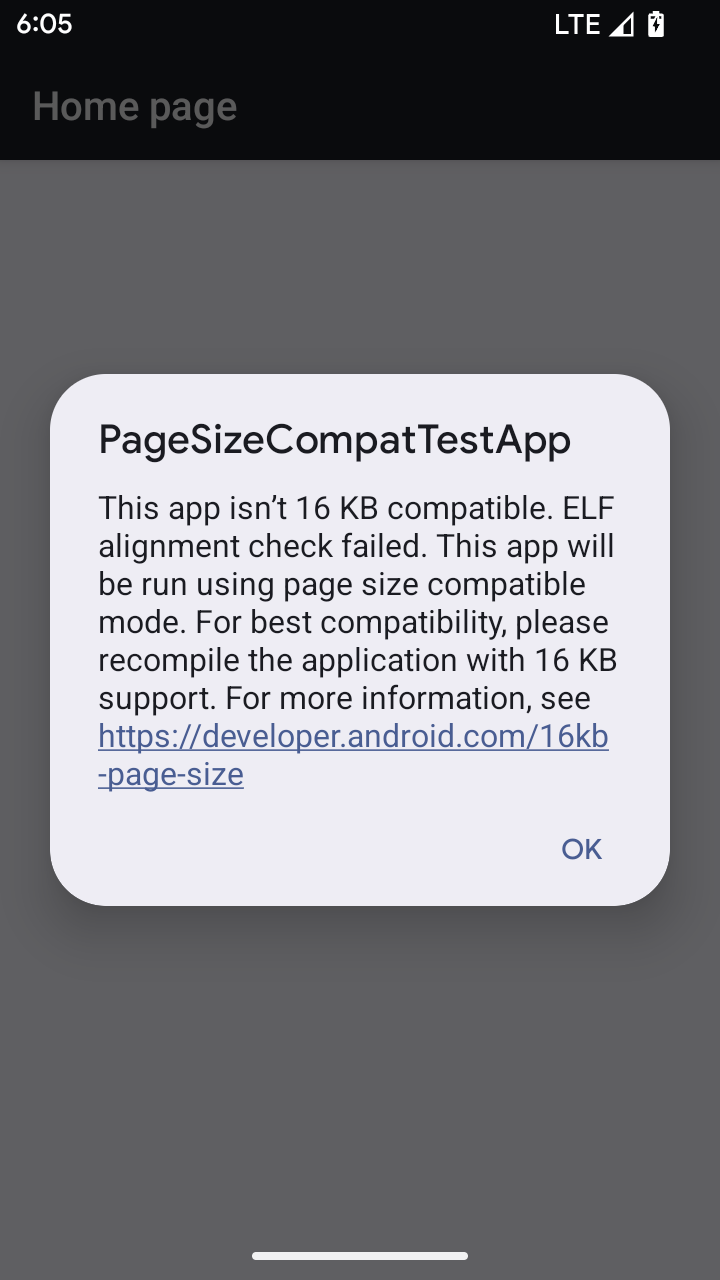
Android 15 memperkenalkan dukungan untuk halaman memori 16 KB guna mengoptimalkan performa platform. Android 16 menambahkan mode kompatibilitas, yang memungkinkan beberapa aplikasi yang di-build untuk halaman memori 4 KB berjalan di perangkat yang dikonfigurasi untuk halaman memori 16 KB.
Saat aplikasi Anda berjalan di perangkat dengan Android 16 atau yang lebih tinggi, jika Android
mendeteksi bahwa aplikasi Anda memiliki halaman memori yang diselaraskan 4 KB, aplikasi akan otomatis menggunakan
mode kompatibilitas dan menampilkan dialog notifikasi kepada pengguna. Menetapkan
properti android:pageSizeCompat di AndroidManifest.xml untuk mengaktifkan
mode kompatibilitas mundur akan mencegah tampilan dialog saat
aplikasi diluncurkan. Untuk menggunakan properti android:pageSizeCompat, kompilasi aplikasi Anda
menggunakan Android 16 SDK.
Untuk performa, keandalan, dan stabilitas terbaik, aplikasi Anda harus tetap selaras dengan 16 KB. Lihat postingan blog terbaru kami tentang mengupdate aplikasi Anda untuk mendukung halaman memori 16 KB guna mengetahui detail selengkapnya.
Pengalaman pengguna dan UI sistem
Android 16 (level API 36) menyertakan perubahan berikut yang dimaksudkan untuk menciptakan pengalaman pengguna yang lebih konsisten dan intuitif.
Penghentian pengumuman aksesibilitas yang mengganggu
Android 16 deprecates accessibility announcements, characterized by the use of
announceForAccessibility or the dispatch of
TYPE_ANNOUNCEMENT accessibility events. These can create
inconsistent user experiences for users of TalkBack and Android's screen reader,
and alternatives better serve a broader range of user needs across a variety of
Android's assistive technologies.
Examples of alternatives:
- For significant UI changes like window changes, use
Activity.setTitle(CharSequence)andsetAccessibilityPaneTitle(java.lang.CharSequence). In Compose, useModifier.semantics { paneTitle = "paneTitle" } - To inform the user of changes to critical UI, use
setAccessibilityLiveRegion(int). In Compose, useModifier.semantics { liveRegion = LiveRegionMode.[Polite|Assertive]}. These should be used sparingly as they may generate announcements every time a View is updated. - To notify users about errors, send an
AccessibilityEventof typeAccessibilityEvent#CONTENT_CHANGE_TYPE_ERRORand setAccessibilityNodeInfo#setError(CharSequence), or useTextView#setError(CharSequence).
The reference documentation for the deprecated
announceForAccessibility API includes more details about
suggested alternatives.
Dukungan untuk navigasi 3 tombol
Android 16 brings predictive back support to the 3-button navigation for apps that have properly migrated to predictive back. Long-pressing the back button initiates a predictive back animation, giving you a preview of where the back swipe takes you.
This behavior applies across all areas of the system that support predictive back animations, including the system animations (back-to-home, cross-task, and cross-activity).
Ikon aplikasi bertema otomatis
Mulai dari Android 16 QPR 2, Android secara otomatis menerapkan tema ke ikon aplikasi untuk menciptakan pengalaman layar utama yang kohesif. Hal ini terjadi jika aplikasi tidak menyediakan ikon aplikasi bertemanya sendiri. Aplikasi dapat mengontrol desain ikon aplikasi bertema dengan menyertakan lapisan monokrom dalam ikon adaptif dan melihat pratinjau tampilan ikon aplikasi di Android Studio.
Faktor bentuk perangkat
Android 16 (level API 36) menyertakan perubahan berikut untuk aplikasi saat diproyeksikan ke layar oleh pemilik perangkat virtual.
Penggantian pemilik perangkat virtual
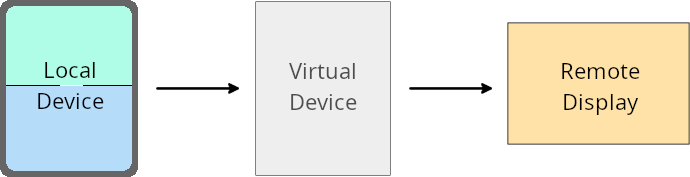
Pemilik perangkat virtual adalah aplikasi tepercaya atau istimewa yang membuat dan mengelola perangkat virtual. Pemilik perangkat virtual menjalankan aplikasi di perangkat virtual, lalu memproyeksikan aplikasi ke layar perangkat jarak jauh, seperti komputer pribadi, perangkat virtual reality, atau sistem infotainment mobil. Pemilik perangkat virtual menggunakan perangkat lokal, seperti ponsel.
Penggantian per aplikasi
Di perangkat yang menjalankan Android 16 (level API 36), pemilik perangkat virtual dapat mengganti setelan aplikasi di perangkat virtual tertentu yang dikelola pemilik perangkat virtual. Misalnya, untuk meningkatkan tata letak aplikasi, pemilik perangkat virtual dapat mengabaikan batasan orientasi, rasio aspek, dan kemampuan pengubahan ukuran saat memproyeksikan aplikasi ke layar eksternal.
Perubahan umum yang dapat menyebabkan gangguan
Perilaku Android 16 dapat memengaruhi UI aplikasi Anda pada faktor bentuk layar besar seperti layar mobil atau Chromebook, terutama tata letak yang didesain untuk layar kecil dalam orientasi potret. Untuk mempelajari cara membuat aplikasi Anda adaptif untuk semua faktor bentuk perangkat, lihat Tentang tata letak adaptif.
Referensi
Keamanan
Android 16 (level API 36) menyertakan perubahan yang meningkatkan keamanan sistem untuk membantu melindungi aplikasi dan pengguna dari aplikasi berbahaya.
Peningkatan keamanan terhadap serangan pengalihan Intent
Android 16 provides default security against general Intent redirection
attacks, with minimum compatibility and developer changes required.
We are introducing by-default security hardening solutions to Intent
redirection exploits. In most cases, apps that use intents normally won't
experience any compatibility issues; we've gathered metrics throughout our
development process to monitor which apps might experience breakages.
Intent redirection in Android occurs when an attacker can partly or fully control the contents of an intent used to launch a new component in the context of a vulnerable app, while the victim app launches an untrusted sub-level intent in an extras field of an ("top-level") Intent. This can lead to the attacker app launching private components in the context of the victim app, triggering privileged actions, or gaining URI access to sensitive data, potentially leading to data theft and arbitrary code execution.
Opt out of Intent redirection handling
Android 16 introduces a new API that allows apps to opt out of launch security protections. This might be necessary in specific cases where the default security behavior interferes with legitimate app use cases.
For applications compiling against Android 16 (API level 36) SDK or higher
You can directly use the removeLaunchSecurityProtection() method on the Intent
object.
val i = intent
val iSublevel: Intent? = i.getParcelableExtra("sub_intent")
iSublevel?.removeLaunchSecurityProtection() // Opt out from hardening
iSublevel?.let { startActivity(it) }
For applications compiling against Android 15 (API level 35) or lower
While not recommended, you can use reflection to access the
removeLaunchSecurityProtection() method.
val i = intent
val iSublevel: Intent? = i.getParcelableExtra("sub_intent", Intent::class.java)
try {
    val removeLaunchSecurityProtection = Intent::class.java.getDeclaredMethod("removeLaunchSecurityProtection")
    removeLaunchSecurityProtection.invoke(iSublevel)
} catch (e: Exception) {
    // Handle the exception, e.g., log it
} // Opt-out from the security hardening using reflection
iSublevel?.let { startActivity(it) }
Aplikasi pendamping tidak lagi diberi tahu tentang waktu tunggu penemuan
Android 16 introduces a new behavior during
companion device pairing flow to protect the user's location
privacy from malicious apps. All companion apps running on Android 16 are no
longer directly notified of discovery timeout using
RESULT_DISCOVERY_TIMEOUT. Instead, the user is
notified of timeout events with a visual dialog. When the user dismisses
the dialog, the app is alerted of the association failure with
RESULT_USER_REJECTED.
The search duration has also been extended from the original 20 seconds, and the device discovery can be stopped by the user at any point during the search. If at least one device was discovered within the first 20 seconds of starting the search, the CDM stops searching for additional devices.
Konektivitas
Android 16 (level API 36) menyertakan perubahan berikut dalam stack Bluetooth untuk meningkatkan konektivitas dengan perangkat periferal.
Peningkatan penanganan kehilangan ikatan
Starting in Android 16, the Bluetooth stack has been updated to improve security and user experience when a remote bond loss is detected. Previously, the system would automatically remove the bond and initiate a new pairing process, which could lead to unintentional re-pairing. We have seen in many instances apps not taking care of the bond loss event in a consistent way.
To unify the experience, Android 16 improved the bond loss handling to the system. If a previously bonded Bluetooth device could not be authenticated upon reconnection, the system will disconnect the link, retain local bond information, and display a system dialog informing users of the bond loss and directing them to re-pair.