
Modern UIs are rarely static. The state of the UI changes when the user interacts with the UI or when the app needs to display new data.
This document prescribes guidelines for the production and management of UI state. It is meant to help you understand the following:
- What APIs to use to produce UI state. This depends on the nature of the sources of state change available in your state holders, following unidirectional data flow principles.
- How to scope the production of UI state to be conscious of system resources.
- How to expose the UI state for consumption by the UI.
Fundamentally, state production is the incremental application of these changes to the UI state. State always exists, and it changes as a result of events. The differences between events and state are summarized in the table below:
| Events | State |
|---|---|
| Transient, unpredictable, and exist for a finite period. | Always exists. |
| The inputs of state production. | The output of state production. |
| The product of the UI or other sources. | Is consumed by the UI. |
A great mnemonic that summarizes the above is state is; events happen. The diagram below helps visualize changes to state as events occur in a timeline. Each event is processed by the appropriate state holder and it results in a state change:

Events can come from the following:
- Users: As they interact with the app's UI.
- Other sources of state change: APIs that present app data from UI, domain, or data layers like Snackbar timeout events, use cases, or repositories, respectively.
The UI state production pipeline
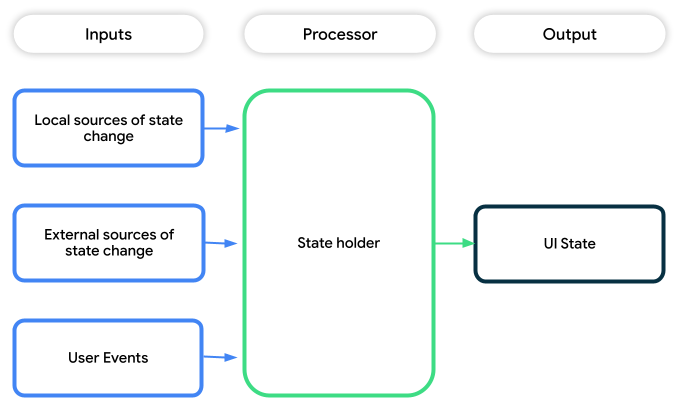
State production in Android apps can be thought of as a processing pipeline comprising the following:
- Inputs: The sources of state change. They can be:
- Local to the UI layer: These might be user events like a user entering a
title for a "to-do" in a task management app, or APIs that provide
access to UI logic that drives changes in UI state—for example,
calling the
openmethod onDrawerStatein Jetpack Compose. - External to the UI layer: These are sources from the domain or data
layers that cause changes to UI state—for example, news that finished
loading from a
NewsRepositoryor other events. - A mixture of the above.
- Local to the UI layer: These might be user events like a user entering a
title for a "to-do" in a task management app, or APIs that provide
access to UI logic that drives changes in UI state—for example,
calling the
- State holders: Types that apply business logic and UI logic to sources of state change, and that process user events to produce UI state.
- Output: The UI State that the app can render to provide users the information they need.
State production APIs
There are two main APIs used in state production depending on what stage of the pipeline you're in:
| Pipeline stage | API |
|---|---|
| Input | Use asynchronous APIs like Coroutines and Flows to perform work off the UI thread to keep the UI jank-free. |
| Output | Use observable data holder APIs like Compose State or StateFlow to invalidate and re-render the UI when state changes. Observable data holders ensure that the UI always has a UI state to display on the screen. |
The choice of asynchronous API for input has a greater influence on the nature of the state production pipeline than the choice of observable API for output. This is because the inputs dictate the kind of processing that can be applied to the pipeline.
State production pipeline assembly
The next sections cover state production techniques best suited for various inputs, and the output APIs that match. Each state production pipeline is a combination of inputs and outputs and must be the following:
- Lifecycle aware: In the case where the UI is not visible or active, the state production pipeline must not consume any resources unless explicitly required.
- Easy to consume: The UI must be able to easily render the produced UI state. In Jetpack Compose, state consumption is central to the UI, because composables can update based on state changes.
Inputs in state production pipelines
Inputs in a state production pipeline provide their sources of state change through the following:
- One-shot operations that can be synchronous or asynchronous—for example,
calls to
suspendfunctions. - Stream APIs—for example,
Flows. - All of the above.
The following sections cover how you can assemble a state production pipeline for each of the above inputs.
One-shot APIs as sources of state change
Manage state with observable data holders. Use the mutableStateOf API,
especially when working with Compose text APIs. For more complex state
management or when integrating with other architectural components, use the
MutableStateFlow API. Both APIs offer methods that allow safe atomic
updates to the values they host, whether the updates are synchronous or
asynchronous.
For example, consider state updates in a simple dice-rolling app. Each roll of
the dice from the user invokes the synchronous Random.nextInt method,
and the result is written into the UI state.
Compose State
@Stable
interface DiceUiState {
    val firstDieValue: Int?
    val secondDieValue: Int?
    val numberOfRolls: Int?
}

private class MutableDiceUiState: DiceUiState {
    override var firstDieValue: Int? by mutableStateOf(null)
    override var secondDieValue: Int? by mutableStateOf(null)
    override var numberOfRolls: Int by mutableStateOf(0)
}

class DiceRollViewModel : ViewModel() {

    private val _uiState = MutableDiceUiState()
    val uiState: DiceUiState = _uiState

    // Called from the UI
    fun rollDice() {
        _uiState.firstDieValue = Random.nextInt(from = 1, until = 7)
        _uiState.secondDieValue = Random.nextInt(from = 1, until = 7)
        _uiState.numberOfRolls = _uiState.numberOfRolls + 1
    }
}
StateFlow
data class DiceUiState(
    val firstDieValue: Int? = null,
    val secondDieValue: Int? = null,
    val numberOfRolls: Int = 0,
)

class DiceRollViewModel : ViewModel() {

    private val _uiState = MutableStateFlow(DiceUiState())
    val uiState: StateFlow<DiceUiState> = _uiState.asStateFlow()

    // Called from the UI
    fun rollDice() {
        _uiState.update { currentState ->
            currentState.copy(
            firstDieValue = Random.nextInt(from = 1, until = 7),
            secondDieValue = Random.nextInt(from = 1, until = 7),
            numberOfRolls = currentState.numberOfRolls + 1,
            )
        }
    }
}
Mutating the UI state from asynchronous calls
For state changes that require an asynchronous result, launch a Coroutine in the
appropriate CoroutineScope. This allows the app to discard the work when the
CoroutineScope is canceled. The state holder then writes the result of the
suspend method call into the observable API used to expose the UI state.
For example, consider the AddEditTaskViewModel in the
Architecture sample. When the suspending saveTask method saves a task
asynchronously, the update method on the MutableStateFlow propagates the
state change to the UI state.
Compose State
@Stable
interface AddEditTaskUiState {
    val title: String
    val description: String
    val isTaskCompleted: Boolean
    val isLoading: Boolean
    val userMessage: String?
    val isTaskSaved: Boolean
}

private class MutableAddEditTaskUiState : AddEditTaskUiState() {
    override var title: String by mutableStateOf("")
    override var description: String by mutableStateOf("")
    override var isTaskCompleted: Boolean by mutableStateOf(false)
    override var isLoading: Boolean by mutableStateOf(false)
    override var userMessage: String? by mutableStateOf<String?>(null)
    override var isTaskSaved: Boolean by mutableStateOf(false)
}

class AddEditTaskViewModel(...) : ViewModel() {

   private val _uiState = MutableAddEditTaskUiState()
   val uiState: AddEditTaskUiState = _uiState

   private fun createNewTask() {
        viewModelScope.launch {
            val newTask = Task(uiState.value.title, uiState.value.description)
            try {
                tasksRepository.saveTask(newTask)
                // Write data into the UI state.
                _uiState.isTaskSaved = true
            }
            catch(cancellationException: CancellationException) {
                throw cancellationException
            }
            catch(exception: Exception) {
                _uiState.userMessage = getErrorMessage(exception))
            }
        }
    }
}
StateFlow
data class AddEditTaskUiState(
    val title: String = "",
    val description: String = "",
    val isTaskCompleted: Boolean = false,
    val isLoading: Boolean = false,
    val userMessage: String? = null,
    val isTaskSaved: Boolean = false
)

class AddEditTaskViewModel(...) : ViewModel() {

   private val _uiState = MutableStateFlow(AddEditTaskUiState())
   val uiState: StateFlow<AddEditTaskUiState> = _uiState.asStateFlow()

   private fun createNewTask() {
        viewModelScope.launch {
            val newTask = Task(uiState.value.title, uiState.value.description)
            try {
                tasksRepository.saveTask(newTask)
                // Write data into the UI state.
                _uiState.update {
                    it.copy(isTaskSaved = true)
                }
            }
            catch(cancellationException: CancellationException) {
                throw cancellationException
            }
            catch(exception: Exception) {
                _uiState.update {
                    it.copy(userMessage = getErrorMessage(exception))
                }
            }
        }
    }
}
Mutating the UI state from background threads
It's preferable to launch Coroutines on the main dispatcher for the production
of UI state—that is, outside the withContext block in the code snippets below.
However, if you need to update the UI state in a different background context,
you can do the following:
- Use the
withContextmethod to run Coroutines in a different concurrent context. - When using
MutableStateFlow, use theupdatemethod as usual. - When using Compose State, use the
Snapshot.withMutableSnapshotmethod to guarantee atomic updates to State in the concurrent context.
For example, assume that in the DiceRollViewModel snippet below,
SlowRandom.nextInt is a computationally intensive suspend function that
needs to be called from a CPU-bound Coroutine.
Compose State
class DiceRollViewModel(
    private val defaultDispatcher: CoroutineScope = Dispatchers.Default
) : ViewModel() {

    private val _uiState = MutableDiceUiState()
    val uiState: DiceUiState = _uiState

  // Called from the UI
  fun rollDice() {
        viewModelScope.launch() {
            // Other Coroutines that may be called from the current context
            …
            withContext(defaultDispatcher) {
                Snapshot.withMutableSnapshot {
                    _uiState.firstDieValue = SlowRandom.nextInt(from = 1, until = 7)
                    _uiState.secondDieValue = SlowRandom.nextInt(from = 1, until = 7)
                    _uiState.numberOfRolls = _uiState.numberOfRolls + 1
                }
            }
        }
    }
}
StateFlow
class DiceRollViewModel(
    private val defaultDispatcher: CoroutineScope = Dispatchers.Default
) : ViewModel() {

    private val _uiState = MutableStateFlow(DiceUiState())
    val uiState: StateFlow<DiceUiState> = _uiState.asStateFlow()

  // Called from the UI
  fun rollDice() {
        viewModelScope.launch() {
            // Other Coroutines that may be called from the current context
            …
            withContext(defaultDispatcher) {
                _uiState.update { currentState ->
                    currentState.copy(
                        firstDieValue = SlowRandom.nextInt(from = 1, until = 7),
                        secondDieValue = SlowRandom.nextInt(from = 1, until = 7),
                        numberOfRolls = currentState.numberOfRolls + 1,
                    )
                }
            }
        }
    }
}
Stream APIs as sources of state change
For sources of state change that produce multiple values over time in streams, aggregating the outputs of all the sources into a cohesive whole is a straightforward approach to state production.
When using Kotlin Flows, you can achieve this with the combine function.
An example of this can be seen in the "Now in Android" sample in the
InterestsViewModel:
class InterestsViewModel(
    authorsRepository: AuthorsRepository,
    topicsRepository: TopicsRepository
) : ViewModel() {

    val uiState = combine(
        authorsRepository.getAuthorsStream(),
        topicsRepository.getTopicsStream(),
    ) { availableAuthors, availableTopics ->
        InterestsUiState.Interests(
            authors = availableAuthors,
            topics = availableTopics
        )
    }
        .stateIn(
            scope = viewModelScope,
            started = SharingStarted.WhileSubscribed(5_000),
            initialValue = InterestsUiState.Loading
    )
}
Use of the stateIn operator to create StateFlows gives the UI finer grained
control over the activity of the state production pipeline as it might need to
be active only when the UI is visible.
- Use
SharingStarted.WhileSubscribedif the pipeline needs to be active only when the UI is visible while collecting the flow in a lifecycle-aware manner. - Use
SharingStarted.Lazilyif the pipeline needs to be active as long as the user might return to the UI—that is, the UI is on the backstack or in another tab offscreen.
In cases where aggregating stream-based sources of state does not apply, stream APIs like Kotlin Flows offer a rich set of transformations such as merging, flattening, and so on to help with processing the streams into UI state.
One-shot and stream APIs as sources of state change
In the case where the state production pipeline depends on both one-shot calls and streams as sources of state change, streams are the defining constraint. Therefore, convert the one-shot calls into streams APIs, or pipe their output into streams and resume processing as described in the streams section above.
With flows, this typically means creating one or more private backing
MutableStateFlow instances to propagate state changes. You can also create
snapshot flows from Compose state.
Consider the TaskDetailViewModel from the architecture-samples
repository. The UI state depends on a stream for the current task (_task) and
a one-shot source (_isTaskDeleted) that updates when the task is deleted. This
flag is necessary to differentiate between when a task is not found in the
database because of an incorrect ID, and when it is not found because the user
just deleted it:
Compose State
class TaskDetailViewModel @Inject constructor(
    private val tasksRepository: TasksRepository,
    savedStateHandle: SavedStateHandle
) : ViewModel() {

    private var _isTaskDeleted by mutableStateOf(false)
    private val _task = tasksRepository.getTaskStream(taskId)

    val uiState: StateFlow<TaskDetailUiState> = combine(
        snapshotFlow { _isTaskDeleted },
        _task
    ) { isTaskDeleted, taskAsync ->
        TaskDetailUiState(
            task = taskAsync.data,
            isTaskDeleted = isTaskDeleted
        )
    }
        // Convert the result to the appropriate observable API for the UI
        .stateIn(
            scope = viewModelScope,
            started = SharingStarted.WhileSubscribed(5_000),
            initialValue = TaskDetailUiState()
        )

    fun deleteTask() = viewModelScope.launch {
        tasksRepository.deleteTask(taskId)
        _isTaskDeleted = true
    }
}
StateFlow
class TaskDetailViewModel @Inject constructor(
    private val tasksRepository: TasksRepository,
    savedStateHandle: SavedStateHandle
) : ViewModel() {

    private val _isTaskDeleted = MutableStateFlow(false)
    private val _task = tasksRepository.getTaskStream(taskId)

    val uiState: StateFlow<TaskDetailUiState> = combine(
        _isTaskDeleted,
        _task
    ) { isTaskDeleted, taskAsync ->
        TaskDetailUiState(
            task = taskAsync.data,
            isTaskDeleted = isTaskDeleted
        )
    }
        // Convert the result to the appropriate observable API for the UI
        .stateIn(
            scope = viewModelScope,
            started = SharingStarted.WhileSubscribed(5_000),
            initialValue = TaskDetailUiState()
        )

    fun deleteTask() = viewModelScope.launch {
        tasksRepository.deleteTask(taskId)
        _isTaskDeleted.update { true }
    }
}
Output types in state production pipelines
The choice of the output API for UI state and the nature of its presentation depend largely on the API your app uses to render the UI, such as Compose. Jetpack Compose is the recommended modern toolkit for building native UI. Considerations here include the following:
- Reading state in a lifecycle-aware manner.
- Whether to expose state in one or multiple fields from the state holder.
The following table summarizes what APIs to use for your state production pipeline when using Jetpack Compose:
| Input | Output |
|---|---|
| One-shot APIs | StateFlow or Compose State |
| Stream APIs | StateFlow |
| One-shot and stream APIs | StateFlow |
State production pipeline initialization
Initializing state production pipelines involves setting the initial conditions
for the pipeline to run. This might involve providing initial input values
critical to the starting of the pipeline—for example, an id for the detail
view of a news article, or starting an asynchronous load.
When possible, initialize the state production pipeline lazily to conserve
system resources. Practically, this often means waiting until there is a
consumer of the output. Flow APIs allow for this with the started argument
in the stateIn method. In the cases where this is inapplicable, define
an idempotent initialize function to explicitly start the state
production pipeline as shown in the following snippet:
class MyViewModel : ViewModel() {

    private var initializeCalled = false

    // This function is idempotent provided it is only called from the UI thread.
    @MainThread
    fun initialize() {
        if(initializeCalled) return
        initializeCalled = true

        viewModelScope.launch {
            // seed the state production pipeline
        }
    }
}
Samples
The following Google samples demonstrate the production of state in the UI layer. Go explore them to see this guidance in practice:
Additional resources
For more information about UI state, see the following additional resources:
Documentation
Views content
Recommended for you
- Note: link text is displayed when JavaScript is off
- UI layer
- Build an offline-first app
- State holders and UI State {:#mad-arch}