
Paging library overview Part of Android Jetpack.
The Paging library helps you load and display pages of data from a larger dataset from local storage or over a network. This approach lets your app use both network bandwidth and system resources more efficiently. The components of the Paging library are designed to fit into the recommended Android app architecture, integrate cleanly with other Jetpack components, and provide first-class Kotlin support.
Benefits of using the Paging library
The Paging library includes the following features:
- In-memory caching for your paged data. This helps ensure that your app uses system resources efficiently while working with paged data.
- Built-in request deduplication, which helps ensure that your app uses network bandwidth and system resources efficiently.
- First-class support for Kotlin coroutines and flows.
- Built-in support for error handling, including refresh and retry capabilities.
Setup
To import Paging components into your Android app, add the following
dependencies to your app's build.gradle file:
Kotlin
dependencies {
  val paging_version = "3.4.2"

  implementation("androidx.paging:paging-common:$paging_version")

  // Jetpack Compose integration
  implementation("androidx.paging:paging-compose:$paging_version")
}
Groovy
dependencies {
  def paging_version = "3.4.2"

  implementation "androidx.paging:paging-common:$paging_version"

  // Jetpack Compose integration
  implementation "androidx.paging:paging-compose:$paging_version"
}
Library architecture
The Paging library's components operate in three layers of your app:
- The repository layer
- The
ViewModellayer - The UI layer
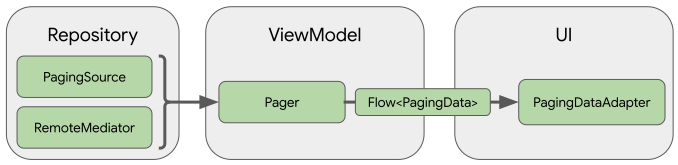
This section describes the Paging library components that operate at each layer and how they work together to load and display paged data.
Repository layer
The primary Paging library component in the repository layer is
PagingSource. Each
PagingSource object defines a source of data and how to retrieve data from
that source. A PagingSource object can load data from any single source,
including network sources and local databases.
Another Paging library component that you might use is
RemoteMediator. A
RemoteMediator object handles paging from a layered data source, such as a
network data source with a local database cache.
ViewModel layer
The Pager component provides a
public API for constructing instances of PagingData that are exposed in
reactive streams, based on a PagingSource object and a
PagingConfig configuration
object.
The component that connects the ViewModel layer to the UI is
PagingData. A PagingData
object is a container for a snapshot of paginated data. It queries a
PagingSource object and
stores the result.
UI layer
The primary Paging UI API is collectAsLazyPagingItems(). It exposes paged
items as a list of data that can be easily consumed by Compose's lazy layout
components, like LazyColumn and LazyRow.
Add the androidx.paging:paging-compose library to use Compose-compatible APIs
that let the UI automatically react to data loads, updates, and errors without
the need for adapters or diffing logic. Use the
collectAsLazyPagingItems() extension function on a Flow<PagingData>
to pass in the returned LazyPagingItems to items() in a LazyColumn.
@Composable fun MessageList(pager: Pager<Int, Message>) { val lazyPagingItems = pager.flow.collectAsLazyPagingItems() LazyColumn { items( lazyPagingItems.itemCount, key = lazyPagingItems.itemKey { it.id } ) { index -> val message = lazyPagingItems[index] if (message != null) { MessageRow(message) } else { MessagePlaceholder() } } } }
For more information, see Large data-sets (paging).
Recommended for you
- Note: link text is displayed when JavaScript is off
- Load and display paged data
- Migrate to Paging 3
- Page from network and database