
Android's recommended app architecture encourages dividing your code into classes to benefit from separation of concerns, a principle where each class of the hierarchy has a single defined responsibility. This leads to more, smaller classes that need to be connected to fulfill each other's dependencies.

The dependencies between classes can be represented as a graph, in which each
class is connected to the classes it depends on. The representation of all your
classes and their dependencies makes up the application graph. In figure 1,
you can see an abstraction of the application graph. When class A (ViewModel)
depends on class B (Repository), there's a line that points from A to B
representing that dependency.
Dependency injection helps make these connections and lets you swap out
implementations for testing. For example, when testing a ViewModel that
depends on a repository, you can pass different implementations of Repository
with either fakes or mocks to test the different cases.
Basics of manual dependency injection
This section covers how to apply manual dependency injection in a real Android app scenario. It walks through an iterated approach of how you might start using dependency injection in your app. The approach improves until it reaches a point that is very similar to what Dagger would automatically generate for you. For more information about Dagger, read Dagger basics.
Consider a flow to be a group of screens in your app that correspond to a feature. Login, registration, and checkout are all examples of flows.
When covering a login flow for a typical Android app, the LoginActivity
depends on LoginViewModel, which in turn depends on UserRepository. Then
UserRepository depends on a UserLocalDataSource and a
UserRemoteDataSource, which in turn depends on a Retrofit service.
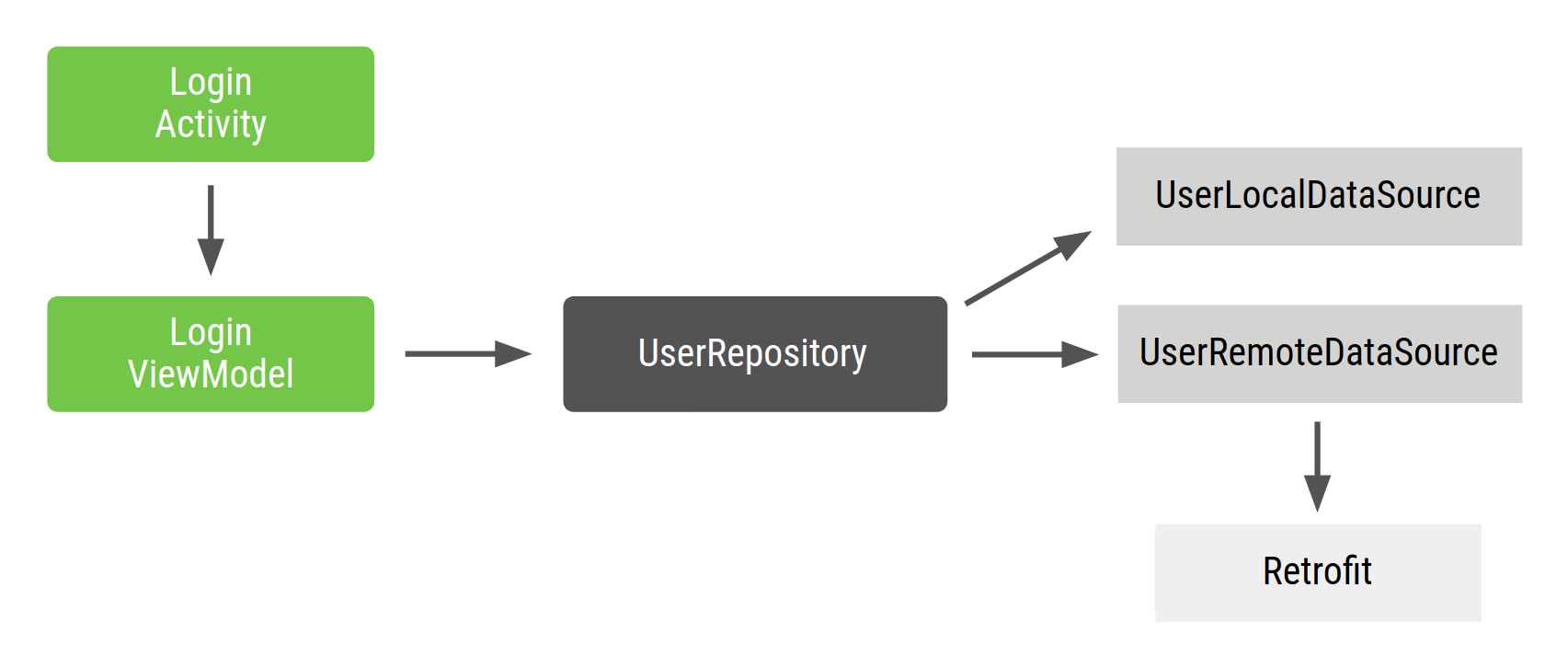
LoginActivity is the entry point to the login flow, and the user interacts
with the activity. Thus, LoginActivity needs to create the LoginViewModel
with all its dependencies.
The Repository and DataSource classes of the flow look like this:
class UserRepository(
    private val localDataSource: UserLocalDataSource,
    private val remoteDataSource: UserRemoteDataSource
) { ... }

class UserLocalDataSource { ... }
class UserRemoteDataSource(
    private val loginService: LoginRetrofitService
) { ... }
In Compose, ComponentActivity is the entry point; the dependency wiring
happens once in onCreate, and the UI is described by composables called from
setContent:
class ApiService {
    /* Your API implementation here */
}

class UserRepository(private val apiService: ApiService) {
    /* Your implementation here */
}

class LoginActivity : ComponentActivity() {
    override fun onCreate(savedInstanceState: Bundle?) {
        super.onCreate(savedInstanceState)
        // Satisfy the dependencies of LoginViewModel recursively,
        // then pass what the UI needs into setContent.
        val apiService = ApiService()
        val userRepository = UserRepository(apiService)

        setContent {
            LoginScreen(userRepository)
        }
    }
}

@Composable
fun LoginScreen(userRepository: UserRepository) {
    val viewModel: LoginViewModel = viewModel(
        factory = LoginViewModelFactory(userRepository)
    )
    // ...
}
There are issues with this approach:
- Dependencies have to be declared in order. You have to instantiate
UserRepositorybeforeLoginViewModelin order to create it. - It's difficult to reuse objects. If you wanted to reuse
UserRepositoryacross multiple features, you'd have to make it follow the singleton pattern. The singleton pattern makes testing more difficult because all tests share the same singleton instance.
Managing dependencies with a container
To solve the issue of reusing objects, you can create your own dependencies
container class that you use to get dependencies. All instances provided by
this container can be public. In the example, because you only need an instance
of UserRepository, you can make its dependencies private with the option of
making them public in the future if they need to be provided:
// Container of objects shared across the whole app
class AppContainer {

    // apiService and userRepository aren't private and will be exposed
    val apiService = ApiService()
    val userRepository = UserRepository(apiService)
}
Because these dependencies are used across the whole application, they need to
be placed in a common place all activities can use: the Application
class. Create a custom Application class that contains an AppContainer
instance.
// Custom Application class that needs to be specified
// in the AndroidManifest.xml file
class MyApplication : Application() {

    // Instance of AppContainer that will be used by all the Activities of the app
    val appContainer = AppContainer()
}
With Compose, the same AppContainer is still created in the Application
subclass. You access it either in the activity, before calling setContent, or
from within a composable, using LocalContext:
class LoginActivity : ComponentActivity() {
    override fun onCreate(savedInstanceState: Bundle?) {
        super.onCreate(savedInstanceState)

        val appContainer = (application as MyApplication).appContainer

        setContent {
            LoginScreen(appContainer.userRepository)
        }
    }
}

// Alternatively, read AppContainer from inside a composable:
@Composable
fun LoginScreen() {
    val context = LocalContext.current
    val appContainer = (context.applicationContext as MyApplication).appContainer
    val viewModel: LoginViewModel = viewModel(
        factory = LoginViewModelFactory(appContainer.userRepository)
    )
    // ...
}
We recommend passing dependencies as composable parameters over reaching into
LocalContext from deep in the tree. This keeps composables testable and their
inputs explicit. Resolve the container once at the screen root and pass what's
needed downward.
In this way, you don't have a singleton UserRepository. Instead, you have an
AppContainer shared across all activities that contains objects from the graph
and creates instances of those objects that other classes can consume.
If LoginViewModel is needed in more places in the application, having a
centralized place where you create instances of LoginViewModel makes sense.
You can move the creation of LoginViewModel to the container and provide new
objects of that type with a factory. The code for a LoginViewModelFactory
looks like this:
// Definition of a Factory interface with a function to create objects of a type
interface Factory<T> {
    fun create(): T
}

// Factory for LoginViewModel.
// Since LoginViewModel depends on UserRepository, in order to create instances of
// LoginViewModel, you need an instance of UserRepository that you pass as a parameter.
class LoginViewModelFactory(private val userRepository: UserRepository) : Factory<LoginViewModel> {
    override fun create(): LoginViewModel {
        return LoginViewModel(userRepository)
    }
}
With Compose, the AppContainer update still exposes the factory. The factory
is then consumed by the viewModel composable so the ViewModel is scoped to
the nearest ViewModelStoreOwner (typically the host activity or, with
Navigation Compose, a nav entry):
// AppContainer exposing the factory (unchanged from the snippet above)
class AppContainer {
    // ...
    val userRepository = UserRepository(localDataSource, remoteDataSource)
    val loginViewModelFactory = LoginViewModelFactory(userRepository)
}

// Compose entry point + screen composable
class LoginActivity : ComponentActivity() {
    override fun onCreate(savedInstanceState: Bundle?) {
        super.onCreate(savedInstanceState)
        val appContainer = (application as MyApplication).appContainer
        setContent {
            LoginScreen(appContainer.loginViewModelFactory)
        }
    }
}

@Composable
fun LoginScreen(factory: LoginViewModelFactory) {
    val viewModel: LoginViewModel = viewModel(factory = factory)
    // ...
}
This approach is better than the previous one, but there are still some challenges to consider:
You have to manage
AppContaineryourself, creating instances for all dependencies by hand.There is still a lot of boilerplate code. You need to create factories or parameters by hand depending on whether you want to reuse an object or not.
Managing dependencies in application flows
AppContainer gets complicated when you want to include more functionality in
the project. When your app becomes larger and you start introducing different
feature flows, there are even more problems that arise:
When you have different flows, you might want objects to just live in the scope of that flow. For example, when creating
LoginUserData(that might consist of the username and password used only in the login flow) you don't want to persist data from an old login flow from a different user. You want a new instance for every new flow. You can achieve that by creatingFlowContainerobjects inside theAppContaineras demonstrated in the next code example.Optimizing the application graph and flow containers can also be difficult. You need to remember to delete instances that you don't need, depending on the flow you're in.
Let's add a LoginContainer to the example code. You want to be able to create
multiple instances of LoginContainer in the app, so instead of making it a
singleton, make it a class with the dependencies the login flow needs from the
AppContainer.
class LoginContainer(val userRepository: UserRepository) {

    val loginData = LoginUserData()

    val loginViewModelFactory = LoginViewModelFactory(userRepository)
}

// AppContainer contains LoginContainer now
class AppContainer {
    ...
    val userRepository = UserRepository(localDataSource, remoteDataSource)

    // LoginContainer will be null when the user is NOT in the login flow
    var loginContainer: LoginContainer? = null
}
In Compose, the flow container's lifetime is tied to the composition rather than
the host Activity. You don't need to mutate a shared
AppContainer.loginContainer, because composables receive their dependencies as
parameters or read them from a hoisted ViewModel. You have two options:
- Navigation Compose nested graph (preferred for multi-screen flows).
Place all screens in the login flow under a nested nav graph and scope the
container to that graph's
NavBackStackEntry. The container is created when the user enters the flow and cleared when the back stack entry is popped, with no manual lifecycle calls required. For more information, see Design your navigation graph. rememberat the screen root (for a single-screen flow or when you aren't using Navigation Compose). Construct the container insiderememberso it is created once per entry into the composition and garbage-collected when the composable leaves:
@Composable
fun LoginFlow(appContainer: AppContainer) {
    val loginContainer = remember(appContainer) {
        LoginContainer(appContainer.userRepository)
    }
    val viewModel: LoginViewModel = viewModel(
        factory = loginContainer.loginViewModelFactory
    )
    // Render the login flow using loginContainer.loginData and viewModel.
}
Conclusion
Dependency injection is a good technique for creating scalable and testable Android apps. Use containers as a way to share instances of classes in different parts of your app and as a centralized place to create instances of classes using factories.
When your application gets larger, you will start seeing that you write a lot of boilerplate code (such as factories), which can be error-prone. You also have to manage the scope and lifecycle of the containers yourself, optimizing and discarding containers that are no longer needed in order to free up memory. Doing this incorrectly can lead to subtle bugs and memory leaks in your app.
In the Dagger section, you'll learn how you can use Dagger to automate this process and generate the same code you would have written by hand otherwise.