

「UI 事件」是 UI 層中應由 UI 或 ViewModel 處理的動作。最常見的事件類型是「使用者事件」。使用者與應用程式互動時產生使用者事件 (例如:輕觸螢幕或產生手勢),然後 UI 會使用回呼 (例如:在不同可組合項上定義的 lambda) 使用這些事件。
ViewModel 通常負責處理特定使用者事件的商業邏輯,例如:使用者點選按鈕重新整理部分資料。一般來說,ViewModel 會公開 UI 可呼叫的函式來進行處理。使用者事件也可能有 UI 可直接處理的 UI 行為邏輯,例如:前往不同畫面或顯示 Snackbar。
雖然相同應用程式中的「商業邏輯」在不同行動平台或板型規格仍會保持不變,但「UI 行為邏輯」是可能區分這些情況的實作詳細資料。UI 層頁面定義了以下類型的邏輯:
- 「商業邏輯」是指狀態變更的「處理方式」,例如:付款或儲存使用者偏好設定。網域和資料層通常會處理這個邏輯。在本指南中,「架構元件 ViewModel」類別的使用情境為處理商業邏輯的類別相關解決方案。
- UI 行為邏輯或 UI 邏輯是指狀態變更的「顯示方式」,例如:導覽邏輯或向使用者顯示訊息的方式。UI 會處理這個邏輯。
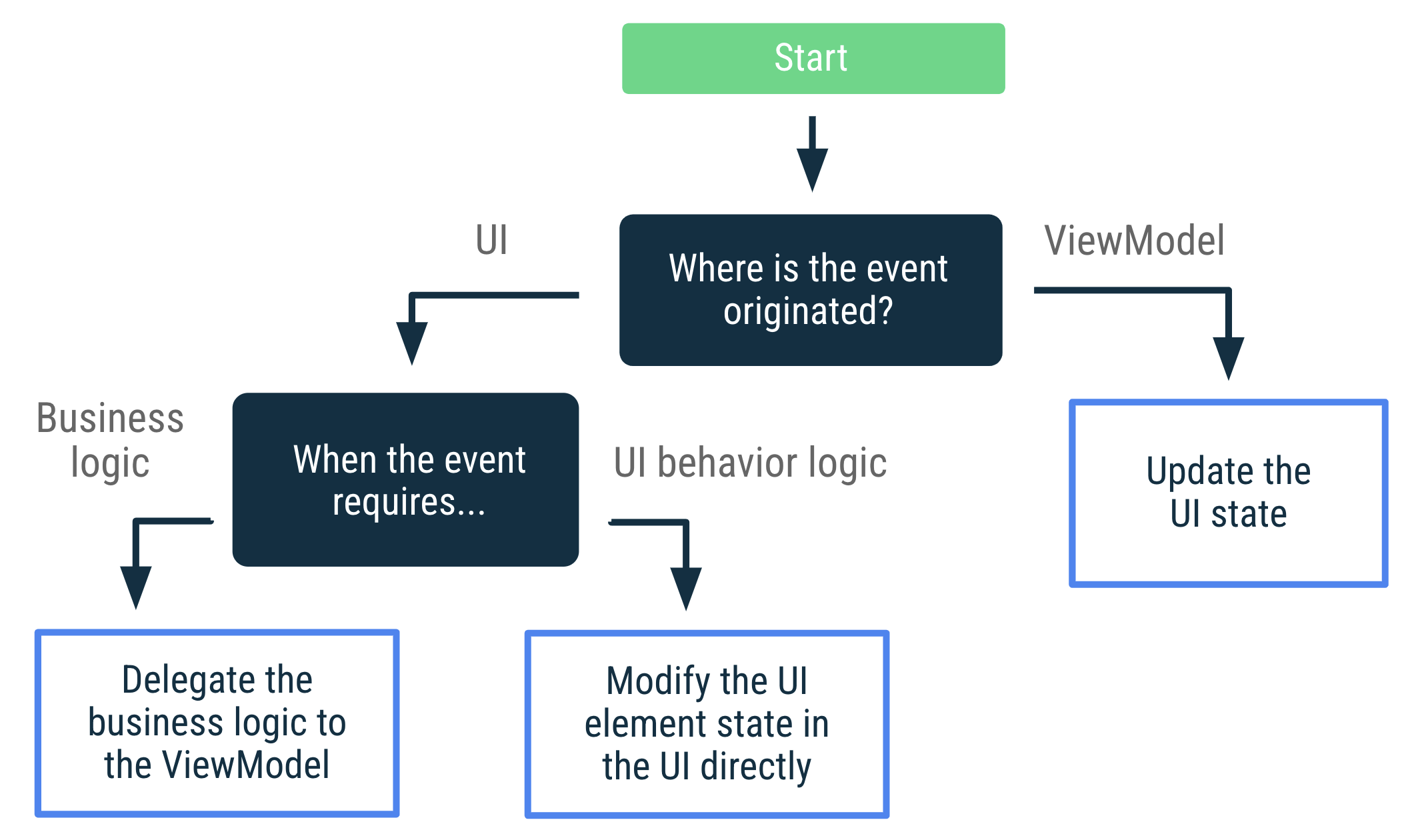
UI 事件決策樹
以下圖表顯示尋找處理特定事件用途最佳方式時的決策樹。本指南的其餘部分會詳細說明這些方法。
處理使用者事件
如果事件涉及修改 UI 元素的狀態 (例如:可展開項目的狀態),UI 即可直接處理使用者事件。如果事件需要執行商業邏輯,例如:重新整理畫面中的資料,則 ViewModel 應會處理此事件。
以下範例說明如何使用不同的按鈕展開 UI 元素 (UI 邏輯),並重新整理畫面資料 (商業邏輯):
@Composable
fun LatestNewsScreen(viewModel: LatestNewsViewModel = viewModel()) {

    // State of whether more details should be shown
    var expanded by remember { mutableStateOf(false) }

    Column {
        Text("Some text")
        if (expanded) {
            Text("More details")
        }

        Button(
        // The expand details event is processed by the UI that
        // modifies this composable's internal state.
        onClick = { expanded = !expanded }
        ) {
        val expandText = if (expanded) "Collapse" else "Expand"
        Text("$expandText details")
        }

        // The refresh event is processed by the ViewModel that is in charge
        // of the UI's business logic.
        Button(onClick = { viewModel.refreshNews() }) {
            Text("Refresh data")
        }
    }
}
延遲清單中的使用者事件
如果動作是在 UI 樹狀圖相對下方的位置產生 (例如:LazyColumn 項目中),則 ViewModel 應仍會處理使用者事件。
舉例來說,假設有一份可點選的項目清單。請勿將 ViewModel 執行個體傳遞至清單可組合項 (MyList),因為這會將 UI 元件緊密連結至實作詳細資料。
請改為在可組合項中,將事件公開為 lambda 函式參數。這樣一來,清單就能觸發事件,不必知道是由誰或如何處理。
data class MyItem(val id: Int)

@Composable
fun MyList(
    items: List<String>,
    onItemClick: (MyItem) -> Unit
) {
    Card {
        LazyColumn {
            itemsIndexed(items) { index, string ->
                ListItem(
                    modifier = Modifier.clickable {
                        onItemClick(MyItem(index))
                    },
                    headlineContent = {
                        Text(text = string)
                    }
                )
            }
        }
    }
}
採用這種做法時,MyList 可組合函式只會處理顯示的資料和公開的事件。無法存取 ViewModel。事件會提升並傳遞至先前可組合項中的 ViewModel。
如要進一步瞭解事件處理,請參閱「Compose 中的事件」。
使用者事件函式和事件處理常式的命名慣例
在本指南中,用於處理使用者事件的 ViewModel 函式會根據其處理的動作來命名,例如:validateInput() 或 login()。
Compose 中的事件處理常式遵循標準命名慣例,讓資料流程一目瞭然:
- 參數名稱:
on+Verb+Target(例如onExpandClicked或onValueChange)。 - Lambda 運算式:呼叫可組合函式時,lambda 通常只是該事件的實作項目。
處理 ViewModel 事件
源自 ViewModel (ViewModel 事件) 的 UI 動作應一律導致 UI 狀態更新。這符合雙向資料流的原則。這項設定會使事件在設定變更後得以重現,並確保 UI 動作不會遺失。或者,如果您使用已儲存的狀態模組,也能在程序終止後重現事件。
對應 UI 動作至 UI 狀態並非簡單的程序,但會讓邏輯變得更簡單。舉例來說,您要決定的不是只有決定如何使 UI 導覽至特定畫面。您還必須進一步思考,決定如何在自己的 UI 狀態中呈現該使用者流程。換句話說,不要思考 UI 必須採取的動作,而是這些動作要如何影響 UI 狀態。
舉例來說,試想登入畫面的情況。您可以按照下列方式,模擬這個畫面的 UI 狀態:
data class LoginUiState(
    val isLoginInProgress: Boolean = false,
    val errorMessage: String? = null,
    val isUserLoggedIn: Boolean = false
)
登入畫面會對 UI 狀態的變更做出反應。
class LoginViewModel : ViewModel() {

    var uiState by mutableStateOf(LoginUiState())

    fun tryLogin(username: String, password: String) {
        viewModelScope.launch {
            // Emit a new state indicating that login is in progress
            uiState = uiState.copy(isLoginInProgress = true)

            uiState = if (login(username, password)) {
                // Emit a new state indicating that login was successful
                uiState.copy(isLoginInProgress = false, isUserLoggedIn = true)
            } else {
                // Emit a new state with the error message
                LoginUiState(isLoginInProgress = false, errorMessage = "Login failed")
            }
        }
    }

    private suspend fun login(username: String, password: String): Boolean {
        delay(1000)
        return (username == "Hello" && password == "World!")
    }
}

@Composable
fun LoginScreen(viewModel: LoginViewModel, onSuccessfulLogin: () -> Unit) {

    val uiState = viewModel.uiState

    LaunchedEffect(uiState) {
        if (uiState.isUserLoggedIn) {
            onSuccessfulLogin()
        }
    }

    if (uiState.isLoginInProgress) {
        CircularProgressIndicator()
    } else {
        LoginForm(
            onLoginAttempt = { username, password ->
                viewModel.tryLogin(username, password)
            },
            errorMessage = uiState.errorMessage
        )
    }
}
消耗事件會觸發狀態更新
在 UI 中消耗特定 ViewModel 事件,可能會導致其他 UI 狀態更新。舉例來說,當畫面上顯示暫時性訊息以告知使用者發生的情況時,UI 必須通知 ViewModel 於畫面顯示訊息時立即觸發另一個狀態更新。使用者消耗訊息 (關閉訊息或逾時後) 後發生的事件可以當做「使用者輸入內容」,因此 ViewModel 應該能夠得知此情況。在這種情況下,UI 狀態可透過下列方式建構:
// Models the UI state for the Latest news screen.
data class LatestNewsUiState(
    val news: List<News> = emptyList(),
    val isLoading: Boolean = false,
    val userMessage: String? = null
)
當商業邏輯需要向使用者顯示新的暫時性訊息時,ViewModel 會以下列方式更新 UI 狀態:
class LatestNewsViewModel(/* ... */) : ViewModel() {

    var uiState by mutableStateOf(LatestNewsUiState())
        private set

    fun refreshNews() {
        viewModelScope.launch {
            // If there isn't internet connection, show a new message on the screen.
            if (!internetConnection()) {
                uiState = uiState.copy(userMessage = "No Internet connection")
                return@launch
            }

            // Do something else.
        }
    }

    fun userMessageShown() {
        uiState = uiState.copy(userMessage = null)
    }
}
ViewModel 無需瞭解 UI 如何在畫面上顯示訊息,而是只知道是否有需要顯示的使用者訊息。顯示暫時訊息後,UI 就必須通知 ViewModel,進而更新其他 UI 狀態,以便清除 userMessage 屬性:
@Composable
fun LatestNewsScreen(
    snackbarHostState: SnackbarHostState,
    viewModel: LatestNewsViewModel = viewModel(),
) {
    // Rest of the UI content.

    // If there are user messages to show on the screen,
    // show it and notify the ViewModel.
    viewModel.uiState.userMessage?.let { userMessage ->
        LaunchedEffect(userMessage) {
            snackbarHostState.showSnackbar(userMessage)
            // Once the message is displayed and dismissed, notify the ViewModel.
            viewModel.userMessageShown()
        }
    }
}
雖然訊息是暫時性的,但 UI 狀態能夠忠實反映每個時間點畫面上顯示的內容。使用者訊息只會有「顯示」和「不顯示」兩種狀況。
導覽事件
「消耗事件會觸發狀態更新」一節詳細說明了使用 UI 狀態在畫面上顯示使用者訊息的方式,導覽事件也是 Android 應用程式中常見的事件類型。
如果因使用者輕觸按鈕而在 UI 中觸發事件,UI 的回應方式是向呼叫端可組合項公開事件。
@Composable
fun LoginScreen(
    onHelp: () -> Unit, // Caller navigates to the help screen
    viewModel: LoginViewModel = viewModel()
) {
    // Rest of the UI
    Button(
        onClick = dropUnlessResumed { onHelp() }
    ) {
        Text("Get help")
    }
}
dropUnlessResumed 屬於 Lifecycle 程式庫,可讓您只在生命週期至少為 RESUMED 時執行 onHelp 函式。
如果資料輸入在導覽前需要特定商業邏輯驗證,ViewModel 必須向 UI 公開該狀態。UI 也會回應狀態變更,並視情況進行導覽。處理 ViewModel 事件一節會說明這個用途。類似的程式碼如下:
@Composable
fun LoginScreen(
    onUserLogIn: () -> Unit, // Caller navigates to the right screen
    viewModel: LoginViewModel = viewModel()
) {
    Button(
        onClick = {
            // ViewModel validation is triggered
            viewModel.tryLogin()
        }
    ) {
        Text("Log in")
    }
    // Rest of the UI

    val lifecycle = LocalLifecycleOwner.current.lifecycle
    val currentOnUserLogIn by rememberUpdatedState(onUserLogIn)
    LaunchedEffect(viewModel, lifecycle)  {
        // Whenever the uiState changes, check if the user is logged in and
        // call the `onUserLogin` event when `lifecycle` is at least STARTED
        snapshotFlow { viewModel.uiState }
            .filter { it.isUserLoggedIn }
            .flowWithLifecycle(lifecycle)
            .collect {
                currentOnUserLogIn()
            }
    }
}
在上述範例中,由於目前的「登入」到達網頁不會保持在返回堆疊中,因此應用程式可正常運作。使用者按下「返回」後無法返回。不過,若可能發生這種情況,解決方案需要額外的邏輯。
到達網頁保持在返回堆疊時的導覽事件
若 ViewModel 設定某種狀態,而產生畫面 A 到畫面 B 的導覽事件,但畫面 A 保持在導覽返回堆疊中,您可能需要其他邏輯,以免自動進入畫面 B。如要實作這項設定,必須具備額外狀態,指示 UI 是否應前往其他畫面。狀態通常會顯示在 UI 中,因為導覽邏輯與 UI 有關,而不是 ViewModel。我們透過以下用途來說明。
假設您正在應用程式的註冊流程中,在「出生日期」驗證畫面中,若使用者輕觸一個日期,ViewModel 會在使用者輕觸「繼續」按鈕時驗證日期。ViewModel 會將驗證邏輯委派給資料層。如果日期有效,使用者會進入下一個畫面。此外,使用者還可以在不同的註冊畫面之間來回切換,以免需要變更某些資料。因此,註冊流程中的所有到達網頁會保留在相同的返回堆疊中。根據這些需求,您可以依照下列方式實作這個畫面:
class DobValidationViewModel(/* ... */) : ViewModel() {
    var uiState by mutableStateOf(DobValidationUiState())
        private set
}

@Composable
fun DobValidationScreen(
    onNavigateToNextScreen: () -> Unit, // Caller navigates to the right screen
    viewModel: DobValidationViewModel = viewModel()
) {
    // TextField that updates the ViewModel when a date of birth is selected

    var validationInProgress by rememberSaveable { mutableStateOf(false) }

    Button(
        onClick = {
            viewModel.validateInput()
            validationInProgress = true
        }
    ) {
        Text("Continue")
    }
    // Rest of the UI

    /*
        * The following code implements the requirement of advancing automatically
        * to the next screen when a valid date of birth has been introduced
        * and the user wanted to continue with the registration process.
        */

    if (validationInProgress) {
        val lifecycle = LocalLifecycleOwner.current.lifecycle
        val currentNavigateToNextScreen by rememberUpdatedState(onNavigateToNextScreen)
        LaunchedEffect(viewModel, lifecycle) {
            // If the date of birth is valid and the validation is in progress,
            // navigate to the next screen when `lifecycle` is at least STARTED,
            // which is the default Lifecycle.State for the `flowWithLifecycle` operator.
            snapshotFlow { viewModel.uiState }
                .filter { it.isDobValid }
                .flowWithLifecycle(lifecycle)
                .collect {
                    validationInProgress = false
                    currentNavigateToNextScreen()
                }
        }
    }
}
出生日期驗證的日期是 ViewModel 負責的商業邏輯。在多數情況下,ViewModel 會將該邏輯委派給資料層。將使用者導覽至下一個畫面的邏輯為「UI 邏輯」,因為這些要求可能會依據 UI 設定而有所不同。舉例來說,若要同時顯示多個註冊步驟,您可能不會希望使用者在平板電腦上自動前往另一個畫面。上述程式碼中的 validationInProgress 變數會實作這項功能,並處理 UI 是否應在出生日期有效,且使用者也想繼續註冊流程時,自動前往下一個畫面。
其他使用情況
如果您認為 UI 事件用途無法透過 UI 狀態更新解決,您可能需要重新思考應用程式中資料流動的方式。請思考以下原則:
- 每個類別只需完成各自必須負責的工作。 UI 負責的是畫面特定的行為邏輯,例如:導覽呼叫、點擊事件和取得權限要求。ViewModel 提供商業邏輯,並將層級中較低層級的結果轉換為 UI 狀態。
- 您要思考的是事件來源。 依照本指南開頭提供的決策樹,然後使各類別處理各自負責的工作。舉例來說,如果事件源自 UI,且會產生導覽事件,則該事件必須在 UI 中進行處理。某些邏輯可能會委派給 ViewModel,但處理事件無法完全委派給 ViewModel。
- 如果您有多個取用者,且擔心該事件會多次消耗,您可能需要重新思考應用程式架構。有多個並行取用者會導致合約的「一次性提交」變得極難保證,因此複雜性和輕微行為的數量會急遽增加。如果遇到此問題,請考慮在 UI 樹狀結構中將這些問題的層級往上提升。您可能需要在階層的較高層級定義不同實體的範圍。
- 思考需要消耗狀態的時機。 在某些情況下,您可能不希望應用程式在背景執行時保持使用狀態,例如:顯示
Toast時。在這種情況下,請考慮當 UI 在前景中時消耗狀態。
範例
以下 Google 範例為 UI 層中的 UI 事件。歡迎查看這些範例,瞭解實務做法:
其他資源
如要進一步瞭解 UI 事件,請參閱下列其他資源:
程式碼研究室
說明文件
Views content
為您推薦
- 注意:系統會在 JavaScript 關閉時顯示連結文字
- UI 層
- 狀態容器和 UI 狀態 {:#mad-arch}
- 應用程式架構指南